GKB 4CH/8CH VFire Server
46
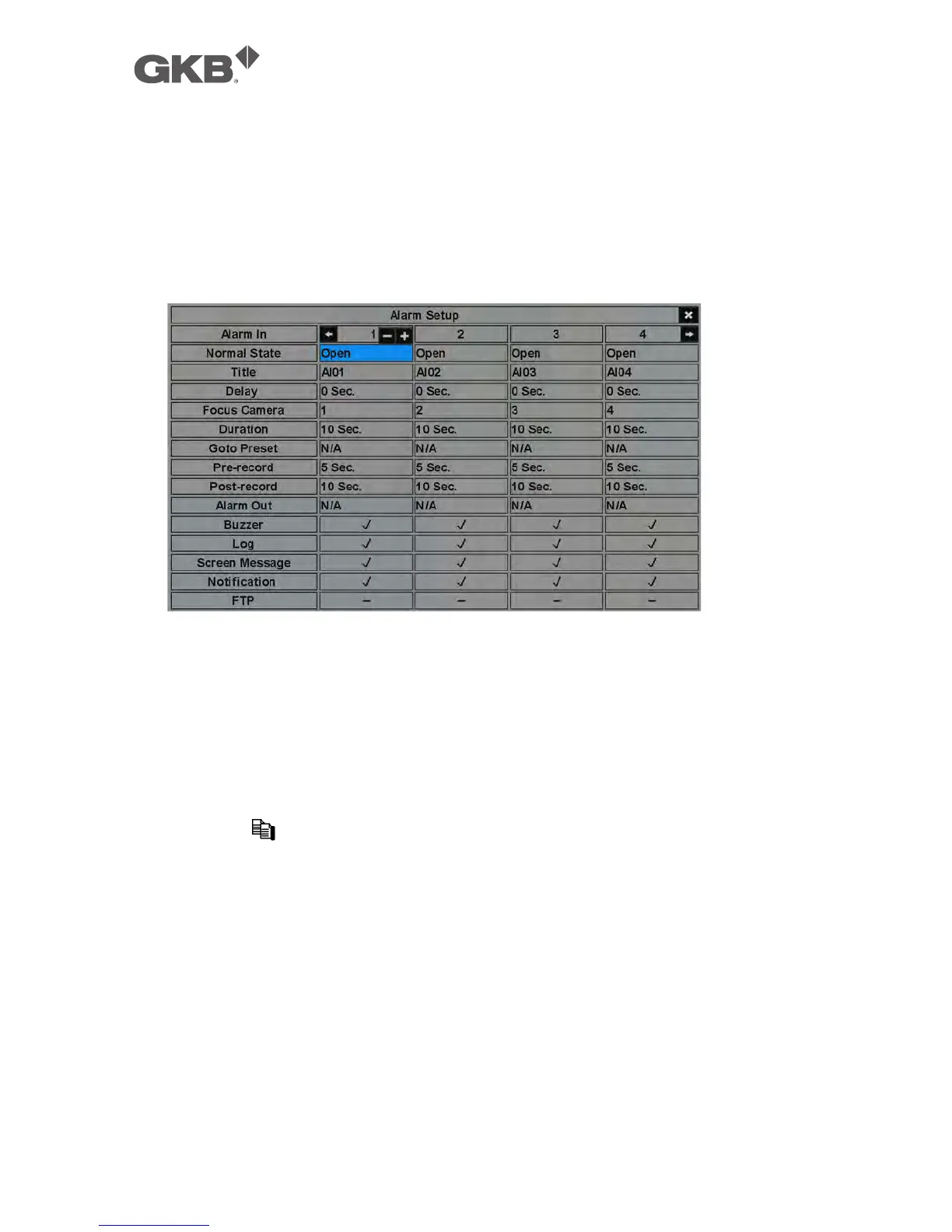
6.3 Alarm Setup
In Setup Menu display, press ▲▼◄► to change the highlighted option to Alarm,
and then press ENTER to call up Alarm Setup display as shown. The Alarm Setup
allows the administrator to define the attributes for each alarm input, and the
actions if it’s triggered. There are up to 4 alarm inputs which can be connected to
the system.
The general operations are as below:
n ▲▼◄► (Mouse: Left click)
Press these buttons to select the items.
n Numeric
Press these buttons to select the alarm input.
n COPY ( )
Press this button to copy the settings of the focus alarm input to all the
following alarm inputs. (EX. focus alarm input is 1, its settings will be copied
to those of alarm inputs 2-4.)
n ESC (Mouse: Right Click)
Press this button to escape from this screen, and return to Setup Menu display.
If the Save dialog is shown, press ENTER to exit and save, ESC (Mouse: Right
Click) to exit without saving.
Following is a brief description for each item and its specific operations:
n Normal State – press +/- buttons to select N/A, Close, Open, Close(Level) or



 To Next Page