GKB 4CH/8CH VFire Server
12
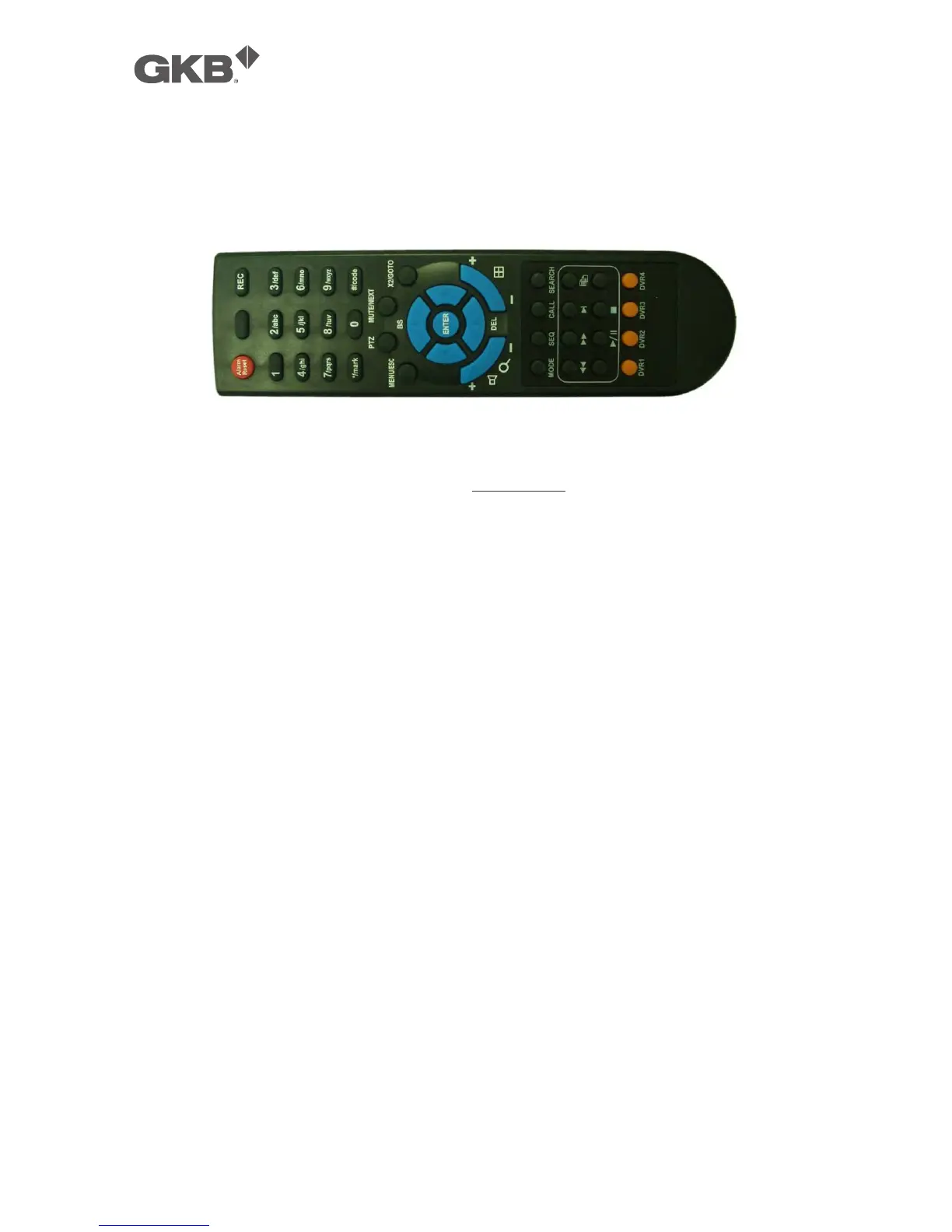
2.3 Remote Controller
The remote controller is an optional accessory to ease the user’s operations. You
can do all the operations by the remote controller instead of the buttons on the
front panel. The effective distance is about 10 meters without any obstacle.
Most of the buttons corresponds to one of those buttons on the front panel.
Please refer to the descriptions in Section 2.1. For the other buttons, the
descriptions are as below:
1. NVR ID Selection Buttons (DVR #1-4)
Press these buttons to select the NVR to be controlled by the remote controller.
The remote controller can control up to 4 sets of NVRs. Please make sure that
the NVR ID (in IR Setup) for each of the NVRs is set correctly.
2. Alpha-numeric Buttons (1-9, 0, *, #)
Press these buttons for camera selection in most of the circumstances. These
buttons can also be used to enter text and number in the way similar to most
of the mobile phones.
3. Alarm Reset Button
Press this button to cancel alarm activation, and return the system to the
condition before the alarm was activated.
4. REC Button
Press this button to force manual recording. To stop manual recording, press
it again.
5. MUTE/NEXT Button
Press this button to mute the audio.
6. X2/GOTO Button
In full screen display, press this button for Digital Zoom (X2/X4).
7. MENU / ESC Button



 To Next Page