41
M_LS900 XP IQ Energy_EN_B
Connections - Installation
2. Power supply connection - Machine
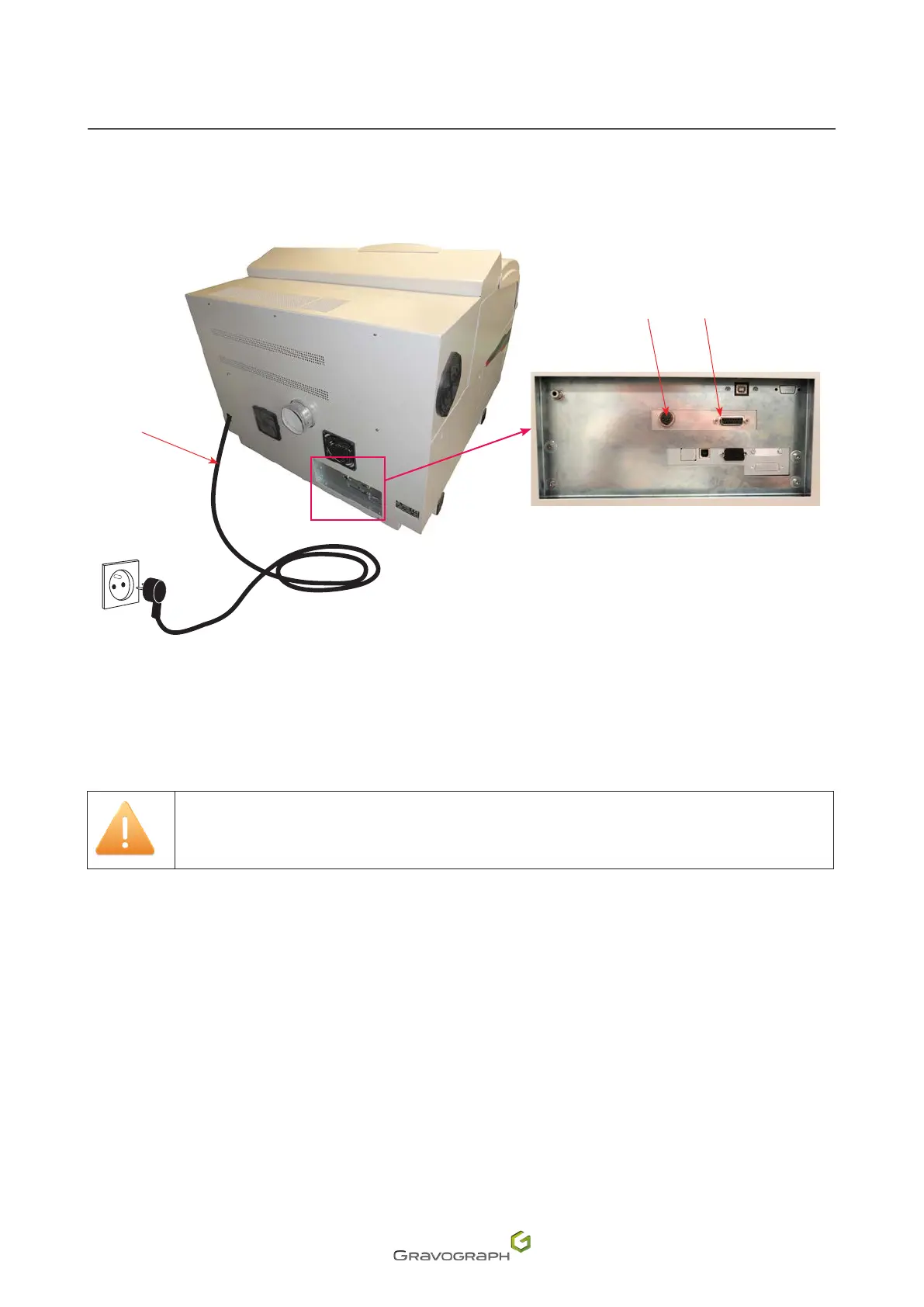
Rear view of the machine
2
3
1
1.
Power cable
2.
Input/outputlink:Airextractionsystem-SELV
3.
Standardinput/outputlink-SELV
1. Connect the machine/extraction system link cable on both sides.
2. Tighten the connector screws using the 3.5 screwdriver.
Make sure the connector screws are properly tightened to prevent the cables from
becoming disconnected while the machine is switched on. This could cause permanent
damage to the circuit boards.
3. Using the PLC function: Connect the user standard input/output link cable to the connector. See:
"Using the PLC function (User standard inputs/outputs)".
4. Connect the female socket to the male connector of the power supply, then plug the power cable
into a single phase electrical outlet.
Tocutothepowertothemachineifthereisaseriousproblem,unplugthepowercableoroperate
theOn/Oswitch(Generalstopbutton)


 To Next Page