52
M_LS900 XP IQ Energy_EN_B
Operating instructions for the machine
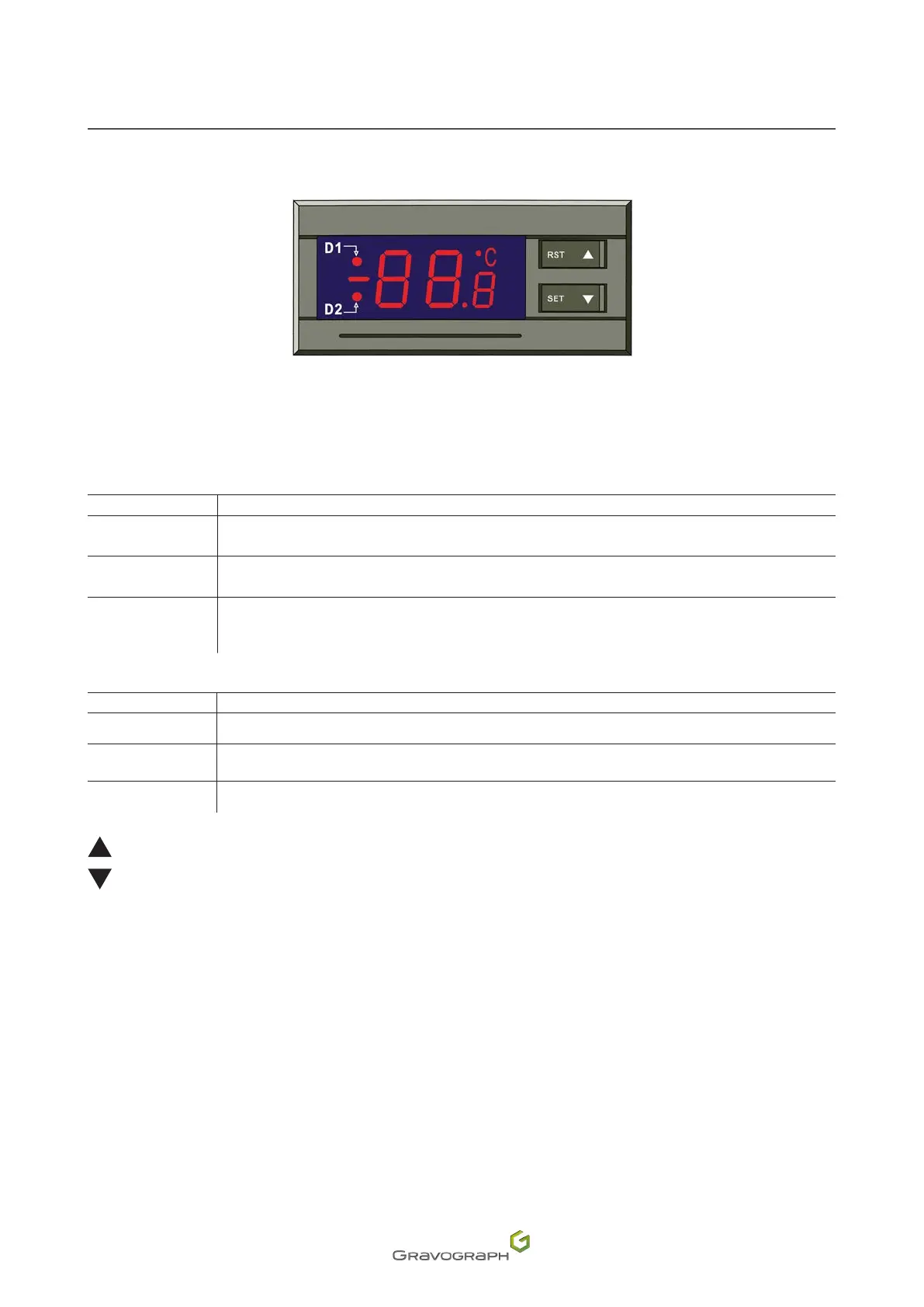
3. Control panel: Water chiller (only for ENERGY machines)
RST:"Check"key
SET:"Functionadjustment"key.
Red light D1
Status Meaning
indicator light on The controller is operating in intelligent control mode.
Indicator light not
illuminated
The controller is operating in constant temperature control mode.
Thelightashes.
The controller is operating in setting adjustment mode or is displaying ambient temperature values
in the room.
Red light D2
Status Meaning
indicator light on The chiller is operating in cooling mode.
Indicator light not
illuminated
The chiller is operating in isolation mode.
Thelightashes. The chiller is operating in energy saving mode.
The arrows enable the operator to adjust the controller, the display mode and the selection and adjustment
of a setting.
In any mode, press the down arrow and the display shows the ambient temperature in the room.
Reset
Before starting the machine, press and hold down both arrows until the controller displays "rE".
Thecontrollerreturnstonormaloperation,6second(s)afterthekeysarereleased.
All the factory settings for the controller are then restored.


 To Next Page