49
M_LS900 XP IQ Energy_EN_B
Operating instructions for the machine
1
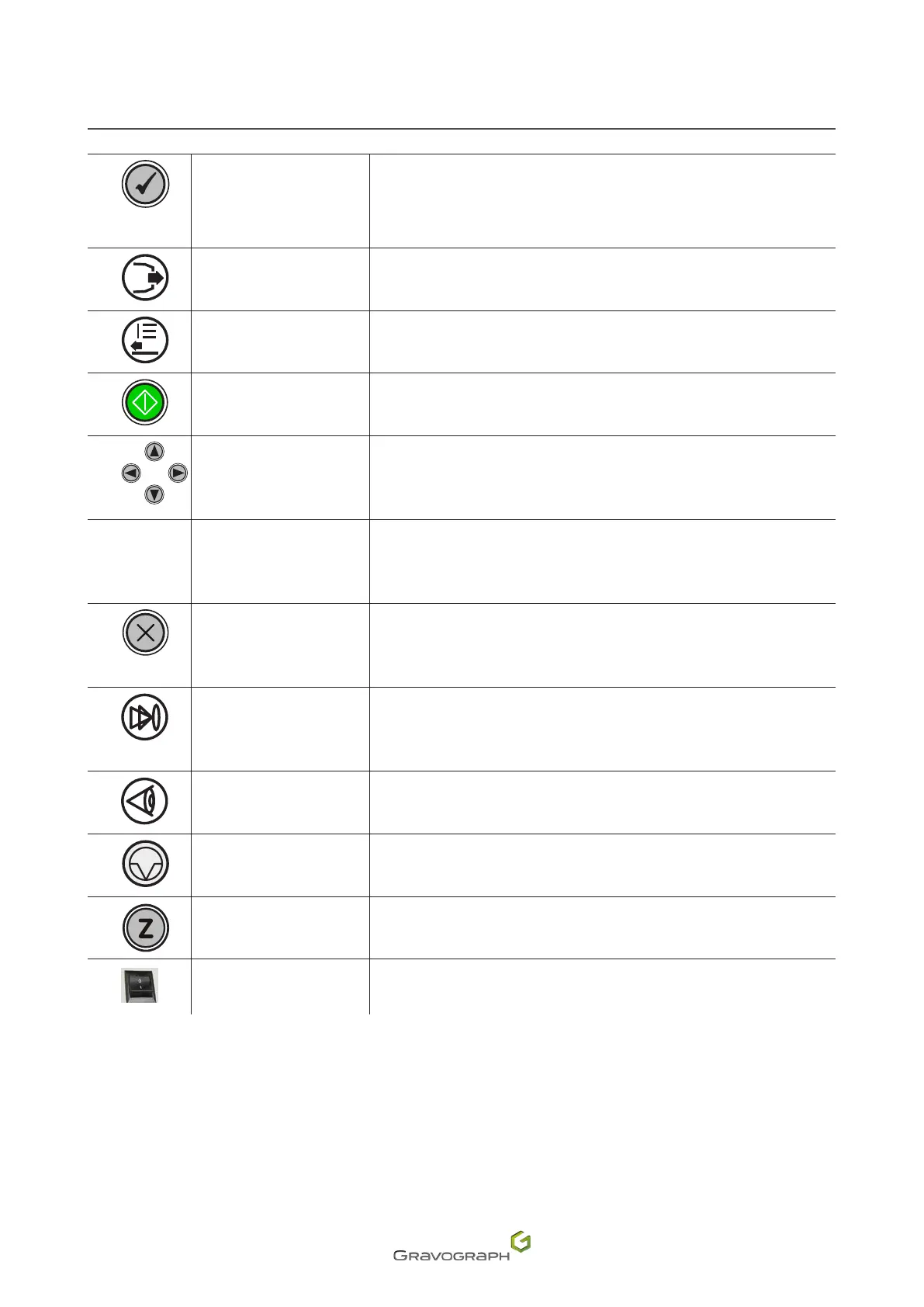
"Check"key
Accesstothedierentmenus
Exit from current menu
Move to next screen
Move to next menu
Validation of the entered data
2
Air assist Activationofairassistduringmarking
3
Selectinga(n)le Displayofnextleinmachinememory,whichbecomescurrentle
4
Start
Startmarking
Start-up engraving
5
Joystick
Head movement (X, Y, Z)
Movethecursortodierentdataentryareas
6
Green light - Red light See: Indicator light(s)
7
Cancel
Exit from menu without applying change to last parameter
Return to reception, during a pause, during end of reception, during end
of engraving
8
Autofocus Automatic focus adjustment (automatic Z Ref.)
9
Positioning pointer
Activation of a very low power laser beam, providing an indication of the
markingpositionontheplate
10
Pause Markingsuspended
11
Focus adjustment Manual focus adjustment (manual Z Ref.)
On/Oswitch
Switching on the machine
Power down


 To Next Page