Chapter 5 Display and operation
35
5.1 Keys operation
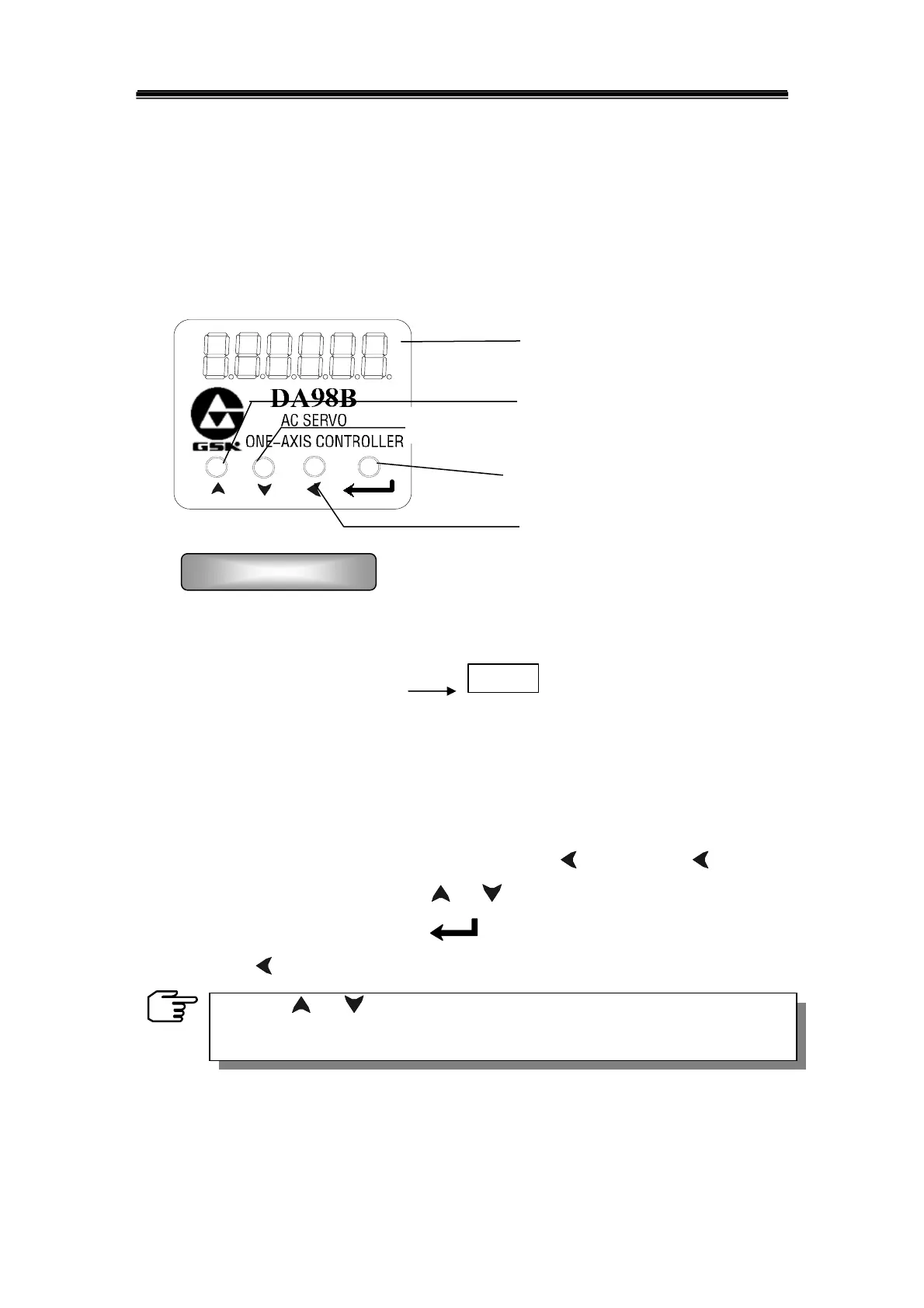
The DA98B servo unit is very easy to operate that the functions required can be set
by only 4 keys. The outline of its panel is as following:
1) In the speed monitoring mode, after switching on the power supply of the servo
unit, the default display is:
r 0.0
;
2) The operation is performed according to multi-layer menus. The first layer is the
main menu that consists of 9 kinds of operation modes, the second layer is the
function menus in various operation modes. The fig.5.1 shows the diagram block
of the main menu:
3) According to the diagram block above, pressing ‘
’key or holding ‘ ’ can enter
into the main menu, then press‘
’ or ‘ ’key to select any mode in the 9 modes.
After selecting a mode, press
key to enter the next menu of the mode.
Press ‘
’ key to return if backing to upper menu is required.
Chapter 5 Display and operation
Operation procedure
6-bit digital LED displayer
For increment of sequence number,
value or forward selection
For decrease of sequence number, value or backward selection
Back to the upper layer of optional
menu or operation cancellation
Entering into the next layer of optional
menu or input confirmation
Holding ‘ ’or ‘ ’key on, the operation will be repeated. The more the
holding time is, the faster the speed repeated is.



 To Next Page