Chapter 5 Display and operation
39
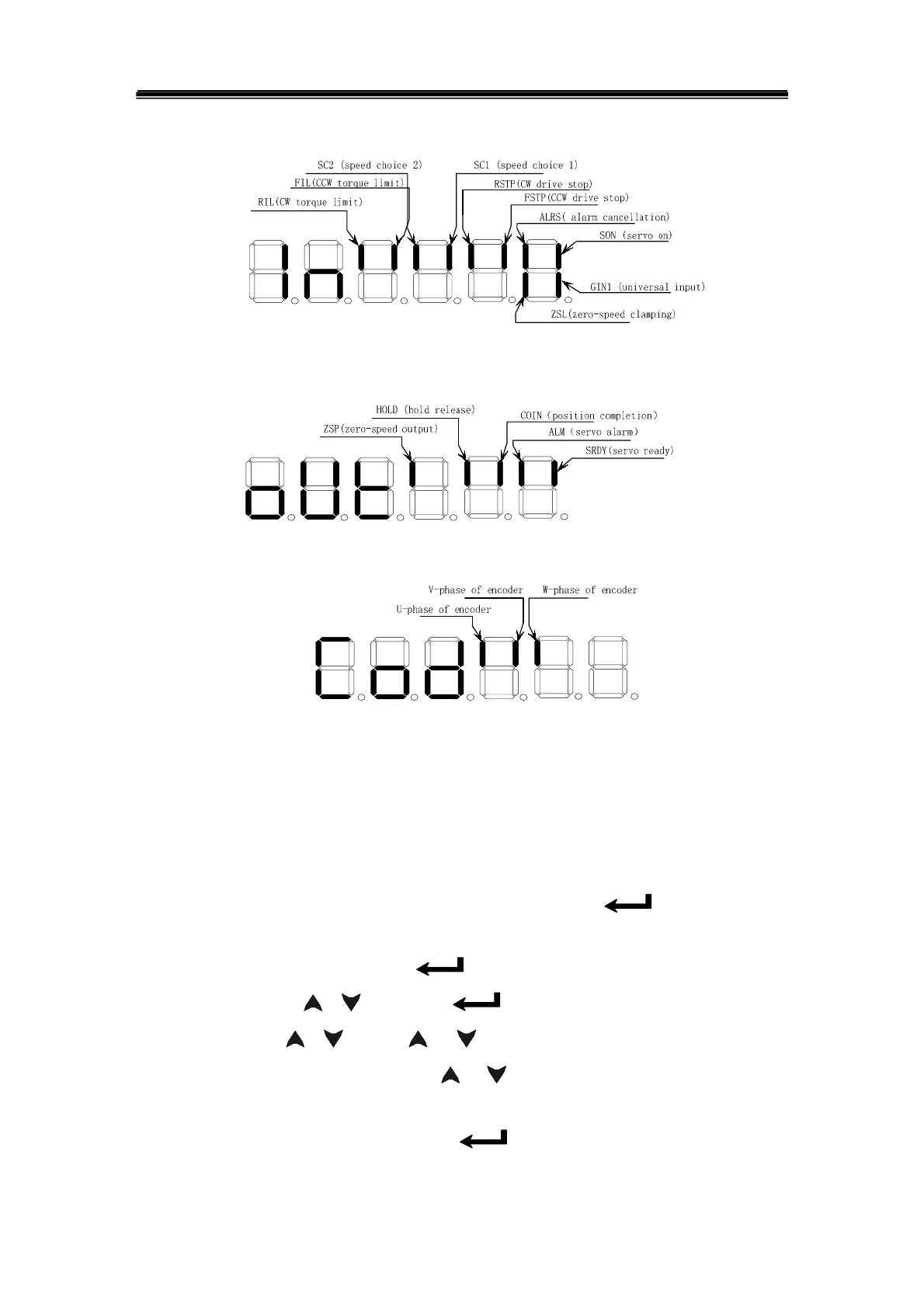
shown as follows, and their definitions are shown in Fig.5.3, Fig.5.4, Fig. 5.5.
Fig. 5.3 Input terminal display (bright light is ON and dark light is OFF)
Fig. 5.4 Output terminal display (bright light is ON and dark light is OFF)
Fig. 5.5 Encoder signal display (bright light is ON and dark light is OFF)
5.3 Parameter setting
Prior to parameter setting, modify the parameter by the user password according to the
PA00 parameter in the parameter list. After the setting, press the‘
’key for confirming
the setting. Attention should be paid for the parameter setting range against accident.
Select “PA-”in the first layer and press‘
’to enter into parameter setting mode. Select
parameter number by
‘ 、 ’,then press‘ ’to display the value of the parameter,
modify the value by
‘ 、 ’. Press ‘ ’ or‘ ’key for once to increase or decrease 1 for
the parameter value, press and hold on
‘ ’or‘ ’to continuously increase or decrease
value for the parameter. When the parameter value is modified, the decimal point of
rightmost LED digital tube is lighted, press‘
’to confirm the modification, and then
the decimal point of rightmost LED digital tube is put out. And the modified value will



 To Next Page