GSK CNC Equipment Co., Ltd.
40
immediately be reflected in the control process, press‘ ’or‘ ’to go on modify
parameters till the completion of modification, then press
‘ ’to back to parameter
selection mode. Do not press‘
’to confirm if the parameters modified are not proper,
press
‘ ’to cancel it to make the parameter recover to its original value and back to the
parameter selection mode.
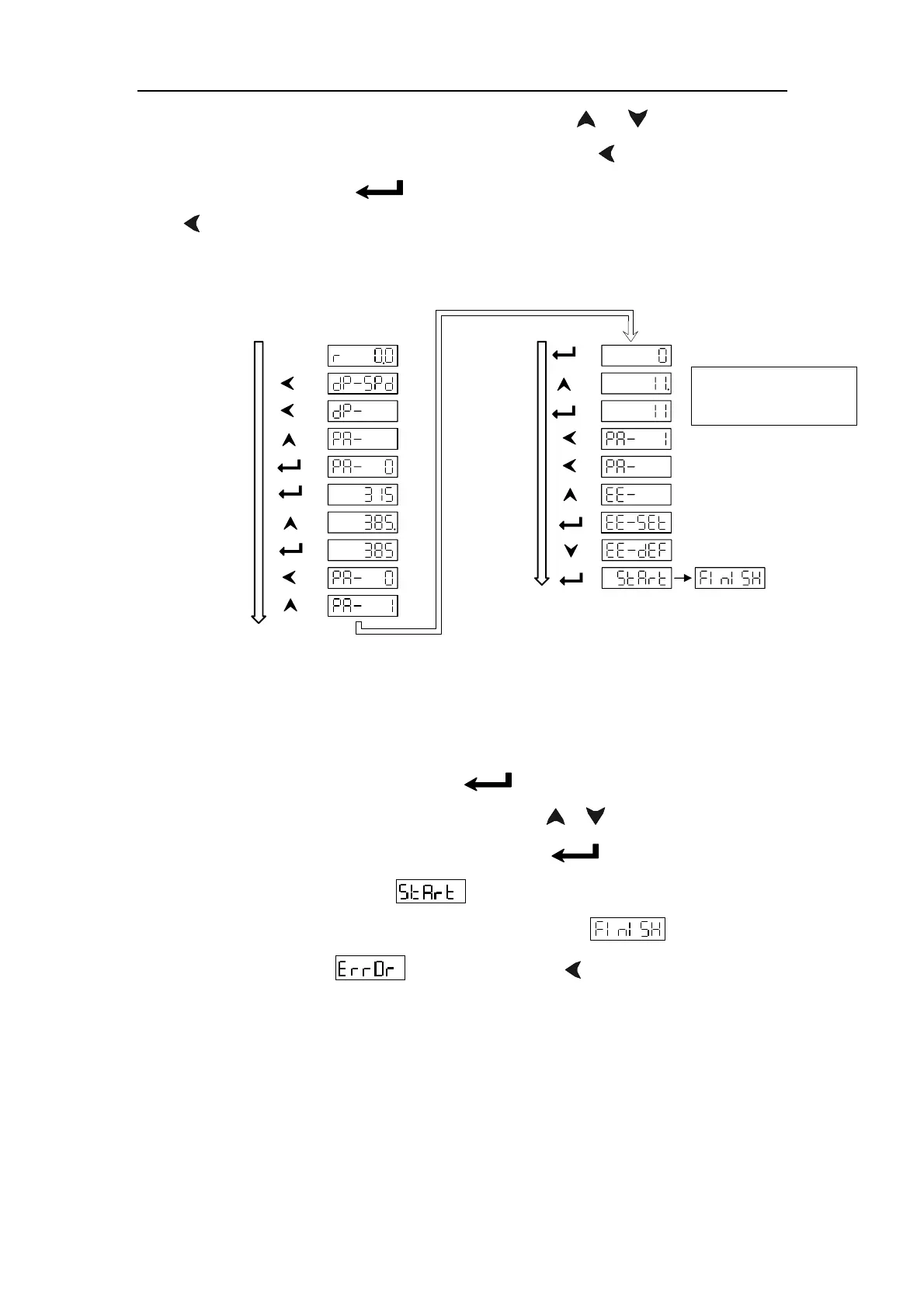
The following is the parameter setting procedure for GSK 110SJT-M040D servo motor
:
Power on
Back a layer
Menu selection
Back a layer
Forward a layer
Parameter value
Modification
Confirmation
Back a layer
Parameter selection
Default call
Parameter value
Modification
Confirmation
Back a layer
Back a layer
Menu selection
Forward a layer
Hold for 2s
Fig. 5.5 Diagram block of parameter setting
5.4 Parameter management
The parameter management is mainly used for memory and EEPROM operation.
Select “EE-” in the first layer and press‘
’to enter into parameter management
mode. 5 operation modes can be selected by
‘ 、 ’keys. For example, for
“ parameter writing ” , select “EE-Set”,then press‘
’and hold it on for over 1
second, the monitor displays “
” that means the parameter is being written
into EEPROM. After 1~2 seconds, the monitor displays “
” if the writing is
successful, otherwise“ ” is displayed. Press ‘ ’again to return to operation
selection mode.
z EE-Set: parameter writing. It means to write the parameters in the memory into
EEPROM parameter area. The parameters modified by user only change the
parameter values in the memory that they will restore to their original values after
power is on again. If the parameter values are changed permanently, parameter
writing should be executed to write the parameters in the memory into the
EEPROM parameter area, so the modified parameter values will be valid after
Model code parameter
of the respective motor



 To Next Page