30
!
"
!
X
Y
!
"
!
Edge sanders
HS 950
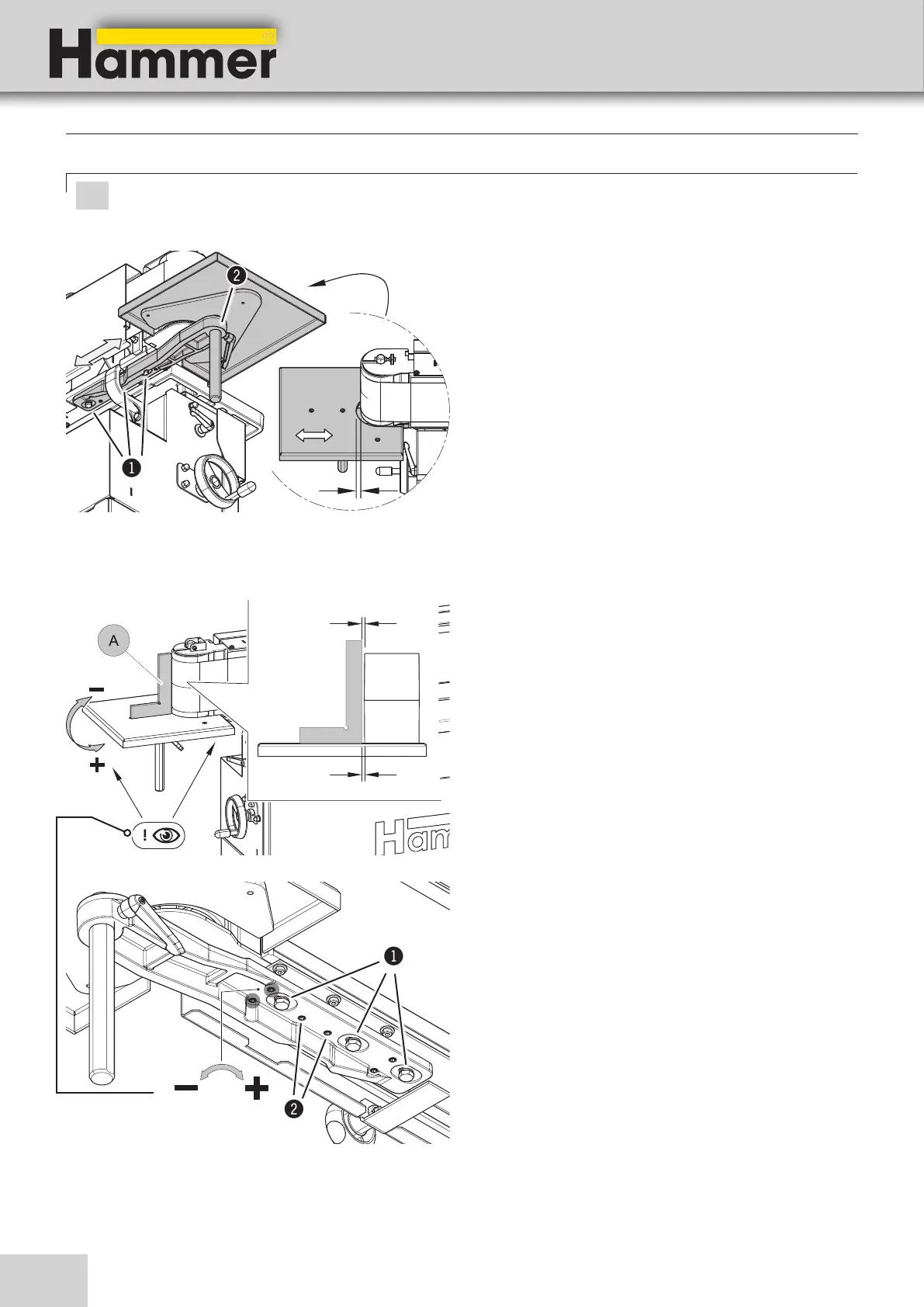
Setting: Distance of the roller to the side working table
1. Loosen the hexagonal screws.
2. Move the clamp along the slotted holes.
3. Tighten the hexagonal screws.
!Socket head cap screw
"clamp
Setup and installation
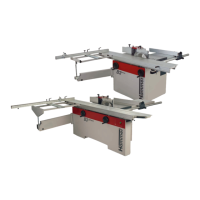
Setting: 90° angle of the roller to the side working table
Angle A:
1. Place a 90° angle between the roller and the side
work table.
2. Measure the distance Y and X . The values X and Y
must be equal.
3. Loosen the hexagonal screws.-
Release the fixing screws
Setting - at X>Y:
• Adjusting in the „-“ direction
Setting - at X<Y:
• Adjusting in the „+“ direction
4. Tighten the hexagonal screws.
Tighten the fixing screws
!Socket head cap screw
"Fixing screws
#clamp
Fig. 7-11: Setting - side working table
Fig. 7-12: Setting - Angle A
Attention! Risk of material damage!:
Set the working table with sufficient distance to the sanding belt! There is the risk of collision.


 To Next Page