36
#
"
%
90
80
85
!
"
#
!
#
$
Edge sanders
HS 950
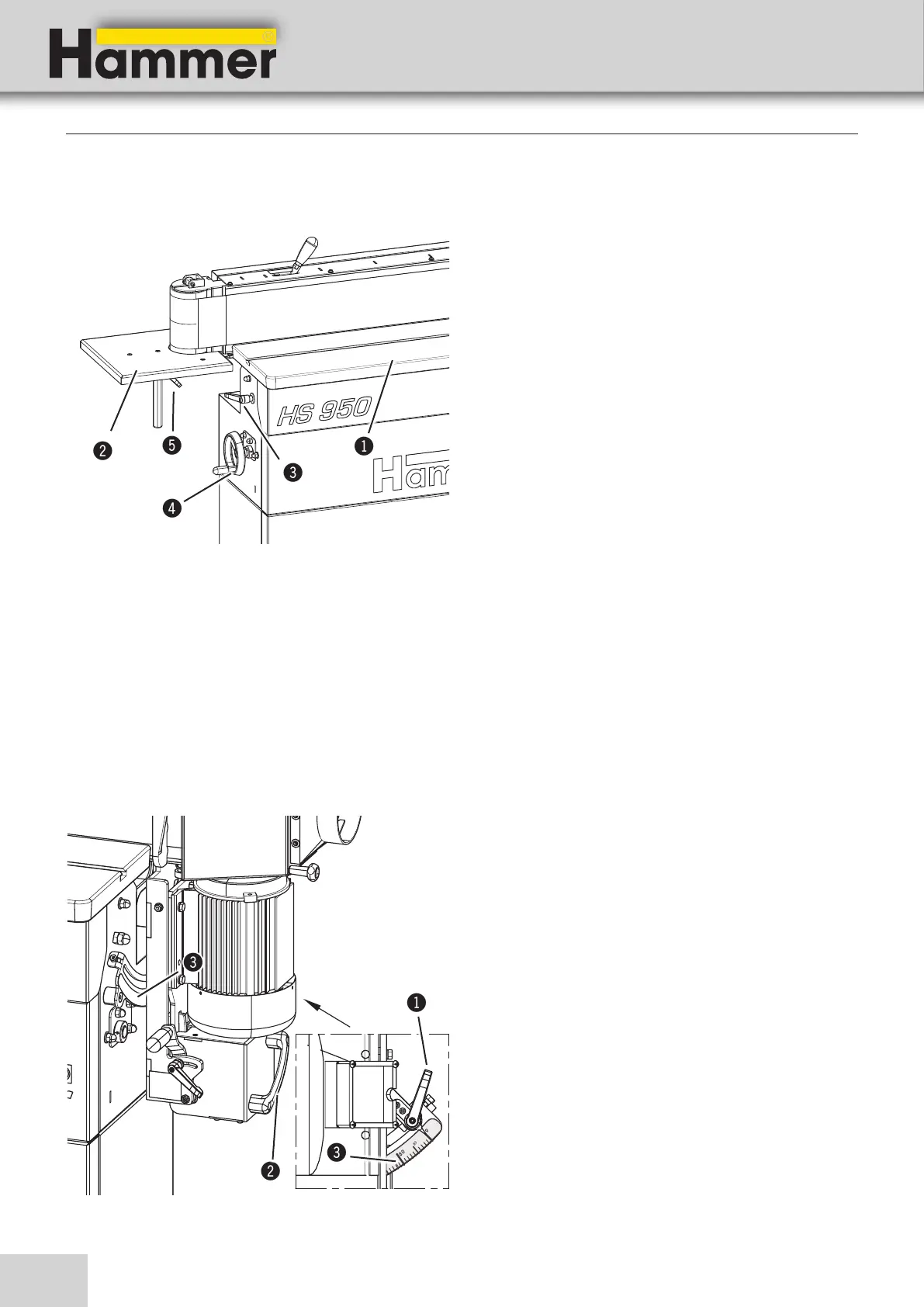
Work bench :
1. Release the clamping lever.
2. table height adjusted using the handwheel.
• Clockwise: lower
• Anti-clockwise: higher
3. Clamp the clamping lever.
additional table :
1. Release the clamping lever.
2. For height adjustment, move the additional table to
the desired position.
3. Clamp the clamping lever.
! Work bench
" additional table
# Clamping lever - Work bench
$ Handwheel - Work bench
% Clamping lever - additional table
8.4 Height adjustment of the working table / additional table
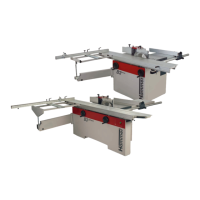
8.5 Angle adjustment of the sanding unit
The sanding unit is continuously adjustable between 0 -
90°.
1. Release the clamping lever.
Use the handgrip to swivel the unit.
2. Set the angle between 0° and 90° on the scale
3. Clamp the clamping lever.
! Clamping lever
" Hand grip
# Scale
Making adjustments and preparations
Fig. 8-3: Height adjustment of the working table
Fig. 8-4: Angle adjustment of the sanding unit


 To Next Page