37
!
"
!
!
"
#
Edge sanders
HS 950
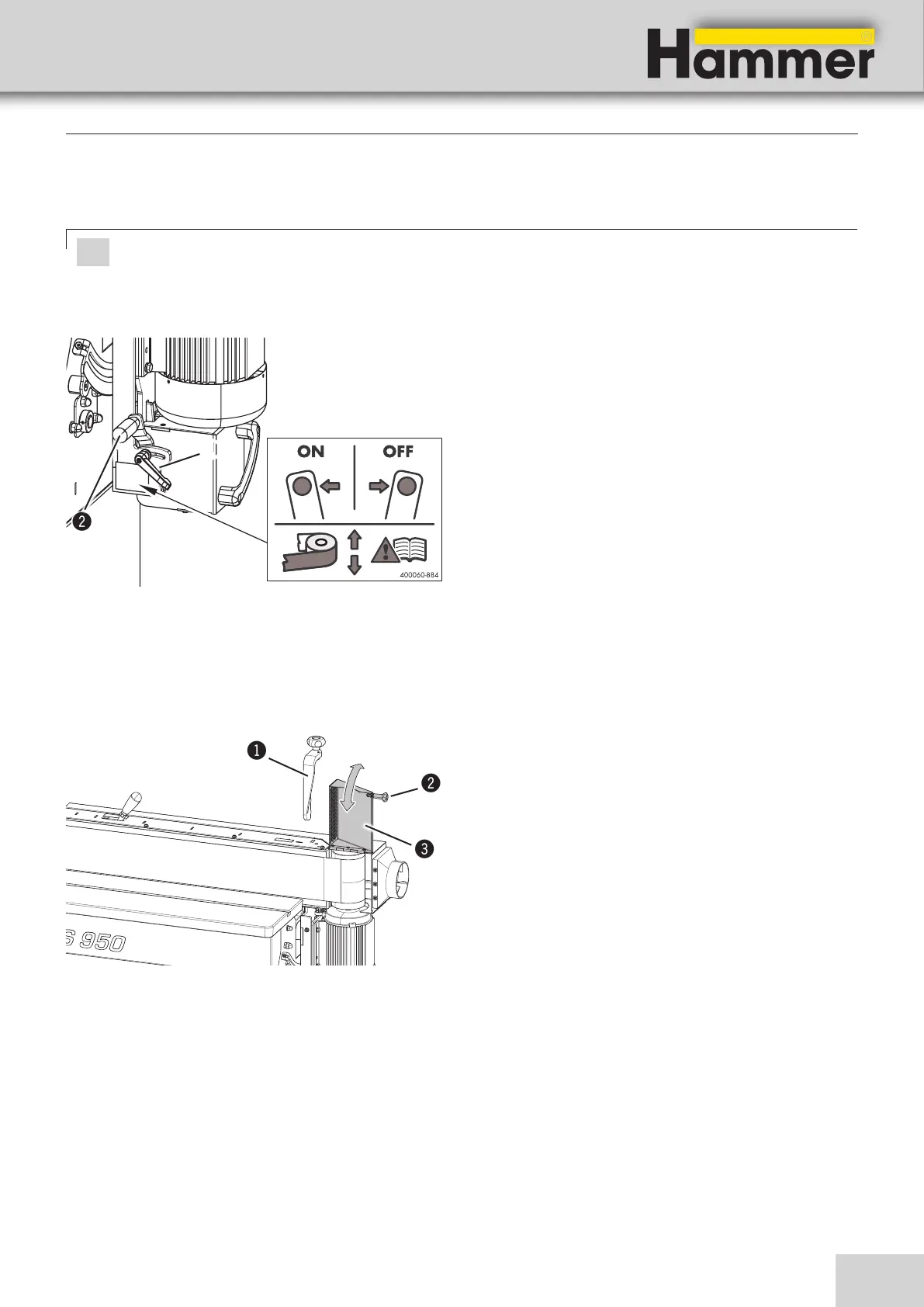
1. Release the clamping lever.
2. Use the lever to switch the oscillation of the grinding
belt on and off.
• Switching on the machine: Shift the lever to the
back.
• Switching off the machine: Shift the lever to the
front.
3. Clamp the clamping lever.
! Clamping lever
" Lever
8.6 Sanding belt oscillation on/off
Attention! Risk of material damage!
The oscillation of the grinding belt can be switched on or off to change the grinding pattern.
To prevent one-sided wear of the abrasive belt, switch on the switched-off oscillation stroke again after use.
8.7 Extending the machining area (long workpieces)
For longer workpieces the grinding surface can be enlar-
ged.
1. Remove the workpiece stop.
2. Release the handle.
3. Swing the extraction flap upwards.
4. To reassemble, follow the instructions in the reverse
order.
! Infeed fence
" Hand grip
# extraction flap
Making adjustments and preparations
Fig. 8-5: Sanding belt oscillation on/off
Fig. 8-6: Extending the machining area (long workpieces)


 To Next Page