67HeartWare™ HVAD™ System Peripherals and Accessories
10
9
8
7
6
5
4
3
2
1
Appendix
Reference
Guides
Alarms and
Emergencies
Patient
Management
Surgical
Implant and
Explant
Monitor
Peripherals
and
Accessories
HVAD
®
PumpOverviewIntroduction
4.1 HVAD
®
Controller Connections (continued)
Connecting Power Sources and Monitor Cable to the Controller:
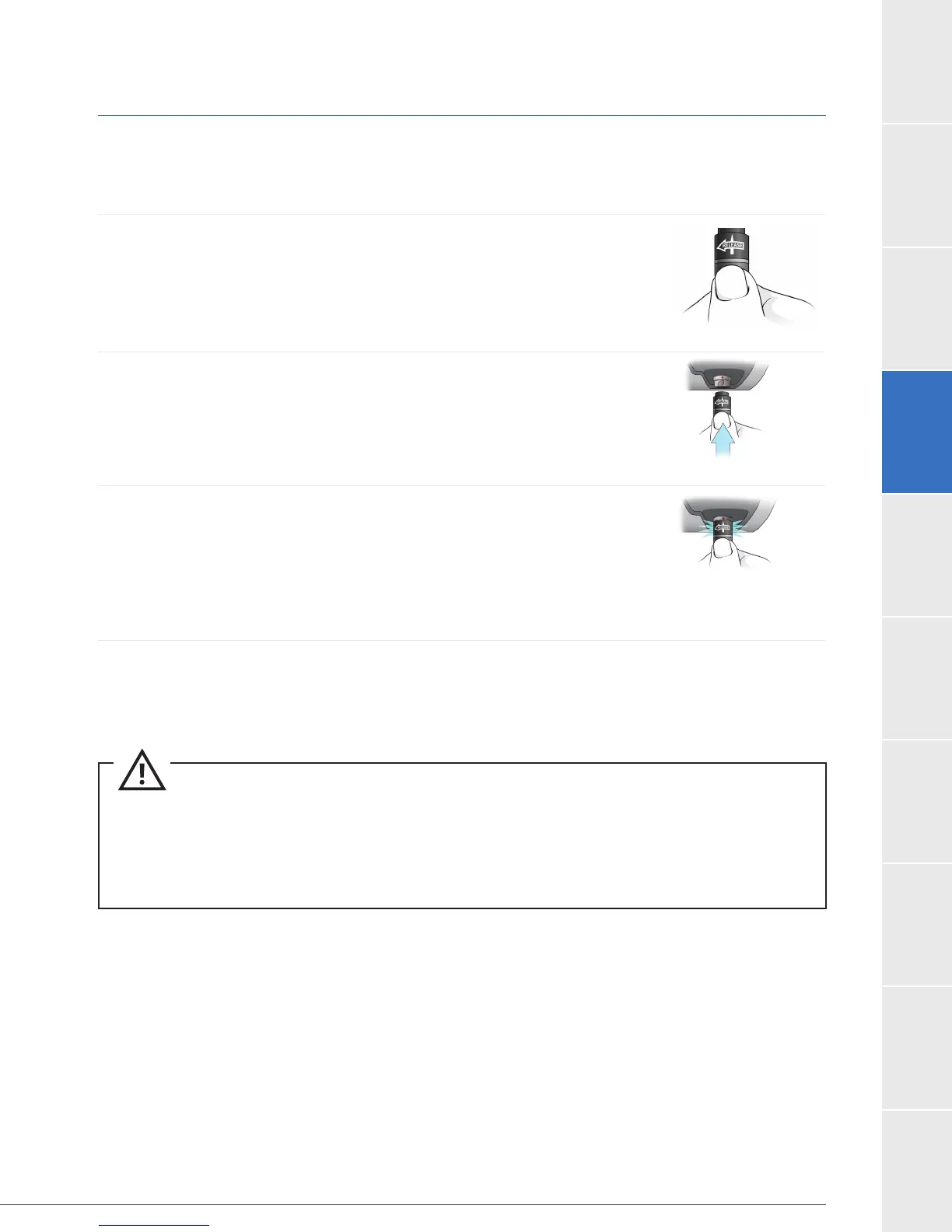
To Connect a Power Source:
1. To connect all power supplies (battery, AC adapter or DC
adapter) grasp the power cable near its connector. Leave the
connector free to rotate.
2. Line up the solid white arrow on the cable connector with the
dot on the controller (Figure 43).
3.
connector, but allow it to naturally lock in place. A good
connection will result in an audible click.
arrow will shift slightly into the correct locking position.
4.
near the connector. Repeat steps above for second power source.
Figure 42
Figure 43
Figure 44
CAUTION:
connectors may damage the connectors.
CAUTION:
pulling the cable near the controller power connector or the power cables may come loose and result
in an alarm or the pump stopping.



 To Next Page