10
9
8
7
6
5
4
3
2
1
Appendix
Reference
Guides
Alarms and
Emergencies
Patient
Management
Surgical
Implant and
Explant
Monitor
Peripherals
and
Accessories
HVAD
®
Pump Overview
Introduction
92 HVAD® Instructions for Use
5.3 System Screens (continued)
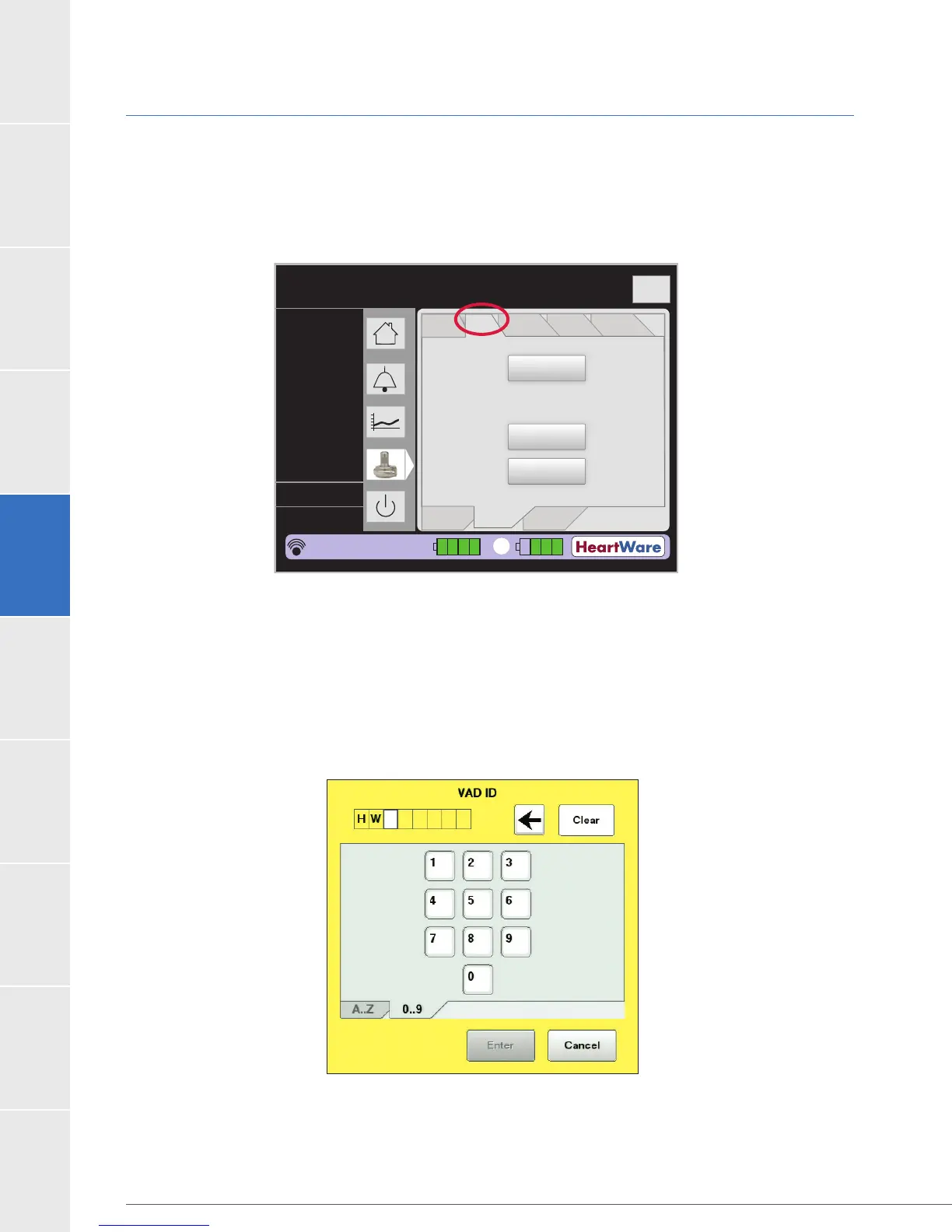
VAD Tab
The VAD tab (Figure 73) is used to enable or disable the Suction Response and to enter the
HVAD
®
Pump serial number.
Figure 73: VAD Tab
Press the “VAD ID” button to enter the HVAD
®
Pump serial number from the Implant Kit package.
After pressing the “VAD ID” button, a dialog box is displayed (Figure 74) and the serial number is
incorrect number is entered, press “Cancel” and start again.
Figure 74: VAD ID Dialog Box
Flow (L/min)
Time (s)
Logout
8
6
4
2
0
Speed/
Control
Alarm
Settings
Controller
SW
Monitor
Controller
Patient
Setup
VAD ID:
Suction
Response:
Mode:
HW1400
Fixed
Off
VAD
2
5.3
2860
4.2
L/min
RPM
Watts
Fixed
Sx Off
HW1234567
POD: 3
21:18:58
1



 To Next Page