EN
60/165
Example:
RPM display (RPM)
Example:
RCF display (
RCF )
RCF
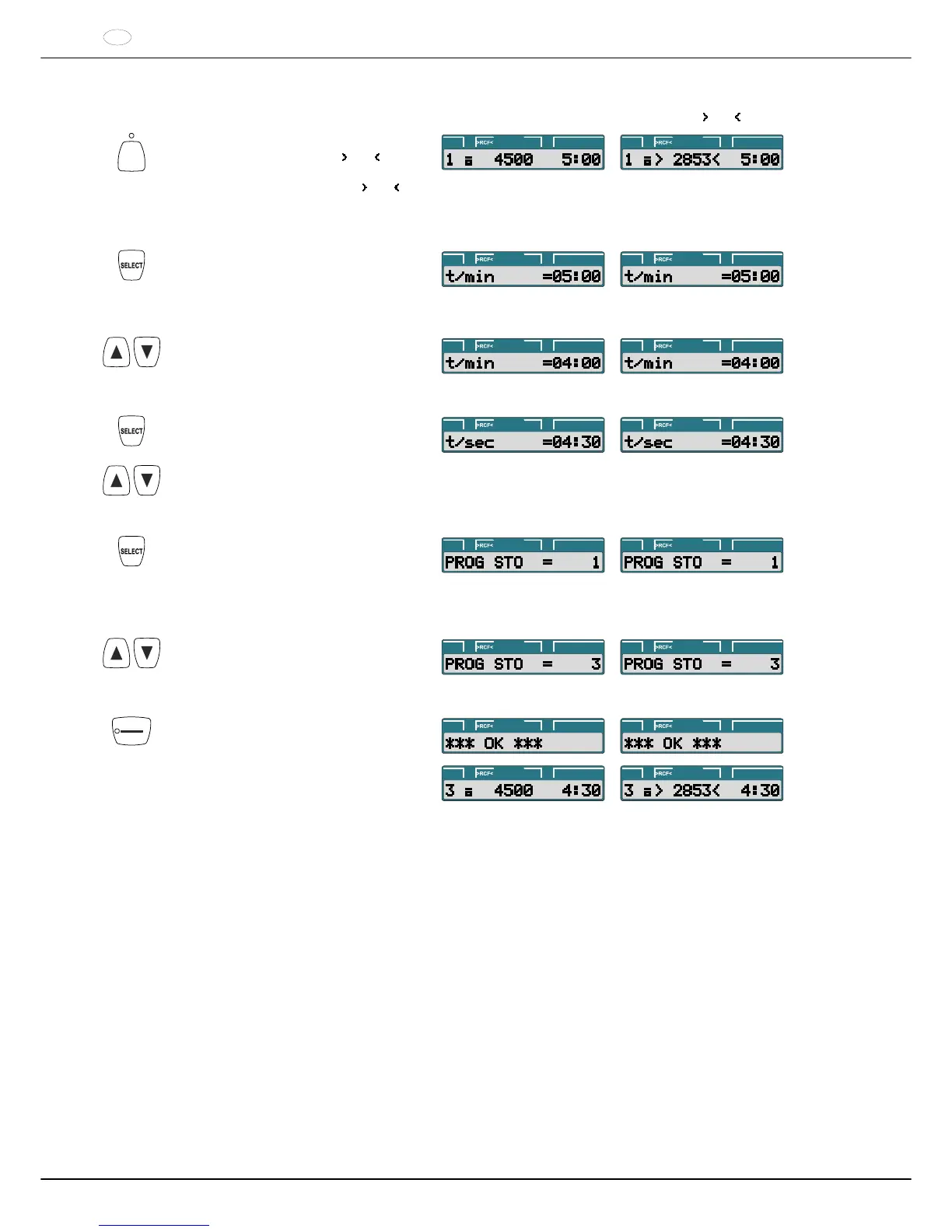
Press the key to activate the RPM display
(RPM) or the RCF display ( RCF ) as
needed. The LED above the key is
illuminated if the RCF display ( RCF ) is
activated.
PROG t/min:sRPM PROG t/min:sRPM
Keep pressing the key until the desired
centrifugation parameter is displayed.
Example: t/min : Runtime, minutes.
PROG t/min:sRPM PROG t/min:sRPM
Set the desired value with the keys.
PROG t/min:sRPM PROG t/min:sRPM
Input all the desired centrifugation
parameters in succession.
PROG t/min:sRPM PROG t/min:sRPM
Press the key until the following is
displayed:
PROG STO : Program location where the
centrifugation parameters are stored.
PROG t/min:sRPM PROG t/min:sRPM
Set the desired program location with the
keys.
PROG t/min:sRPM PROG t/min:sRPM
START
PULSE
Press the key.
The centrifugation parameters are stored
at the program location.
PROG t/min:sRPM
PROG t/min:sRPM
PROG t/min:sRPM
PROG t/min:sRPM



 To Next Page