EN
81/165
25 Faults
If the fault cannot be eliminated with the help of the fault table, please inform Customer Service.
Please specify the type of centrifuge and the serial number. Both numbers can be found on the name plate of the
centrifuge.
Perform a MAINS RESET:
Switch off the mains switch (switch position "0").
Wait at least 10 seconds and then switch on the mains switch again (switch position "").
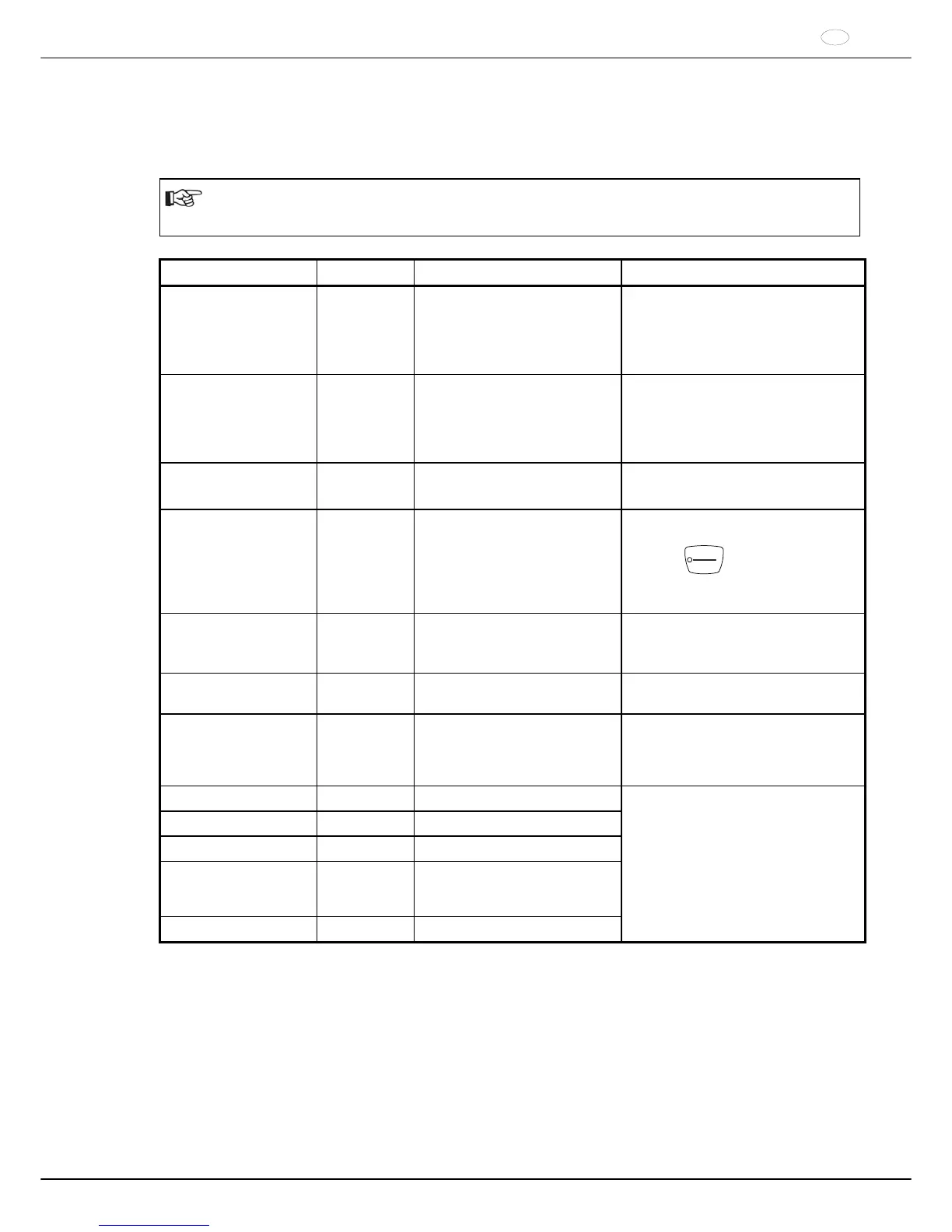
Message / fault Cause Remedy
No display No voltage
Mains input fuses defective.
Check distribution voltage.
Check mains power input fuse, refer
to Chapter "Change mains input
fuse".
Mains switch ON.
IMBALANCE The rotor is unevenly loaded.
Open the lid after the rotor is at a
standstill.
Check the loading of the rotor, see
chapter "Loading the rotor".
Repeat the centrifugation run.
RPM > ROTOR MAX
Speed in the selected program
greater than the maximum speed
of the rotor.
Check the set speed.
Reduce the set speed
MAINS INTERRUPT Power failure during the
centrifugation run. (The
centrifugation run was not
finished.)
Open the lid after the rotor is at a
standstill.
Push
START
PULSE
button.
Repeat the centrifugation run if
necessary.
Rxxx WRONG ROTOR
(xxx = Anzeige des
Rotorcodes)
The used rotor is not approved
for this device.
Use a rotor which is approved for
this device.
KEYBOARD ERROR
Error / defect electronics
Perform a MAINS RESET when the
rotor has been stationary.
TACHO ERROR 1, 2, 96.1 Failure of speed impulses during
operation.
No rotor inserted.
Error / defect electronics
After the displayed waiting time
expires (150 seconds), carry out a
MAINS RESET.
Check whether the rotor is inserted.
LID ERROR 4.1 – 4.127 Error in lid locking or lid closure.
OVER SPEED 5 Rotation too fast
ROTOR ERROR 10.1 – 10.6 Incorrect rotor coding
VERSION ERROR 12 Incorrect centrifuge model
recognized.
Error / defect electronics
UNDER SPEED 13 Rotation too slow
Perform a MAINS RESET when the
rotor has been stationary.



 To Next Page