EN
68/165
20.1 Querying system information
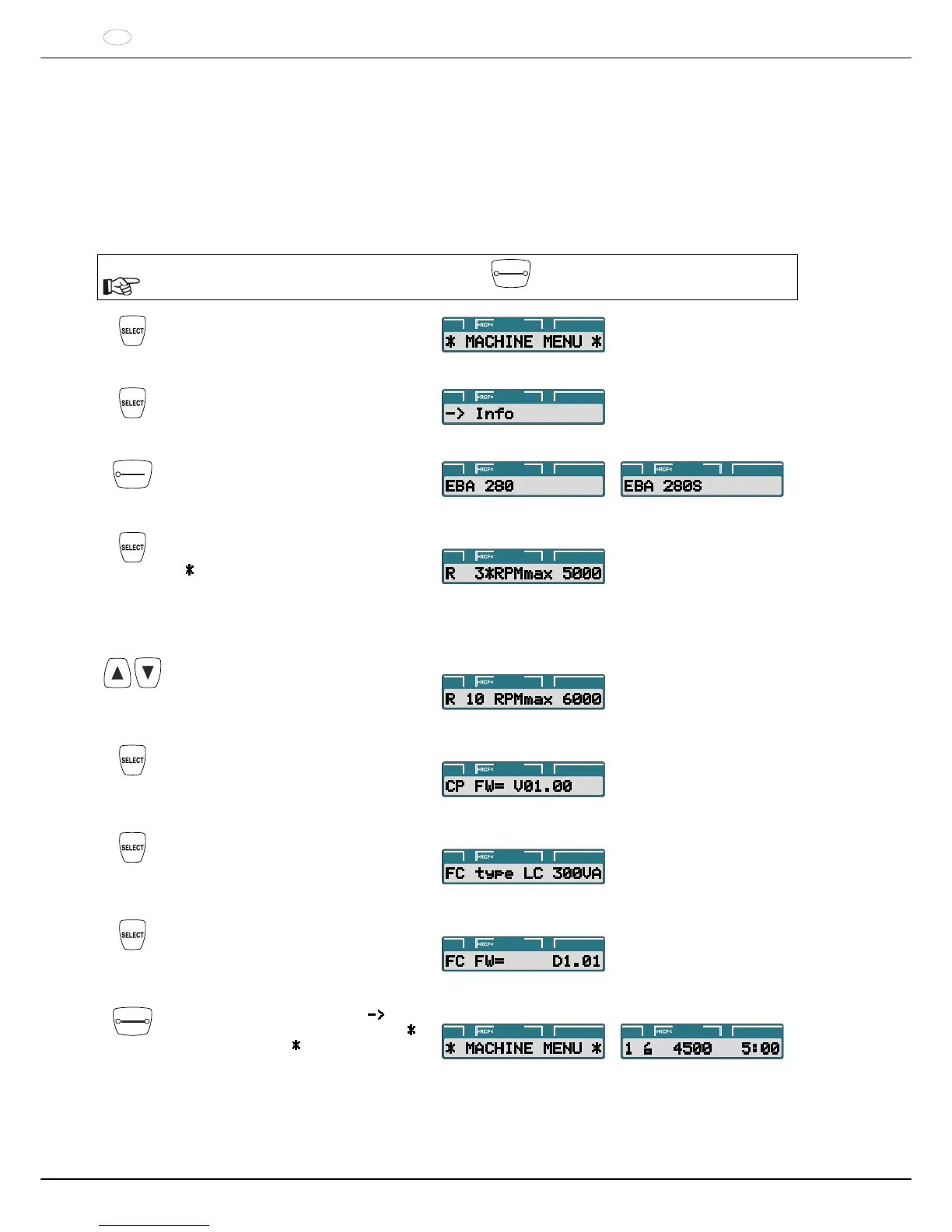
The following system information can be queried:
Centrifuge model
The maximum speeds of the various rotor codes,
Centrifuge program version
Frequency converter type
Frequency converter program version
With the rotor at a standstill, the query can proceed as follows:
The procedure can be aborted at any time by pressing the
STOP
OPEN
key.
Press and hold the button for eight
seconds.
PROG t/min:sRPM
Press the key.
PROG t/min:sRPM
START
PULSE
Press the key.
Centrifuge model.
PROG t/min:sRPM PROG t/min:sRPM
Press the key.
R : Rotor code of the rotor.
: The rotor code of the currently used
rotor is marked with an asterisk.
RPMmax : The maximum speed of the
rotor permitted for this centrifuge.
Example:
PROG t/min:sRPM
The maximum speeds of the various rotor
codes can be displayed with the keys.
Example:
PROG t/min:sRPM
Press the key.
Centrifuge program version.
Example:
PROG t/min:sRPM
Press the key.
Frequency converter type.
Example:
PROG t/min:sRPM
Press the key.
Frequency converter program version.
Example:
PROG t/min:sRPM
STOP
OPEN
Press the key twice to exit the "
Info"
menu or press three times to exit the "
MACHINE MENU
".
PROG t/min:sRPM
Example:
PROG t/min:sRPM



 To Next Page