Accessories
32 Affinity® 4 Birthing Bed Instructions for Use (USR025 REV 13)
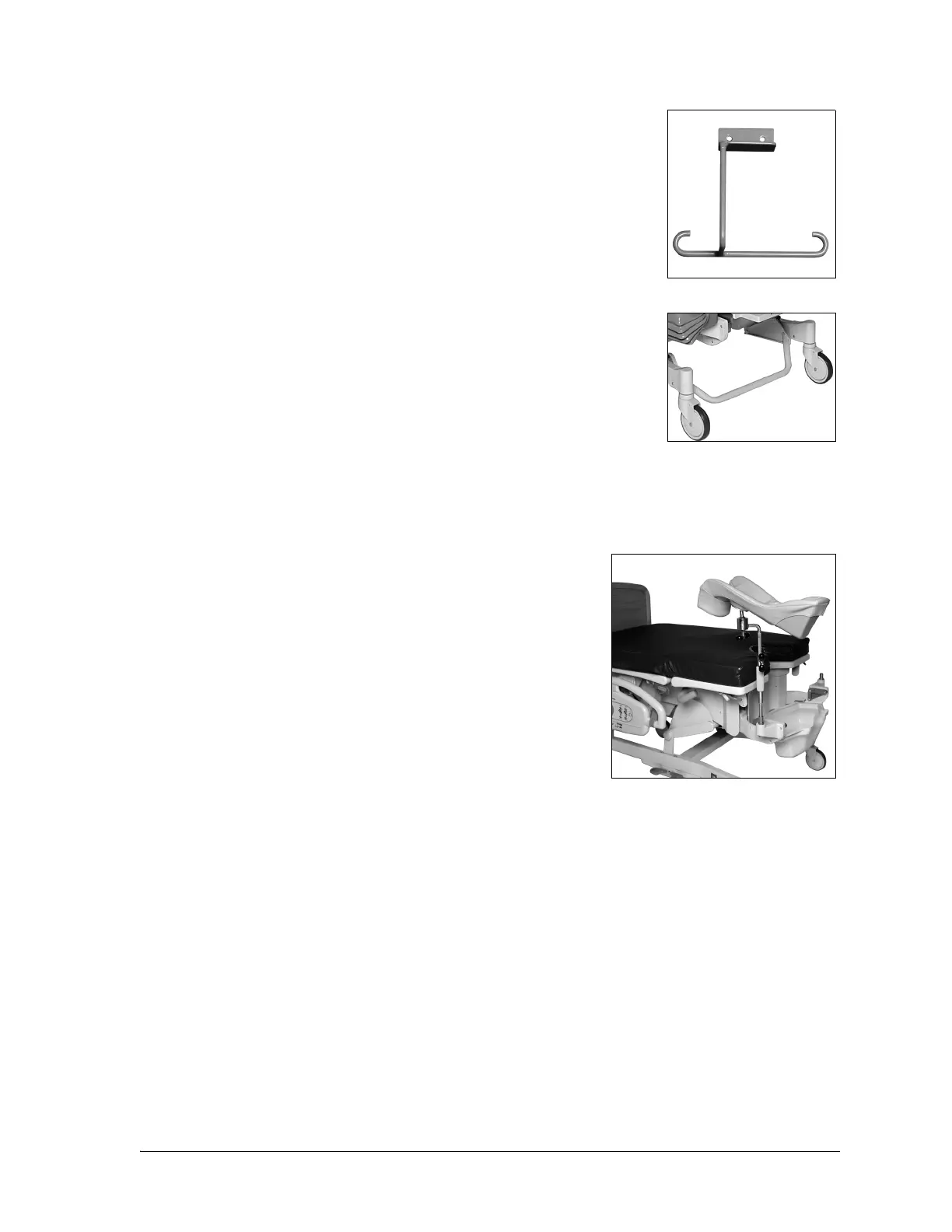
FOLEY HOOK KIT—P3623
This kit can be mounted to either side of the bed frame near the labor grip.
The maximum safe working load is 10 lb (4.5 kg).
FOOT REST BAR—P451
This bar provides a convenient foot rest for the physician (or obstetrician)
and is for lift off versions only.
The maximum safe working load is 150 lb (68 kg).
The Foot Rest Bar is not available on the Affinity® 4 Birthing Bed that has the Stow and Go® Foot Section
option.
FULL LEG SUPPORTS—P7625 AND P7634
Both leg supports are padded with ball joint and pull handles. The
P7634 is telescoping.
To Adjust for Use
1. Electrically lower the foot section to the lowest position, with
the patient’s legs on the foot section, before placing her legs
into the supports.
2. Both full-leg supports are interchangeable right and left.
3. For leg support installation, place the rod into the steel sockets
located at the point where the foot section attaches to the yoke.
4. Drop them into the sockets, and rotate until you hear the
support lock.
5. Rotate the supports so that the black knob faces inboard, toward the patient, and leave the knob
loose.
6. For large patients, rotate the black knob outboard, away from the patient.
7. Place the patient’s legs into the supports.
8. Adjust the position by rotating her knees out.
9. Tighten the black knob.
10. Raise the foot section electrically to fill in the popliteal space by pushing the Foot Up control. The
patient’s legs should be completely supported.
11. Remove the foot section.
12. Rotate the foot supports up and away from the center of the bed.
Check for pressure points, and make appropriate adjustments.
For TALL PATIENTS, angle the support downward. For SHORT PATIENTS, angle the support upward.












 To Next Page