2-36
2.15 Rescue Memory Card
- Use this function when the IJ printer does not start up during turn on procedure.
- Use the Rescue memory card which is prepared by Hitachi.
- This function will initialized all registered data and settings, ensure reinstall all data and
settings with “Back up” data.
This function will be initialized the settings as below items on the list, ensure reinstall all
data and settings with “Back up” data.
Item After rescue Back up data
Serial number [00000000]
Reinstall from Unit information
screen.
Select Languages
Language1 : English,
Language2 : none,
Input mode : 1
Reinstall from language select screen.
Option setup Not supported ○(Back up data)
Print data Original (shipment state) ○
User pattern Original ○
Standard character Original ○
User environment setup Original ○
System environment setup Original ○
Communication environment Original ○
Operation setup Original
Reinstall Ink operating time,
Cumulative op. time and Pint count.
Alarm history All blank -
Excitation V up data Excitation V-ref. [11] ○
Touch screen setup Original ○
Circulation control Original
Reinstall Parts usage time
management.
Maintenance password PHDO Restore by passchg.DAT
1 Be sure to turn off the power.
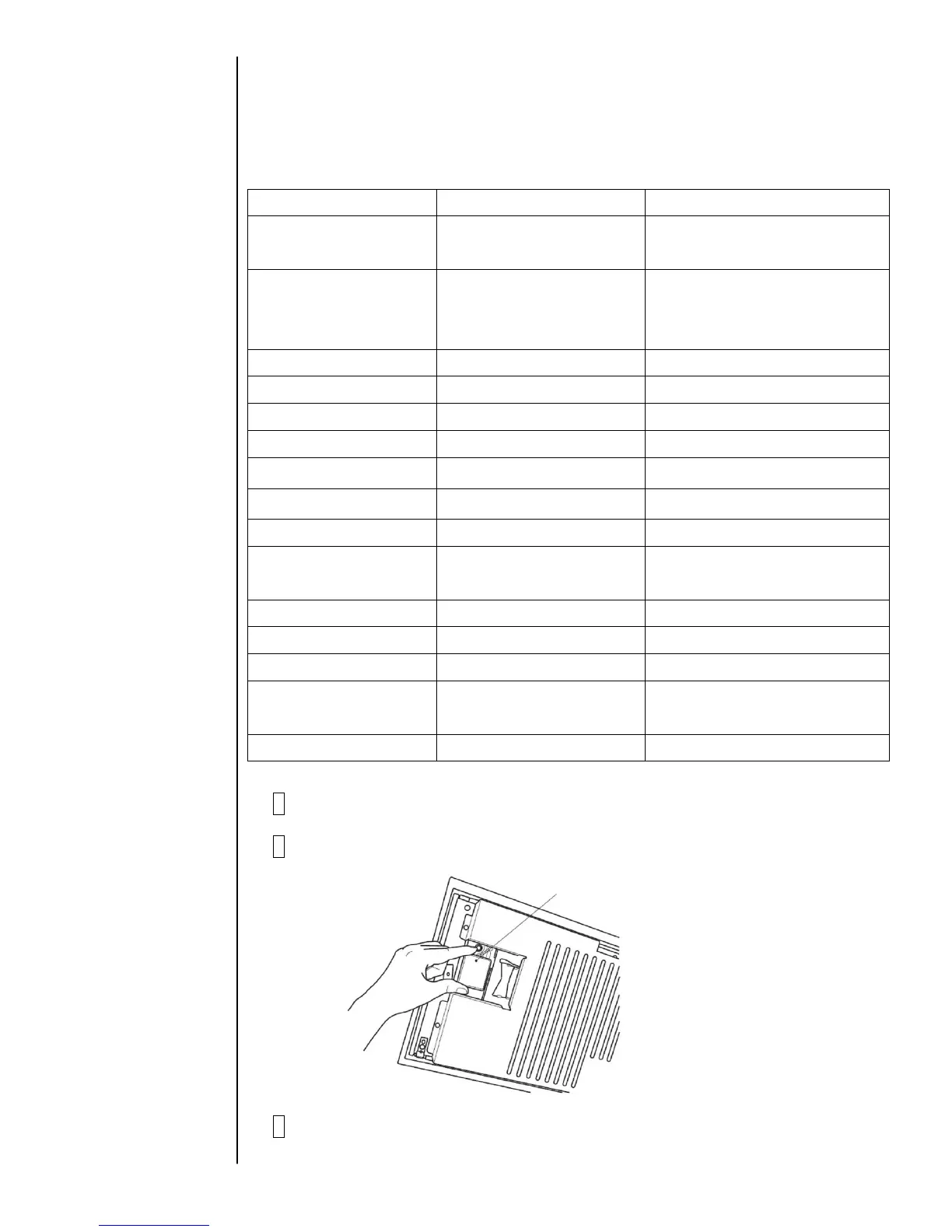
2 Insert a rescue memory card into the slot.
3 Turn on the power.
Download procedure start automatically.



 To Next Page