1 WAKE
2 WAYPOINT
3 EVENT MARK
4 ROUTE
5 ALARM
6
READOUT SETTING
7
INFO MODE DISPLAY
8 OTHERS
9 SOUNDER
1
RECALL WAYPOINT
2
CANCEL WAYPOINT
3
ERASE WAYPOINT
4
MEMORIZED COLOR
5
DISPLAY COLORS
6
CHANGE OF SHAPE
7 LIST/EDIT
0/1000 USED
<RECALL WAYPOINT>
NUMBERING [SET] KEY.
NUMBER=
Select by [CENTER]key
upward or downward
Show menu with [MENU] key
<Enter of numbers>
<Selection of menu items>
Select by [CENTER]key upward or downward
Enter with [NUMBER] key on remote.
After enter numbers, press [SET] key.
To next item by turning [CENTER] key to right, pressing [SET] key or [CENTER] key.
Select by [CENTER]key
upward or downward
Select by [CENTER]key upward or downward
To next item by turning [CENTER] key to right, pressing [SET] key or [CENTER] key.
Return with [MENU] key
Show menu with [MENU] key
Return with [MENU] key
1 WAKE
2 WAYPOINT
3 EVENT MARK
4 ROUTE
5 ALARM
6
READOUT SETTING
7
INFO MODE DISPLAY
8 OTHERS
9 SOUNDER
1 ERASE
2
MEMORIZED COLOR
3
DISPLAY COLOR
4
CHANGE OF SHAPE
5 LIST/EDIT
0/24000 USED
Select with [RIGHT/LEFT] key on remote.
After selection, press [SET] key.
1 MEMORIZED COLOR
[ WAKE ]
12
HOW TO OPERATE MENU
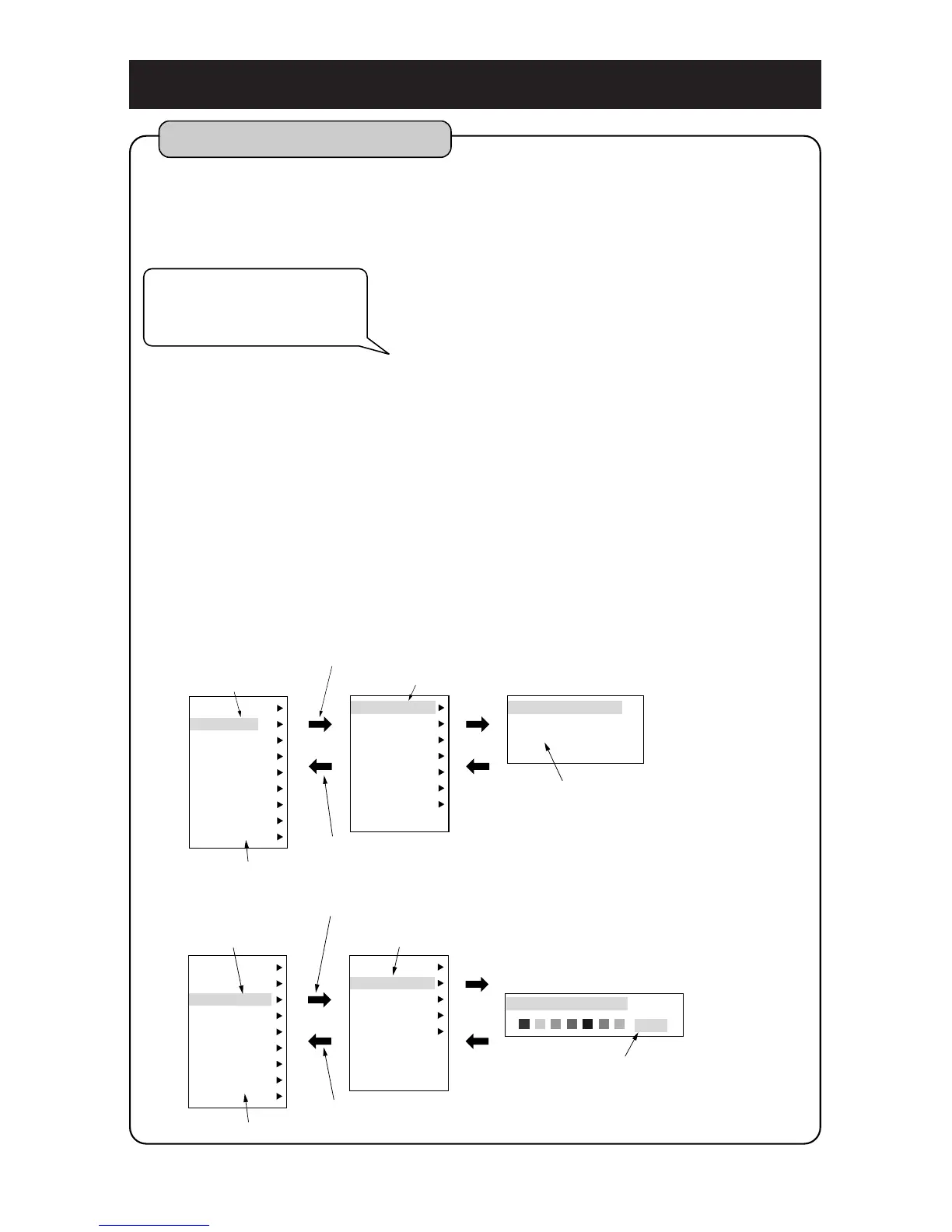
How to operate menu
You can change contents of item which you set by selecting menu item using
[MENU] key, [CENTER] key, [SET] key and [CLR] key.
Press [MENU] key.
Select desired item turning [CENTER] key
upward or downward.
Show next menu display moving [CENTER] key
to right and then select desired item.
Press [MENU] key to return to previous display.
Until set items are shown, repeat procedure 2
and procedure 3 to the extent of necessity.
Change the setting by executing [enter of
numbers] or [selection of items].
Press [CLR] key to finish menu display.
4
5
Instead of right of [CENTER] key,
same operation is available by
pressing [SET] key or Center of
[CENTER]key.



 To Next Page