65
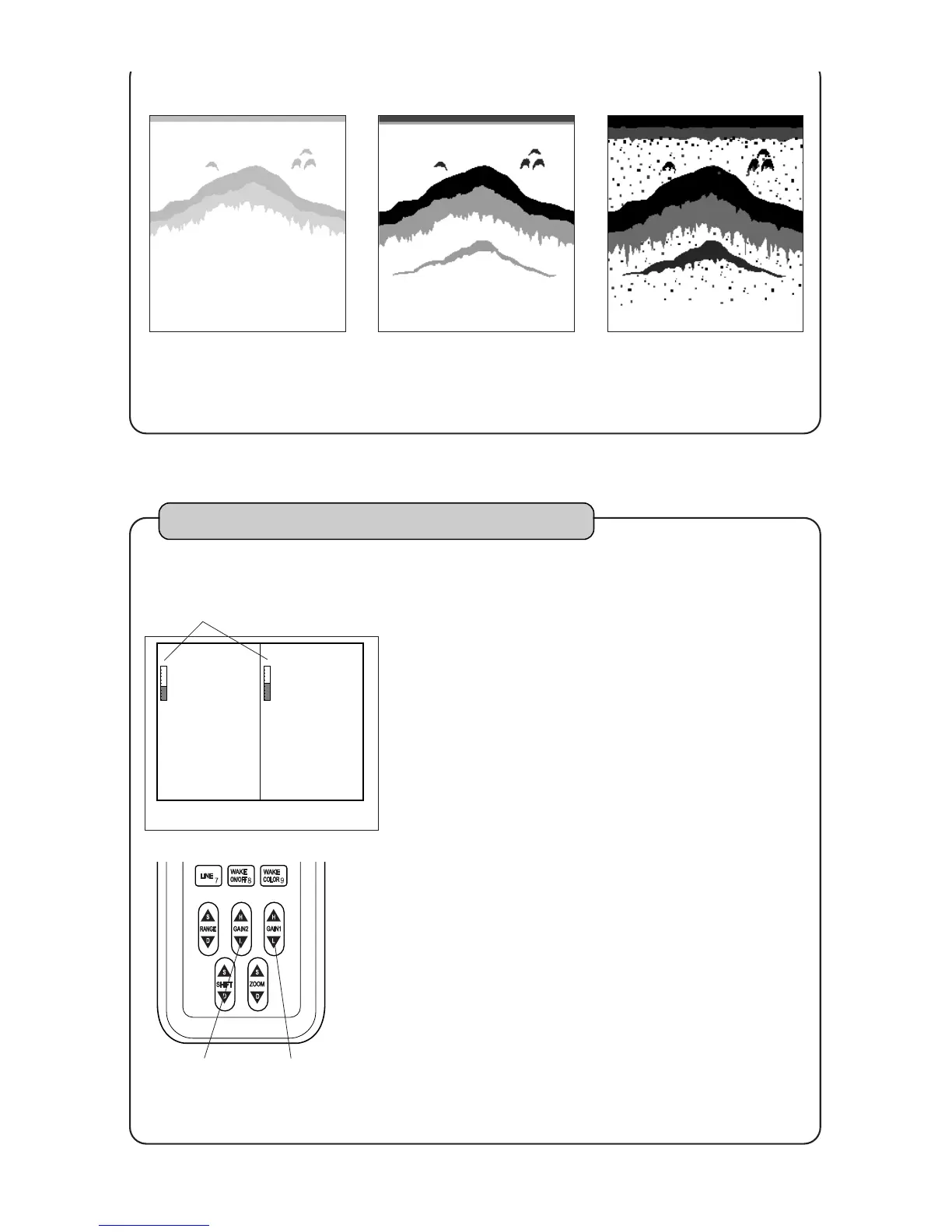
In case of dual frequency display
Adjust sensitivity on left side of screen by
GAIN2 key
[To decrease sensitivity]
Each time when you press GAIN2 (L) key,
gain bar becomes short and the sensitivity
decreases.
[To increase sensitivity]
Each time when you press GAIN2 (H) key,
gain bar becomes long and the sensitivity
increases.
Adjust sensitivity on right side of screen by
GAIN1 key
[To decrease sensitivity]
Each time when you press GAIN1 (L) key,
gain bar becomes short and the sensitivity
decreases.
[To increase sensitivity]
Each time when you press GAIN1 (H) key,
gain bar becomes long and the sensitivity
increases.
1
2
GAIN1 keyGAIN2 key
In case of dual frequency display, you can change the sensitivity on right side of screen
by GAIN1 key and the sensitivity on left side of screen by GAIN2 key.
Sensitivity
<Too poor sensitivity>
As image is pale, it is
difficult to distinct the fish
school.
<Good>
As second reflection is
shown, it is easy to distinct
the fish school.
<Too much sensitivity>
As plankton, stains in
water,and etc. are shown,
it is difficult to distinct the
fish school.



 To Next Page