12–1
SECTION 12
ALARM MONITOR
12.1 ALARM MONITOR OVERVIEW
The Alarm Monitor software is a utility that streams video across a Local Area
Network to a Client PC when an alarm is detected on the DVR unit. The video that
streams across can be stopped, played forwards and backwards, in slow motion or
real speed.
The utility is loaded at startup and placed in the taskbar. It constantly monitors for a
signal from the DVR unit. When an alarm signal is detected the Alarm Monitor
Image Viewer window opens and starts playing the video from the camera
associated to the alarm.
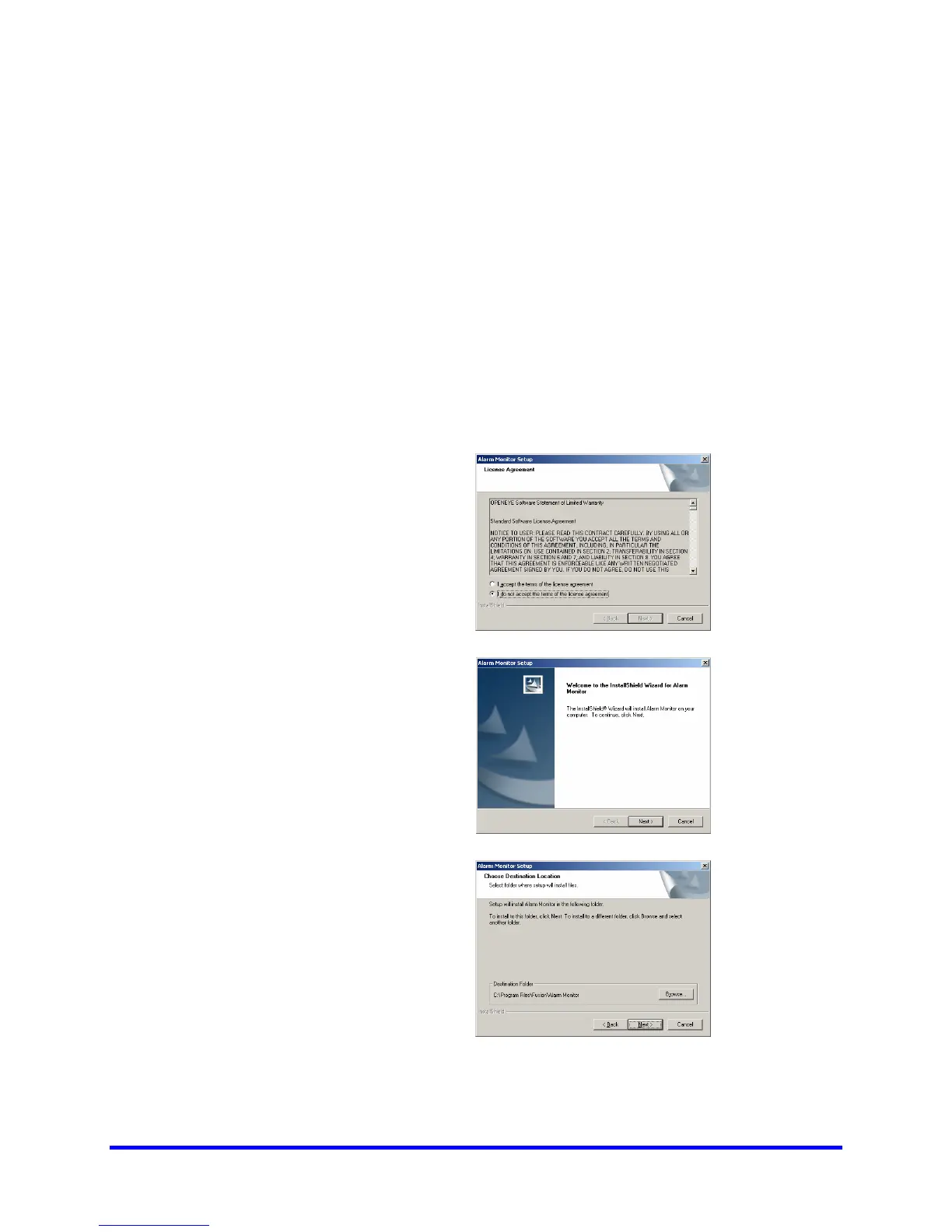
12.2 INSTALLING THE ALARM MONITOR
1
Insert the Software
Installation Disc into
the CDROM. (Do not
install on the DVR unit)
Select the Alarm
Monitor option to begin
installation and accept
the license agreement.
2
When the WELCOME
screen appears, click
NEXT.
3
When the CHOOSE
DESTINATION
LOCATION window
appears click NEXT.



 To Next Page
 Loading...