FUSION DVR Digital Recording and Transmission System
5–6
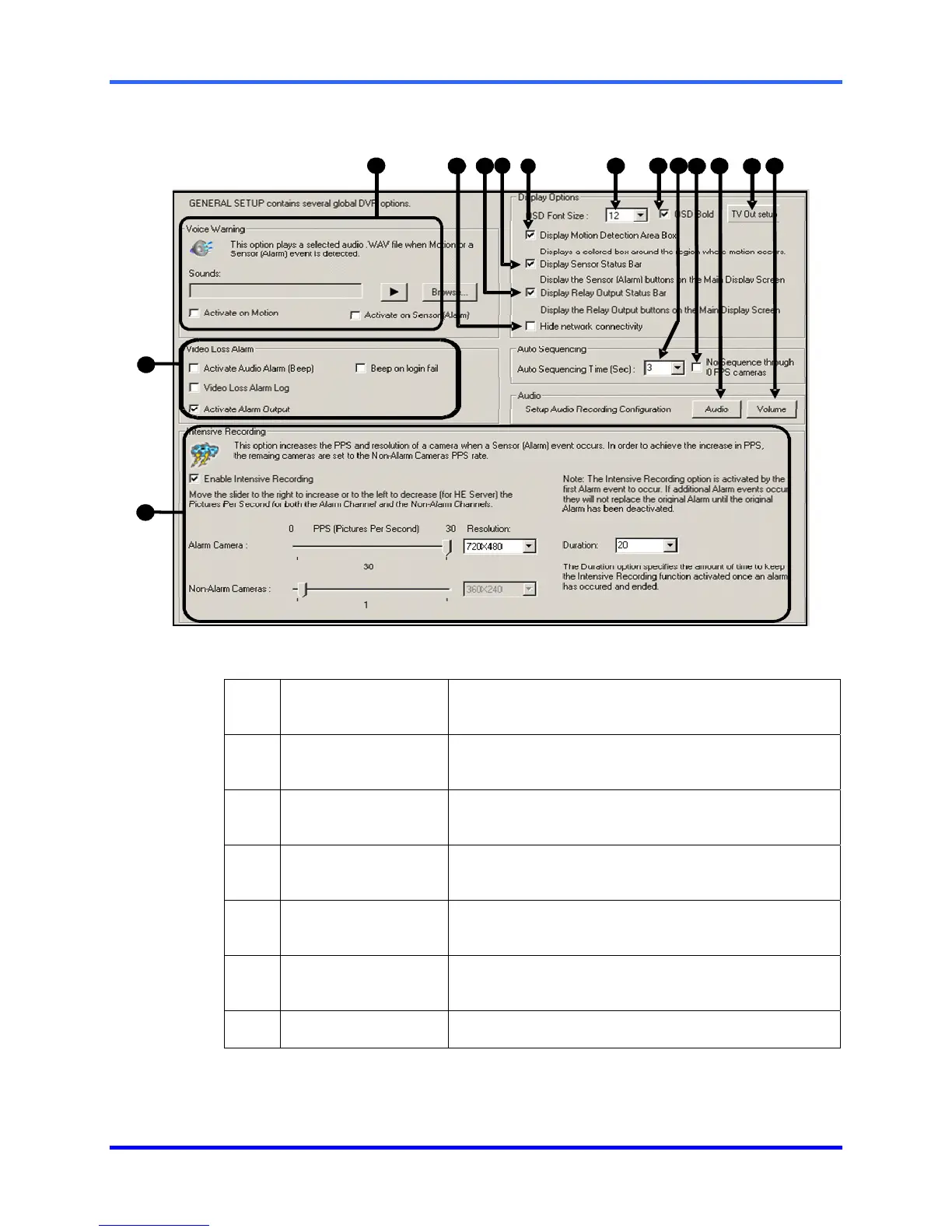
5.4 GENERAL SETUP
1 Voice Warning
Provides an audible warning (.wav sound clip) when
motion or sensors are activated.
2 Hide Network
Connectivity
Enables/Disables display of the Network Connectivity
on the Main Display Screen.
3 Display Relay
Output Status Bar
Enables/Disables display of the Relay Output Status
Bar on the Main Display Screen.
4 Display Sensor
Status Bar
Enables/Disables display of the Alarm Status Bar on
the Main Display Screen
5 Display Motion
Detection Area Box
Displays the motion area box on the Main Screen
whenever motion occurs.
6 OSD Font Size
Allows adjustment of the On-Screen Display font size
for cameras.
7 OSD Bold
Makes OSD Font bold.
6
7
1
0
1
4
1
3
8
9
1
1
1
2
1
2
3
5
4



 To Next Page
 Loading...