Performance Series IP Camera Software Configuration Guide
12
Using the Live View Interface
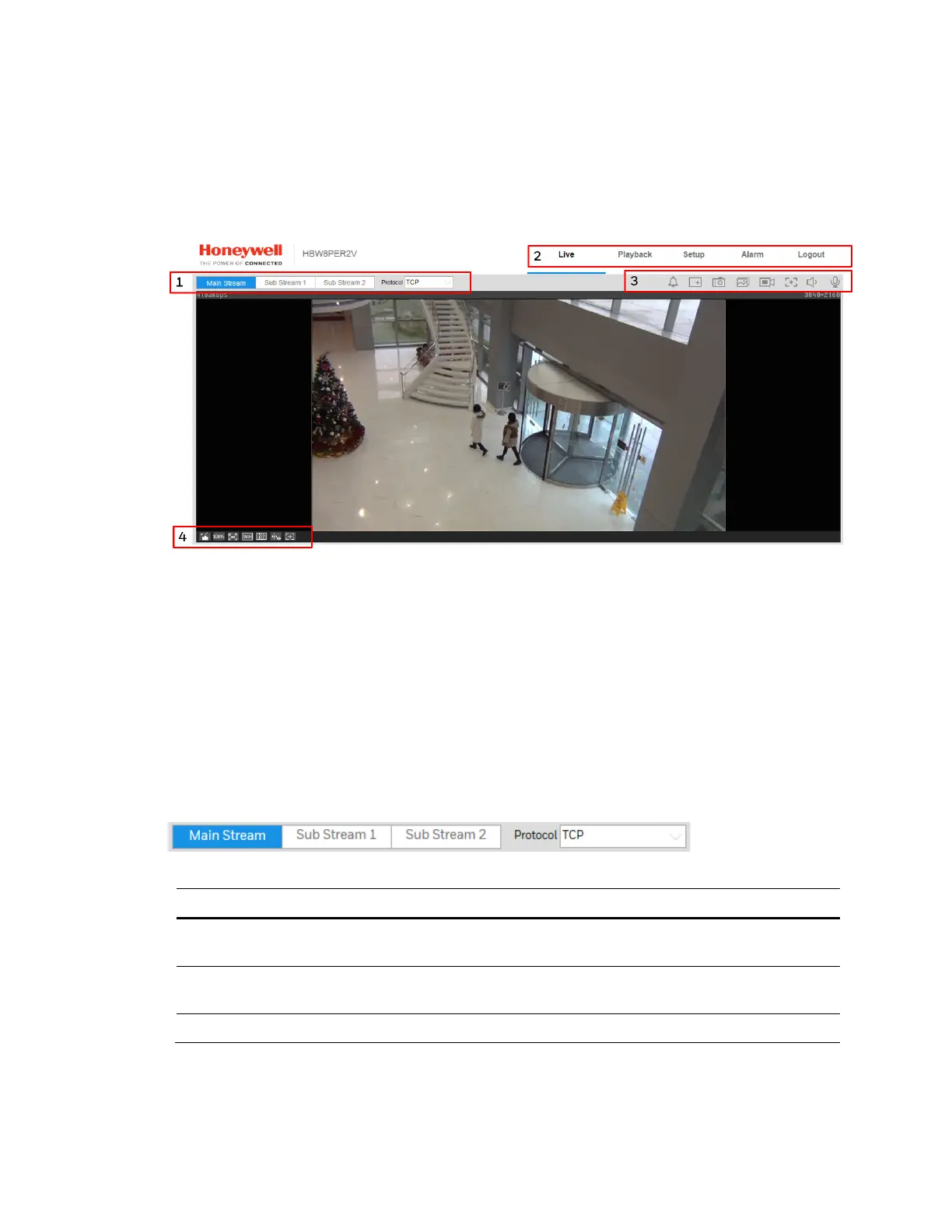
The Live View window has four areas with controls and options for monitoring live video.
Figure 3-4 Live View Interface
1. Video encoder settings area (see Video Encoder Settings, page 12)
2. System menus (see System Menus, page 13)
3. Live View controls toolbar (see Live View Controls, page 13)
4. Live View interface settings toolbar (see Live View Window Configuration, page 14)
Video Encoder Settings
In the video encoder settings area of the Live View interface, you can choose a stream and set
the stream protocol.
Figure 3-5 Video Encoder Settings
T
able 3-1 Video Encoder Settings
Setting Description
Main Stream
Delivers high definition video for real-time monitoring,
recording, and storage. Uses the most bandwidth.
Sub Stream 1
Delivers low/standard definition video, typically for remote
monitoring in lower network bandwidth environments.
Sub Stream 2 Delivers low, standard, or high definition video.



 To Next Page
 Loading...





