Playing Back Video
17
Overview of the Playback Interface
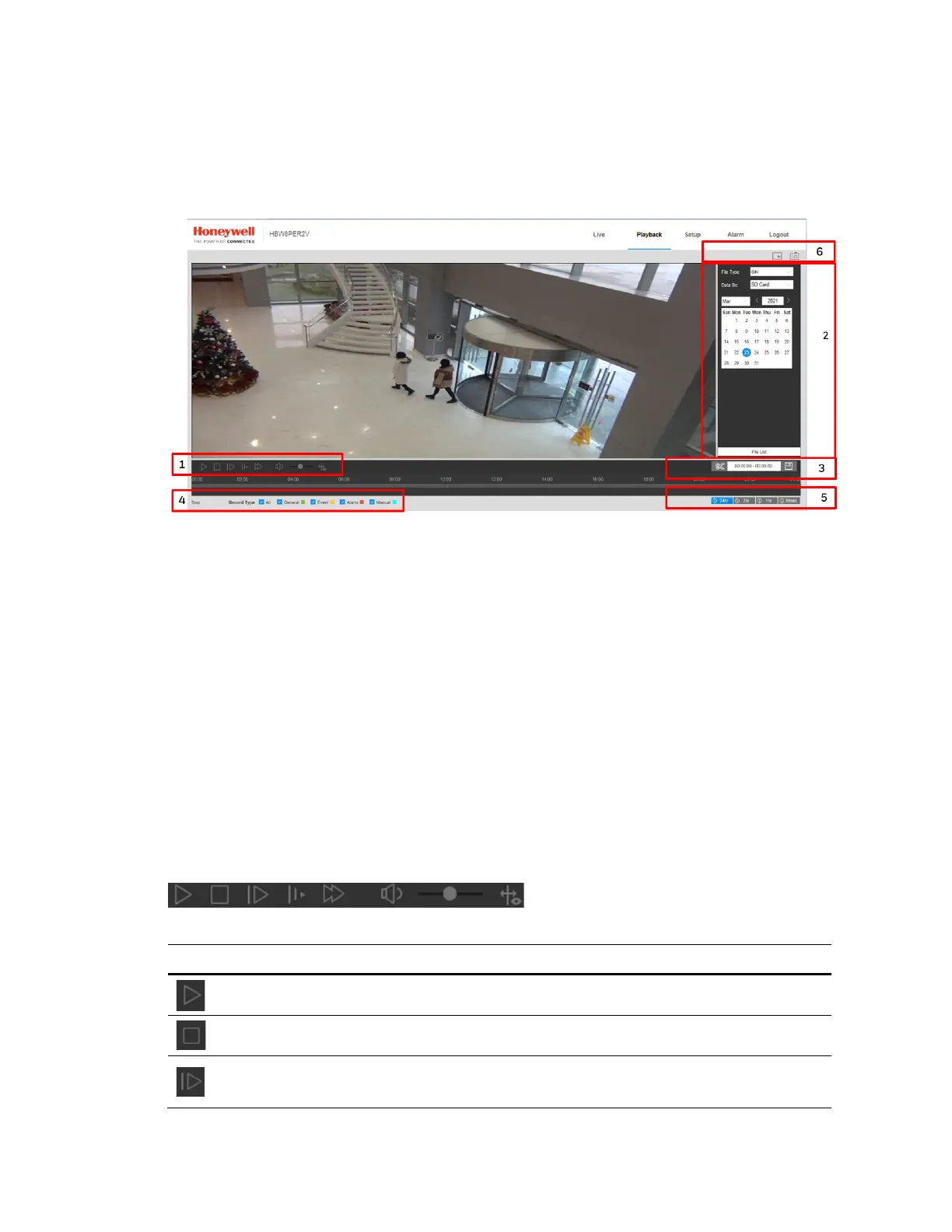
The Playback interface has six areas with controls and options for playback (see Figure 4-1).
Figure 4-1 Playback Interface
1 Playback controls (see Playback Controls on page 17)
2 Calendar area (see Playing a Recorded File from the Calendar on page 18)
3 Clip selection (see Creating a Video Clip on page 20)
4 Recording type (see Searching for a File by Recording Type on page 19)
5 Timeline configuration (see Timeline Configuration on page 20)
6 Playback Assistant (see Using the Playback Assistant on page 20)
Playing Back Recorded Video
Playback Controls
Figure 4-2 Playback Controls
Table 4-1 Playback Controls
Control Description
Click to play video.
Click to stop video playback.
Click to go to the next frame.
Note Video playback must be paused before you can use this function.



 To Next Page
 Loading...





