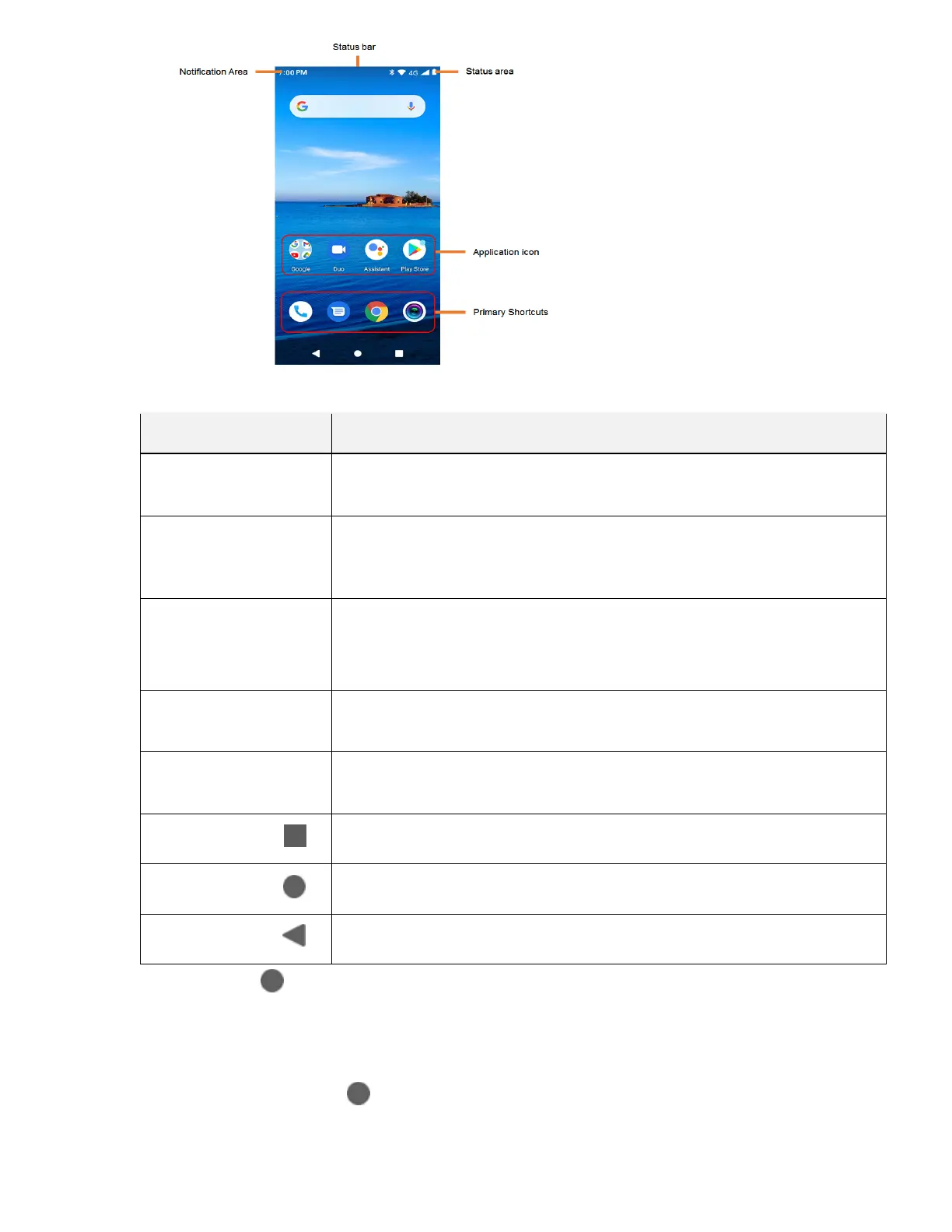
Item Description
Status bar
The status bar displays icons to notify you of your phone’s status (on the right
side) and notifications (on the left side).
Notification area
The notification area of the status bar (on the left) displays notifications for
incoming messages, missed calls, application updates, and more. Pull down
the status bar to display the notification panel.
Status area
The status area of the status bar (on the right) displays phone and service
status information such as signal strength, battery status, Wi-Fi and data
connectivity, and ringer status.
Application icons
Application icons are shortcuts to favorite applications. You can add and
remove these shortcuts as you wish.
Primary shortcuts
Primary shortcuts are application shortcuts that appear in the same location
on all of your phone’s home screens. These are customizable .
Recent Apps key
Tap to display a list of recently used applications.
Home key
Tap to display the main home screen.
Back key
Tap to return to the previous screen.
Tip: Tap Home to return to the main home screen from any other screen.
Extended Home Screens
In addition to the main home screen, your phone features extended home screens to provide more
space
for adding icons. Tap Home
move
to display the main home screen and then slide the screen left to
from the main screen to an extended screen.



 To Next Page