Introduction
About the User Guide
Thank you for purchasing your new Hot Pepper Serrano. The following topics explain how best to use this
guide to get the most out of your phone.
Descriptions in the User Guide
Note that most descriptions in this guide are based on your phone's setup at the time of purchase. Unless
otherwise noted, instructions begin from the phone's home screen, which is displayed by pressing .
Some operation descriptions may be simplified .
Set Up Your Phone
The following topics give you all the information you need to set up your phone and wireless service
the first time.
Parts and Functions
These topics illustrate your phone’s primary parts and key functions.
Note: Your phone's screens and apps layouts are subject to change. This user guide uses
sample images only.
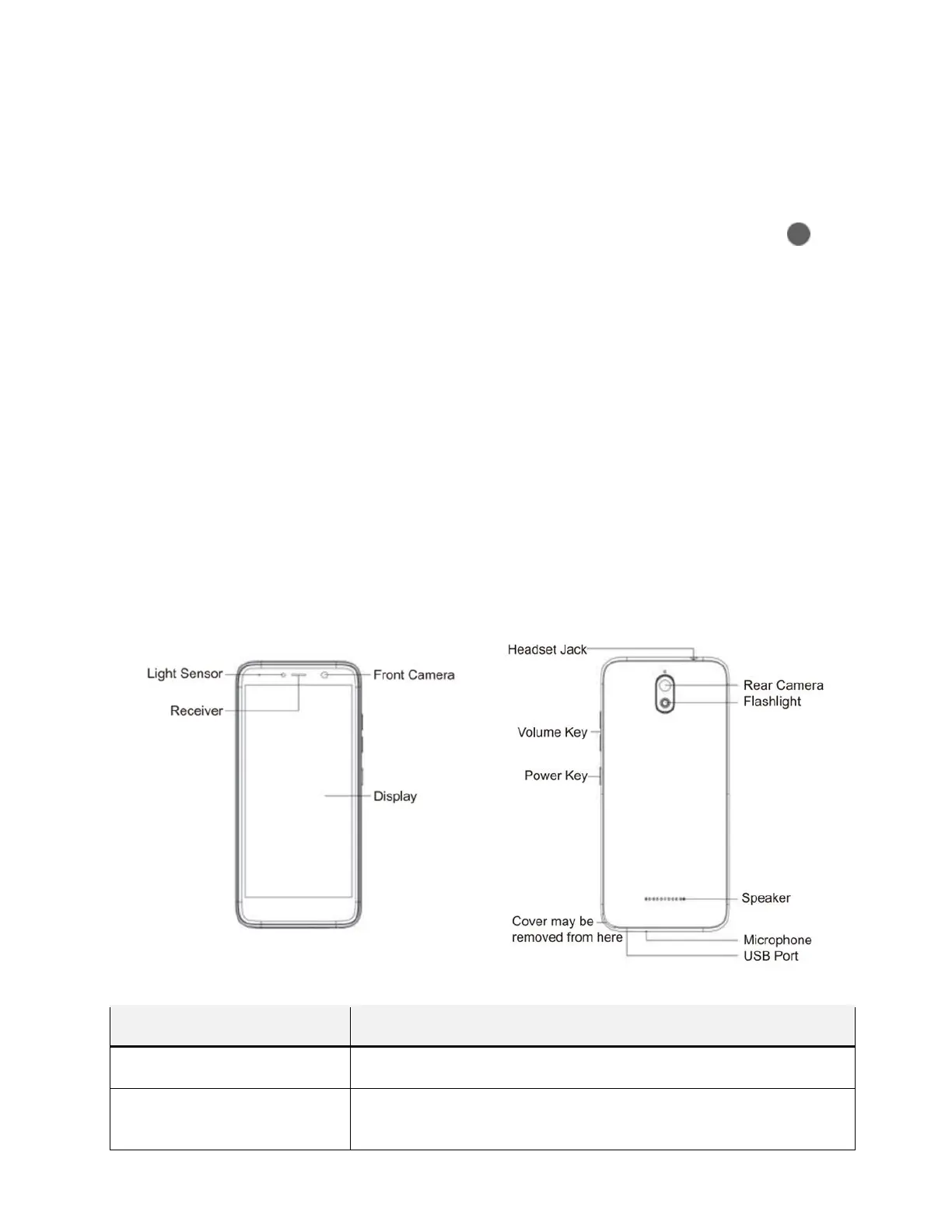
Phone Layout
The following illustration outlines your phone’s primary external features and keys.
Part Description
Receiver Lets you hear the caller and automated prompts.
Front camera
Takes pictures and records videos while facing the screen, and allows
you to video conference.



 To Next Page