13
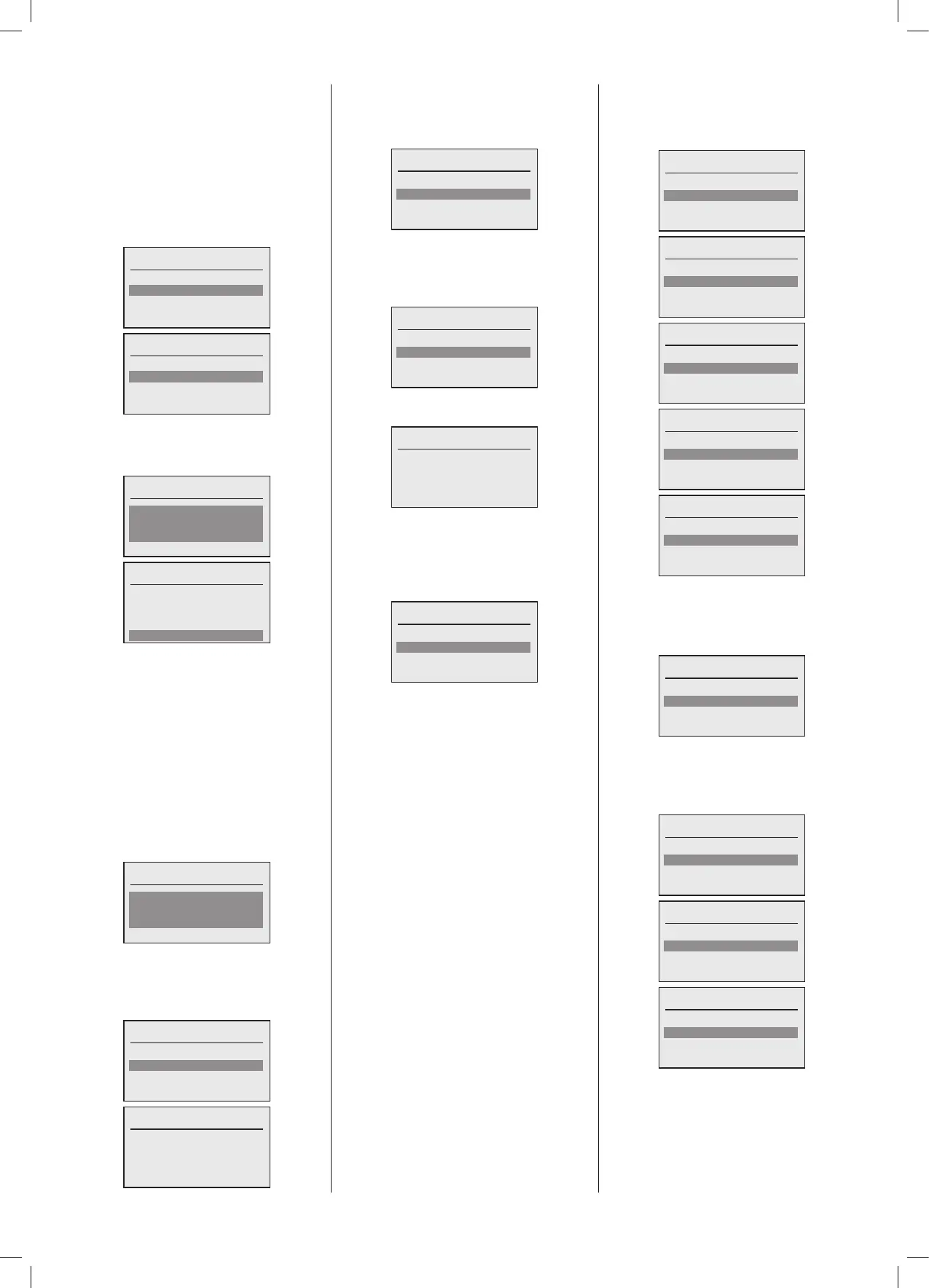
3.5.12 Boiler Pump Operating Mode
The boiler pump can be controlled in one
fortwoways.
Capacity control means that the pump speed
followstheburnercapacityproportionallybetween
minimum capacity/minimum pump speed and
maximumcapacity/maximumpumpspeed.
Temp. Diff. Control means that the pump
speediscontrolledtomaintainaxedboiler
owtoreturntemperaturedifferential.
Operating mode
Capacity control
Temp. Diff. Control
Operating mode
Capacity control
Temp. Diff. Control
3.5.13 Boiler Pump Overrun time
The boiler pump overrun time can be
adjustedifrequired.
Overrun
2minutes
Done
Overrun
2minutes
Done
3.5.14 Menu – Boiler – Flue offset
The ue offset parameter allows adjustment
of the boiler specific cascade flue setting.
Theueoffsetisanincreaseintheminimum
burnercapacitytoensurethatthecascadeue
pressure or an unpowered ue damper can
beovercomesafelyandavoidanyriskofthe
burnergoingoutattheminimumboilercapacity.
Whenamultilineuesystemisselectedduring
congurationthisparameterisenabled,ithasa
predeterminedminimumalreadyappliedwhich
isrequiredfortheoptionaluekitthatcanbe
suppliedfortheboiler.
Flue offset
12%
Done
3.5.15 Menu – Boiler – Hours run
Thehoursrunscreenshowthenumberofsuccessful
burnerstartsandthenumberoffullburneroperating
hoursforeachboilerinthecascade:
Hours run
Boiler 1
Boiler 2
Hours run
Ignitions: 12
Burner: 2 hours
3.5.16 Menu – Boiler – Faults
Thefaulthistory,summaryanddetail,ofeach
boiler in the cascadecan be interrogated,
thiscanalsobereset:
Faults
Summary
Show detail
Reset
3.5.17 Menu – Boiler – Faults – Summary
On selecting which boiler you want to
interrogate, the system will read back the
fault summary and display:
Boiler 1
Fault 09 : Count 14
Fault 10 : Count 11
Fault 51 : Count 5
Thelistcanbescrolledandanyfaultselected
willthenshowthespecicfaultdescription:
Fault 09
Outside thermistor defect
(open/short)
3.5.18 Menu – Boiler – Faults – Show
detail
On selecting which boiler you want to
interrogate,thesystemwillthenreadback
thefaultdetailanddisplay:
Boiler 1
09/09/2019, 09:13 Fault 07
09/09/2019, 09:13 Fault 01
04/09/2019, 09:13 Fault 23
Thelistcan be scrolled to seethelast10
itemsinthefaulthistorywithdateandtime.
3.5.19 Menu – Boiler – Faults – Reset
By selecting the boiler which you want to
resetthefaultinformation,youthenthefault
summaryanddetailsforthatspecicboiler.It
maytakesometimeforthefaultinformation
toclearasthisprocessisaggedforaction
atthenextavailabletimeslot.
3.6 Menu – Plant
Theplant menu hasthefollowingoptions,
thereareotheroptionsbutthesearehidden
fromtheUser/Installer:
Plant
Status
Operating mode
Settings
Plant
Status
Operating mode
Settings
Time clock
Plant
Operating mode
Settings
Time clock
Holiday programme
Plant
Settings
Time clock
Holiday programme
Plant
Time clock
Holiday programme
3.6.1 Menu – Plant - Status
The status sub menus give you access to
seethecurrentrealtimevaluesoftheplant.
Thestatusmenuhasthefollowingoptions:
Status
Real time values
3.6.2 Menu – Plant – Status – Real
time values
TheRealtimevaluesmenuhasthefollowing
options:
Real time values
Demand inputs
Sensors
Outputs
Real time values
Inputs
Sensors
Outputs
Real time values
Sensors
Outputs





 To Next Page