34
5.6 DHW circuit conguration
IfDomestingHotWatercircuitswerelocated
andallocatedduringinitialsetupthenthey
willnowappearheretobecongured.There
isamaximumnumberoflocalDomesticHot
Water circuits for each boiler,in this case
onecircuitidentiedbyboilernumberand
HeatingCircuitnumber.E.g.Boiler1isboiler
1DomesticHotWatercircuit.
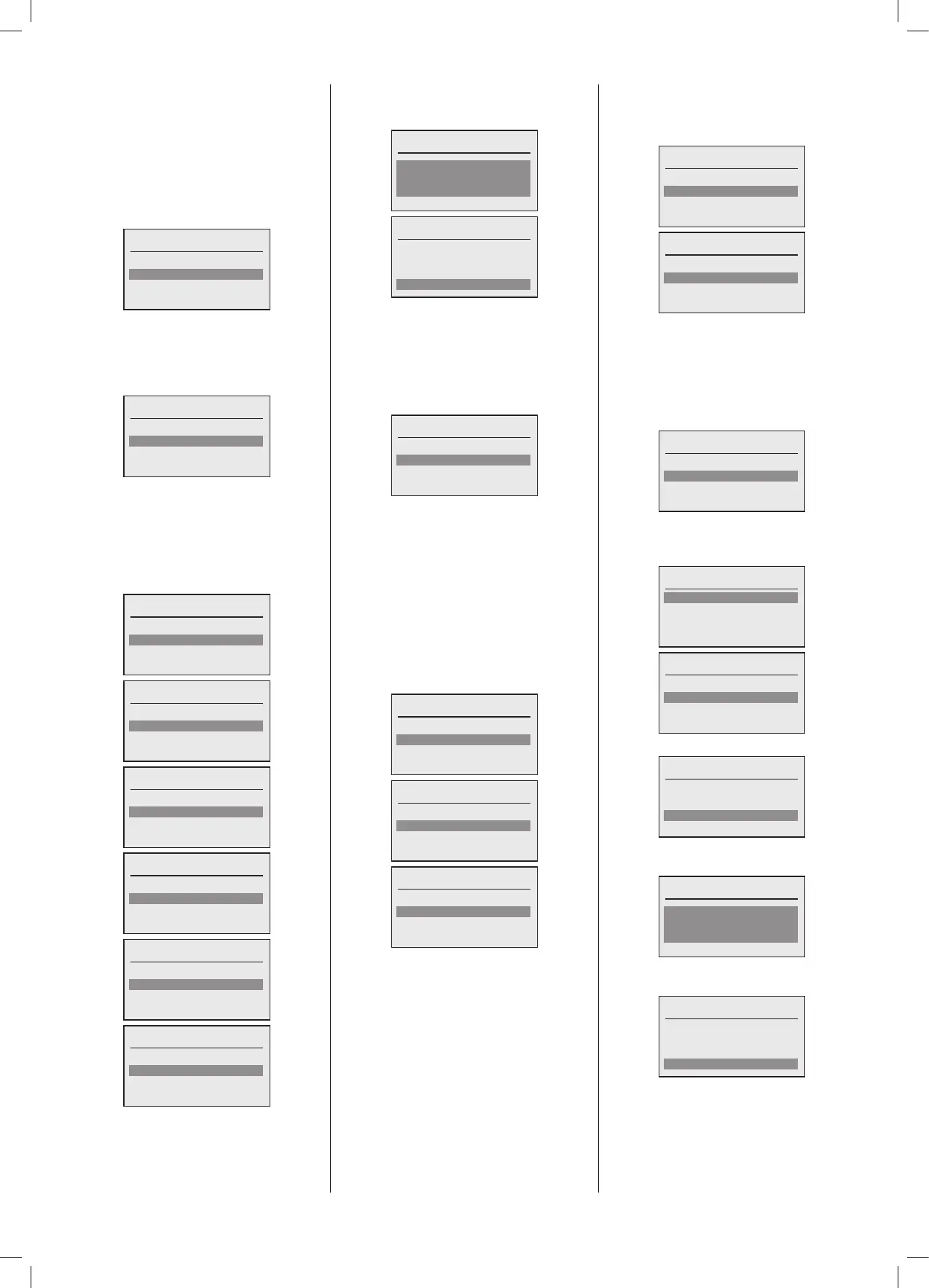
Select DHW to congure
DHW1 Boiler 1
Done
ADomestic Hot Water circuit can be
conguredasaLocalDomesticHotWater
circuit served by that boiler only.See
associated Hydraulics. If this is the case
select‘Yes’inthemenu.
Local DHW circuit
No
Yes
If the selected boiler has its own unique
primaryDomesticHotWaterchargepump
thisiswhereitiscongured.Onceagainone
oftheprogrammableoutputsfromtheboiler
canbeusedtocontrolthispumpfunction.
Ifnoindividualboilerpumpispresentthen
select‘None’.
Select loc’n of DHW pump
None
PWM/0-10V ()
MFR1 ()
Select loc’n of DHW pump
None
PWM/0-10V ()
MFR1 ()
MFR2 ()
Select loc’n of DHW pump
PWM/0-10V ()
MFR1 ()
MFR2 ()
MFR3 ()
Select loc’n of DHW pump
MFR1 ()
MFR2 ()
MFR3 ()
MFR4 ()
Select loc’n of DHW pump
MFR2 ()
MFR3 ()
MFR4 ()
Select loc’n of DHW pump
MFR3 ()
MFR4 ()
Oncecompletedthenextstepistosetthe
MaximumtanktemperaturefortheDomestic
HotWatercircuit,followedby‘Done’.
Max tank temp
60ºC
Done
Max tank temp
60ºC
Done
The next step is to confirm if a Tank
Temperature sensor is connected for the
Domestic Hot Water circuit. This gives
greatercontroltotheTankTemperatureand
allowsmultipletemperaturestoragevalues.
Select‘Yes’ifaTankTemperaturesensoris
connectedtotheboiler.
Tank sensor?
No
Yes
Thenextstepistodeterminethefunctionof
theSL2inputwhichisamandatoryinputfor
anUnventedDomesticHotWatertank.Ifthe
TankisUnventedyouMUSTselectDomestic
Hot Water Enable or Domestic Hot Water
OverrideandwiretheSL2 230V switched
live input accordingly.The SL2 input can
alsoprovideanoverridefunctionwhichwill
generatearechargecycleforthetankwhen
operatedoutsideoftheDomesticHotWater
timeclocksettings.
Selecttheoptionasrequired.
Congure SL2
None
DHW enable
DHW override
Congure SL2
None
DHW enable
DHW override
Congure SL2
DHW enable
DHW override
‘IfanOpenThermcontrolhasbeencongured
onthisboiler,thenthismayalsocontrolthe
DomesticHotWatertimingandSetpoint.If
thisisnotusedselect‘None’.
Congure OpenTherm
None
Temperature demand
Congure OpenTherm
None
Temperature demand
The next step is to set theAntilegionella
operating parameters.The options allow
forsettingaxeddayandtime,oraxed
intervalbetweencycles.Bothhavetheability
to set the Tank temperature that the tank
mustachieveduringthecycle.Ifthefunction
isnotrequired,‘None’maybeselected.
Antilegionella?
None
Weekday
Interval
Onselectingweekdaythefollowingscreens
with options are shown, the weekday and
Start time can be set:
Antilegionella timing
Weekday: Saturday
Start time: 01:00
Done
Antilegionella
Weekday: Saturday
Start time: 01:00
Done
Oncesetselect‘Done’tocontinue:
Antilegionella
Weekday: Saturday
Start time: 01:00
Done
Nextyou willbepromptedto settheTank
temperaturefortheAntilegionellacycle:
Antilegionella temperature
65ºC
Done
Oncetherequiredtemperaturehasbeen
setselect‘Done’toconrmandcontinue:
Antilegionella temperature
65ºC
Done





 To Next Page