35
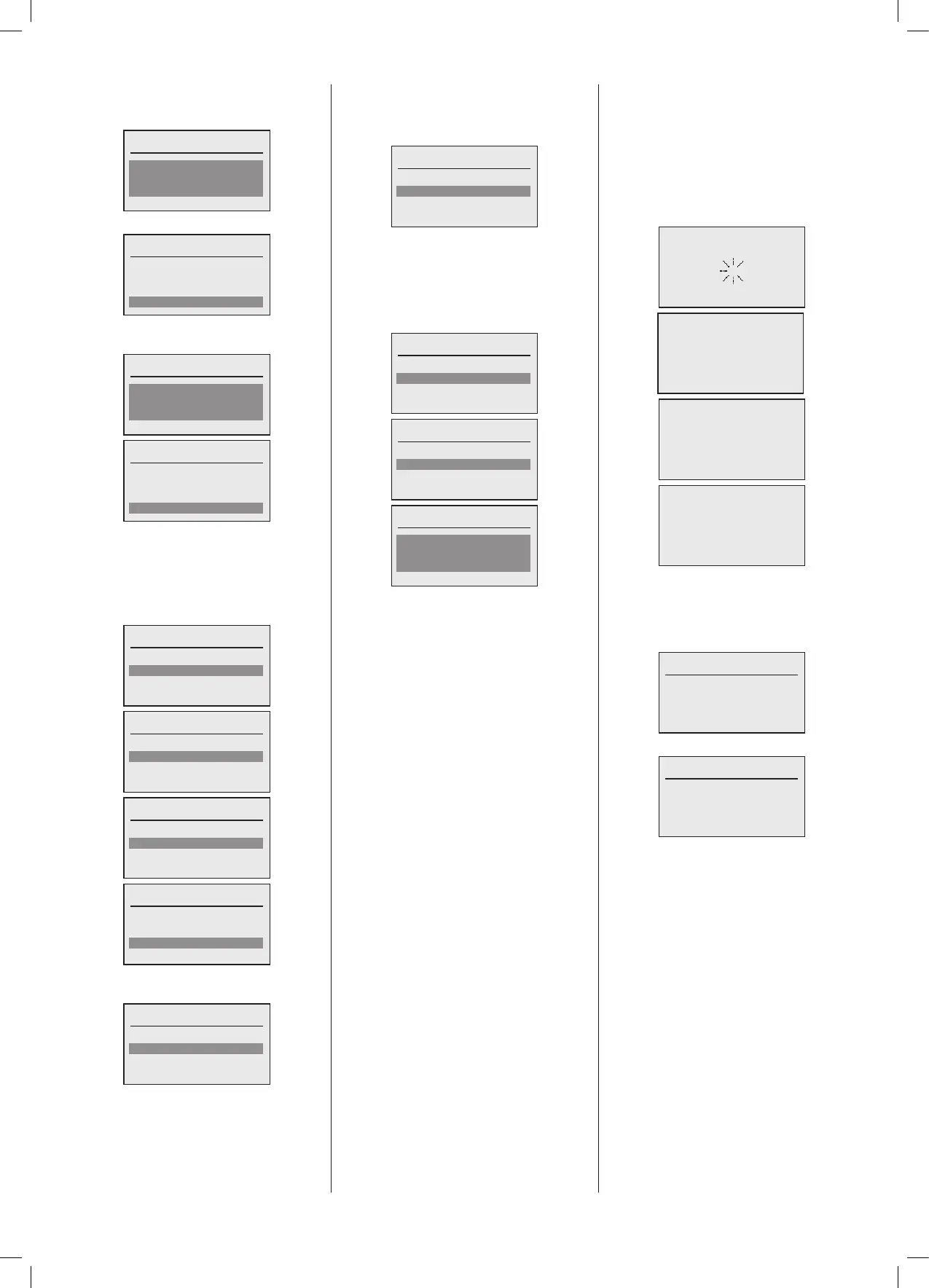
If Interval is selected then the following
screen will be shown and the interval
betweenAntilegionellacyclescanbeset:
Interval
7day(s)
Done
Oncetheintervalissetselect‘Done’.
Interval
7day(s)
Done
Once again the Antilegionella Tank
temperaturecanbesetfollowedby‘Done’.
Antilegionella temperature
65ºC
Done
Antilegionella temperature
65ºC
Done
The next step is to set the initial mode of
operationforthisDomesticHotWatercircuit.
Byselectingthehighlightedeldthechoices
are shown in the following screens. Once
selectedthenselect‘Done’.
Operating mode
Standby
Done
Operating mode
Time clock single day
Done
Operating mode
Time clock multiple days
Done
Operating mode
Standby
Done
Once completed the following screen will
be displayed:
Select DHW to congure
DHW1 Boiler 1
Done
Note:The Domestic Hot Watercircuit that
hasjustbeenconguredwillnowhavea‘’
next to its designation.
The next allocated Domestic Hot Water
circuit to congure can now be selected.
Theprocessaboveisthenrepeatedforall
DomesticHotWatercircuitsinthecascade.
The next allocated Domestic Hot Water
circuit to congure can now be selected.
Theprocessaboveisthenrepeatedforall
DomesticHotWatercircuitsinthecascade.
Select DHW to congure
DHW1 Boiler 1
Done
AfterallDomesticHotWaterCircuitshave
beencongured,select‘Done’.
IfaslaveboilerispresenttheMasterdata
canbestoredonthisSystemmanagerfor
safekeeping.
Store backup?
No
Yes
Store backup?
No
Yes
Store backup?
2
Done
The system conguration has now been
completed.ThesettingsrelatingtothePlant,
Heating circuits and Domestic Hot Water
circuitscanbechangedinthecorresponding
settingsmenuwithineachofthesectionsof
the menus system. Referto the operating
guidesectionofthismanual.
Thesystemwillnowrebootandthefollowing
screenswillbedisplayed:
443.207.001
< BRAND LOGO >
Loading system table
Then the following status screen will be
shown,thisscreenshowstheboilerstatus
foraMasterboilerinacascade,asecond
status screen exists and can be accessed
byrotatingtheknowanticlockwise:
< Boiler Name & Model No. >
Operation: Standby
Boiler Setp.: 0%
Boiler cap.: 0%
Flow temp.: 40.2ºC
ThisthenshowsthatstatusofthePlant.
< Boiler Name & Model No. >
Operation: Standby
Plant Setp.: 0%
Plant cap.: 0%
Header: 40.2ºC
No configuration is specifically required
for the Cascade Manager. Refer to the
OperatingGuideforthestatusandsettings
withinthisfunction.





 To Next Page