26
5.2 Cascade Conguration
Once the VariCAN adapters have been
installed and connected into each boiler
in the cascade then the cascade can be
congured.
Powerup each boiler inthecascadethen
returntotheCascadeMasterboilertostart
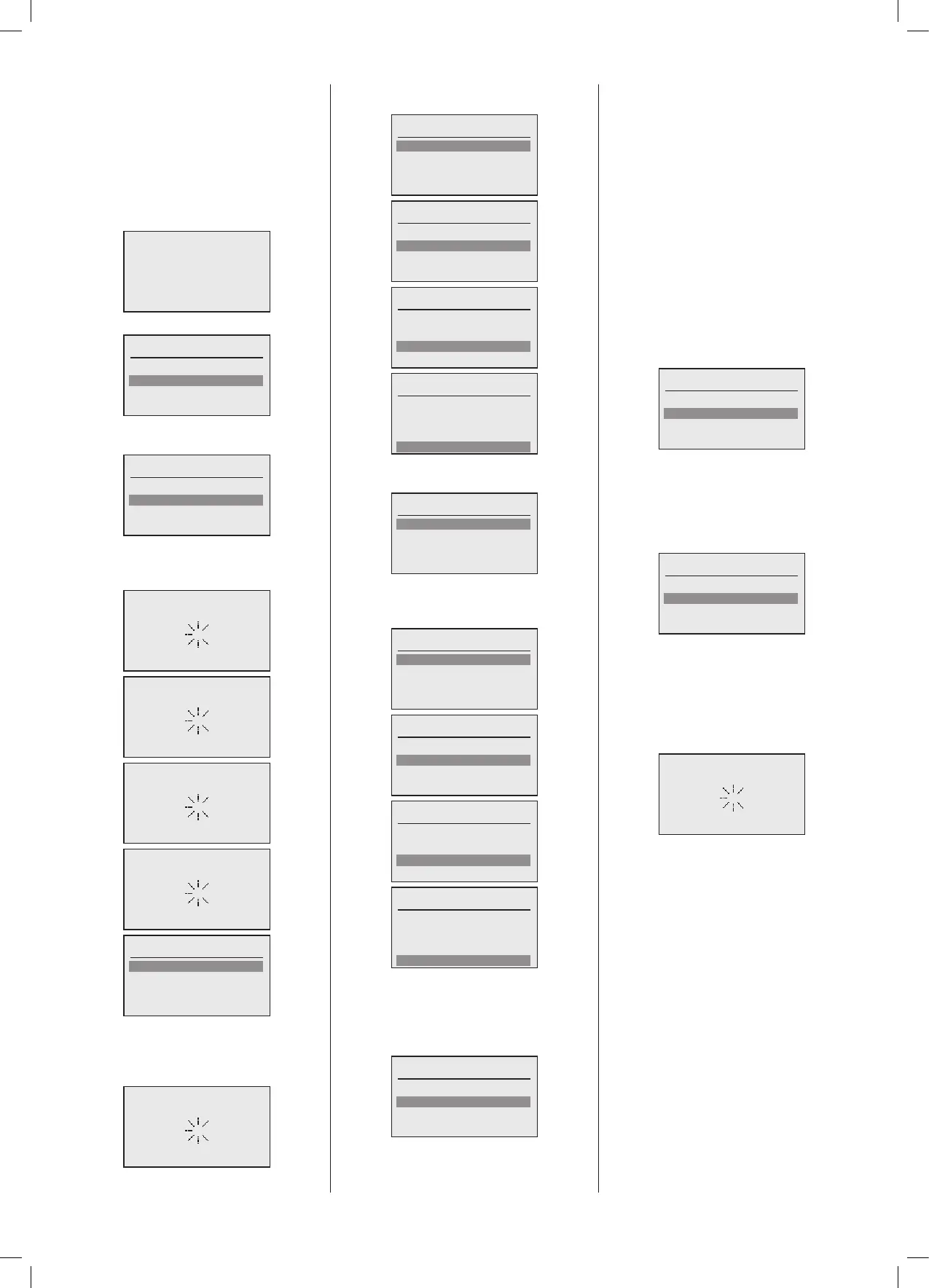
theconguration.Thefollowingscreenswill
bedisplayedoneachboileratpowerup:
443.207.001
Initialconguration
Language
English
Francais
Nederlands
Thedefaultlanguagewillbe selected and
highlighted.
Controller
Slave
Master
OntheMasterboilerinthecascade,select
“Master”,thefollowingscreenswillappear
intheordershownbelow:
Initialize communication
Congure as master
Scan devices
Pairing devices
Date
Year: 2018
Month: 1
Day: 1
Done
Once the master boiler System Manager
has been selected and the Scan Devices
completed,allSlaveboilerswilldisplaythe
followingscreen.
Waiting for master
On the Master boiler, set the date elds,
followedby“Done”.
Date
Year: 2019
Month: 1
Day: 1
Done
Date
Year: 2019
Month: 1
Day: 1
Done
Date
Year: 2019
Month: 9
Day: 1
Done
Date
Year: 2019
Month: 9
Day: 6
Done
Oncethedateissetand“Done”isselected
thefollowingscreenisdisplayed:
Time
Hour: 0
Minute: 0
Auto su/wi time:
Done
OntheMasterboilernowsetthetimeand
settings for Summer/Winter time change,
followedby“Done”:
Time
Hour: 0
Minute: 0
Auto su/wi time:
Done
Time
Hour: 15
Minute: 0
Auto su/wi time:
Done
Time
Hour: 15
Minute: 55
Auto su/wi time:
Done
Time
Hour: 15
Minute: 55
Auto su/wi time:
Done
Once the Master boiler has the date and
time set then all slave boilers will adopt
thesesettings.
Once‘Done’isselected,thefollowingscreen
willappear:
Set boiler number
Boiler 01 Master
Boiler 02
Done
This is an example where there are two
boilersintheCascade,eachSlaveboilerwill
belistedfromBoiler02onwards,Boiler01is
alwaystheMaster,andthecongurationof
SlaveboilerswillbedifferenttotheMaster
butwillfollowtheidenticalprocedure.
The Boilers numbers in the case of only 2
boilers can appear in any order,this is in
relationtohowtheyarediscoveredduringthe
BusScanningprocess,andtheSlaveboileris
alsopre-allocatedasboiler2.WhenaBoiler
ishighlightedinthemenu,thecorresponding
TTL-i5VariCANadapterLEDwillilluminate,in
thecaseofaSlaveboilertheSystemManager
Display will also change to inverse video to
allowidentication,selectionandlabelling.For
anySlaveboilerswherethereismorethan2
boilersinthecascade,thedisplaywillshow:
Set boiler number
Boiler 01 Master
Boiler ##
Boiler ##
IfanySlaveboilersarenotlisted,checkthat
theyareconnectedcorrectlytothebusand
thattheyhavetheirpowerswitchedon.
Each Slave boiler can be selected and a
numberallocated,usuallycorrespondingto
theirphysicallocationinthecascade:
Set boiler number
Boiler 01 Master
Boiler 03
Boiler 02
Inthecaseabove,thesecondSlaveboiler
highlightedwasidentiedasBoiler03inthe
cascade,andthethirdSlaveasBoiler02,
adjacenttotheMasterboiler.
Once you are happy with the selection of
theSlaveboilernumbers,select‘Done’.The
followingscreenwillthenappear:
The Master boiler is now scanning the
installation to locate all of the connected
boilerHeatingCircuits.





 To Next Page