27
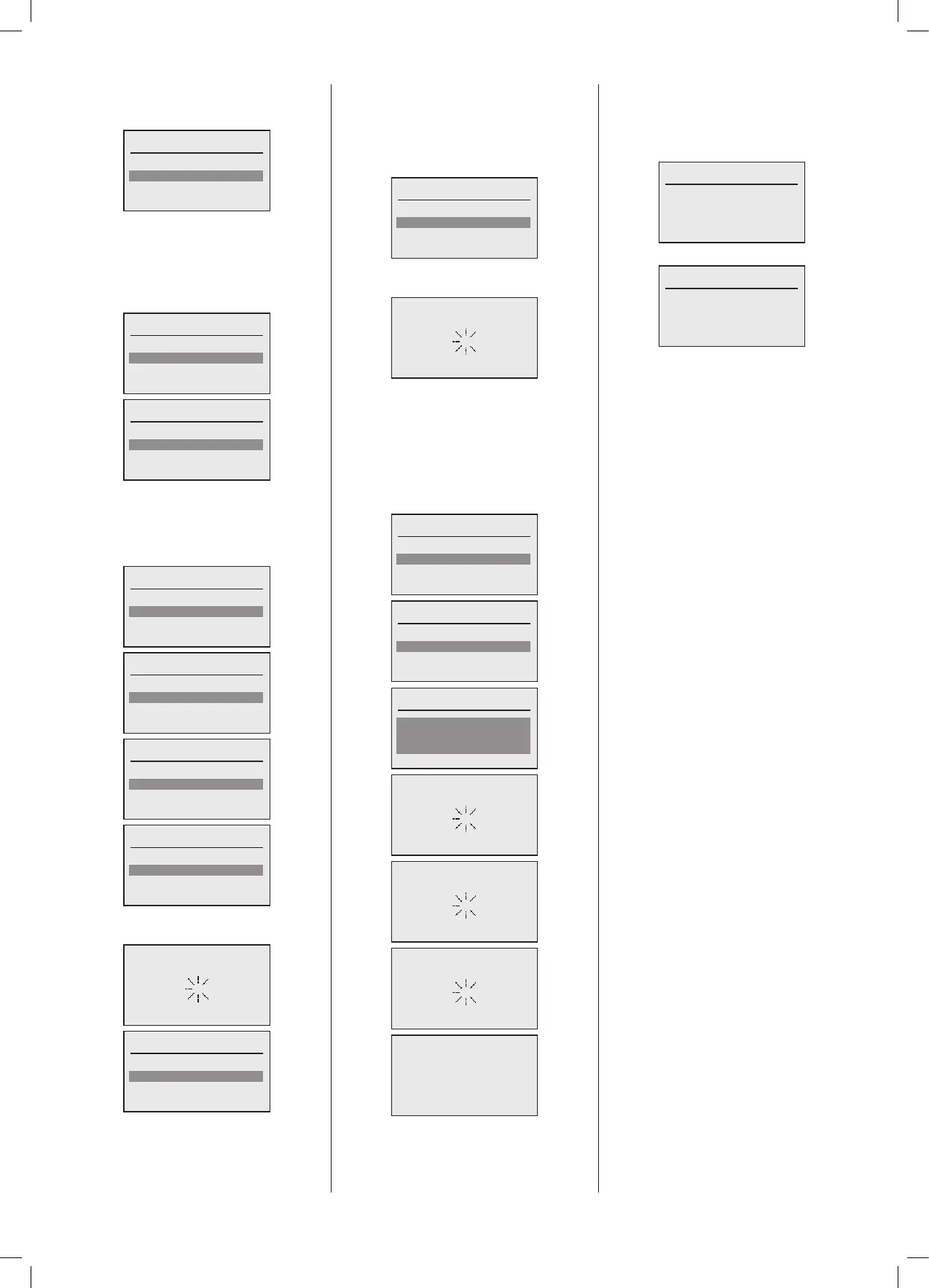
Upon completion the following screen will
bedisplayedshowingallavailableHeating
Circuits in relation to all boilers:
Set HC number
HC ## Boiler 1.1
HC ## Boiler 1.2
HC ## Boiler 2.1
In this example each boiler has 2 heating
circuits that may be selected for use. By
scrollingdownallboilerHeatingCircuitscan
beselectedandallocatedauniquenumber
inthesystem.Forexampleinatwoboiler
cascade:
Set HC number
HC ## Boiler 1.1
HC ## Boiler 1.2
HC ## Boiler 2.1
HC ## Boiler 2.2
Set HC number
HC ## Boiler 1.2
HC ## Boiler 2.1
HC ## Boiler 2.2
Done
Once you have selected and allocated a
numbertotheHeatingCircuitsthatyouwish
touseandcongure,forexampleasingle
HContheMaster boiler andTwoHCson
theSlaveboiler:
Set HC number
HC 01 Boiler 1.1
HC ## Boiler 1.2
HC ## Boiler 2.1
Set HC number
HC 01 Boiler 1.1
HC ## Boiler 1.2
HC ## Boiler 2.1
HC ## Boiler 2.2
Set HC number
HC ## Boiler 1.2
HC 02 Boiler 2.1
HC ## Boiler 2.2
Done
Set HC number
HC 02 Boiler 2.1
HC 03 Boiler 2.2
Done
Select‘Done’andthefollowingscreenswill
appear:
Set DHW number
DHW ## Boiler 1
DHW ## Boiler 2
Done
Note:TheDHWcircuitsharesresourceswith
thesecondHeatingCircuitoneachboiler,
thereforeisasecondHCisalreadyallocated
thenthiswillnotbeavailableforselection.
Once you have selected and allocated a
numbertotheDHWCircuitsthatyouwish
to use and congure, for example, in line
withtheaboveexample,asingleHConthe
Master boiler and Two HCs on the Slave
boiler with a single DHW circuit on the
Master boiler:
Set DHW number
DHW 01 Boiler 1
Done
Select‘Done’andthefollowingscreenwill
appear:
IftheSystemmanagerhasbeenreplaced
or a new master recommissioned then
the configuration backup file may be
recovered from the designated slave
providingthatabackupwasstoredduring
originalcongurationorupdates.
If No is selected below then proceed to
section5.3PlantConguration'
Load back up?
No
Yes
Load back up?
No
Yes
Load back up?
2
Done
Commissioning
Done
System will reboot
Then the following status screen will be
shown,thisscreenshowstheboilerstatus
foraMasterboilerinacascade,asecond
status screen exists and can be accessed
byrotatingtheknobanticlockwise:
< Boiler Name & Model No. >
Operation: Standby
Boiler Setp.: 0%
Boiler cap.: 0%
Flow temp.: 40.2ºC
ThisthenshowsthatstatusofthePlant.
< Boiler Name & Model No. >
Operation: Standby
Plant Setp.: 0%
Plant cap.: 0%
Header: 40.2ºC
No configuration is specifically required
for the Cascade Manager. Refer to the
OperatingGuideforthestatusandsettings
withinthisfunction.





 To Next Page