19
UK
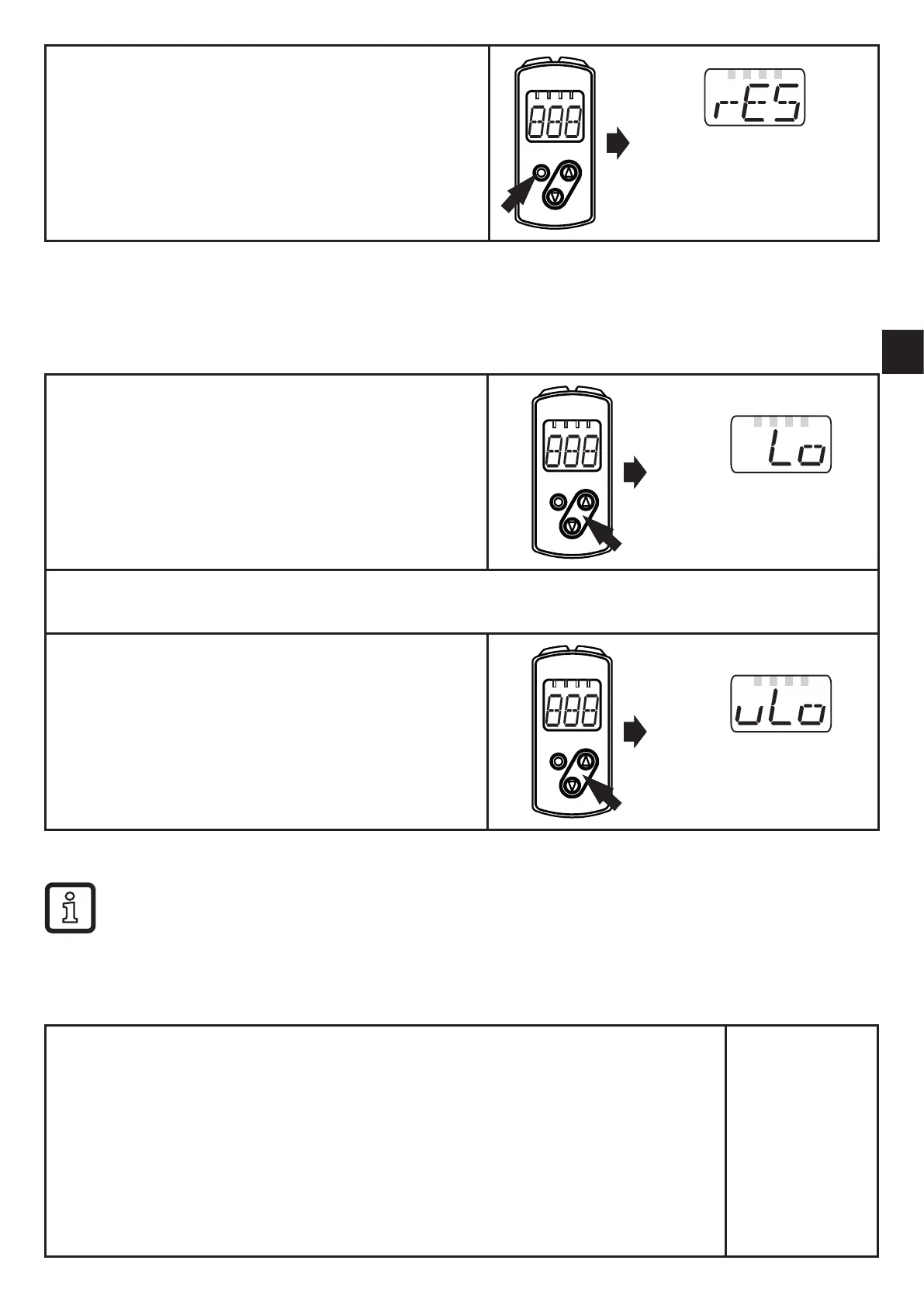
► Briefly press [Enter]�
> The first parameter of the submenu is
displayed (here: [rES])�
10.1.3 Electronic lock
The unit can be locked electronically to prevent unauthorised setting� On delivery
the unit is not locked�
Locking
► Make sure that the unit is in the normal
operating mode�
► Keep the "up" + "down" button pressed
(approx� 10 s) until [Lo] is displayed�
> The unit is locked�
[Lo] is displayed briefly if you try to change parameter values on the locked unit during
operation�
Unlocking
► Keep the "up" + "down" button pressed until
[uLo] is displayed�
> The unit is unlocked�
Timeout
If no button is pressed for 15 s during the setting procedure, the unit returns to the
Run mode with unchanged values�
10.2 Configuration of the basic settings
10.2.1 Configure OUT1 / OUT2
► Select [OU1] / [OU2] and set the switching functions�
Switching functions:
• [Hno] = hysteresis function / normally open
• [Hnc] =
hysteresis function / normally closed
• [Fno] = window function / normally open
• [Fnc] = window function / normally closed
• [OFF] = switching output is deactivated
► Confirm with [ENTER]�
0v1
0v2



 To Next Page