The StellarMate Plus Manual
226 / 341
· FPS: Displays the average FPS of the live video being streamed.
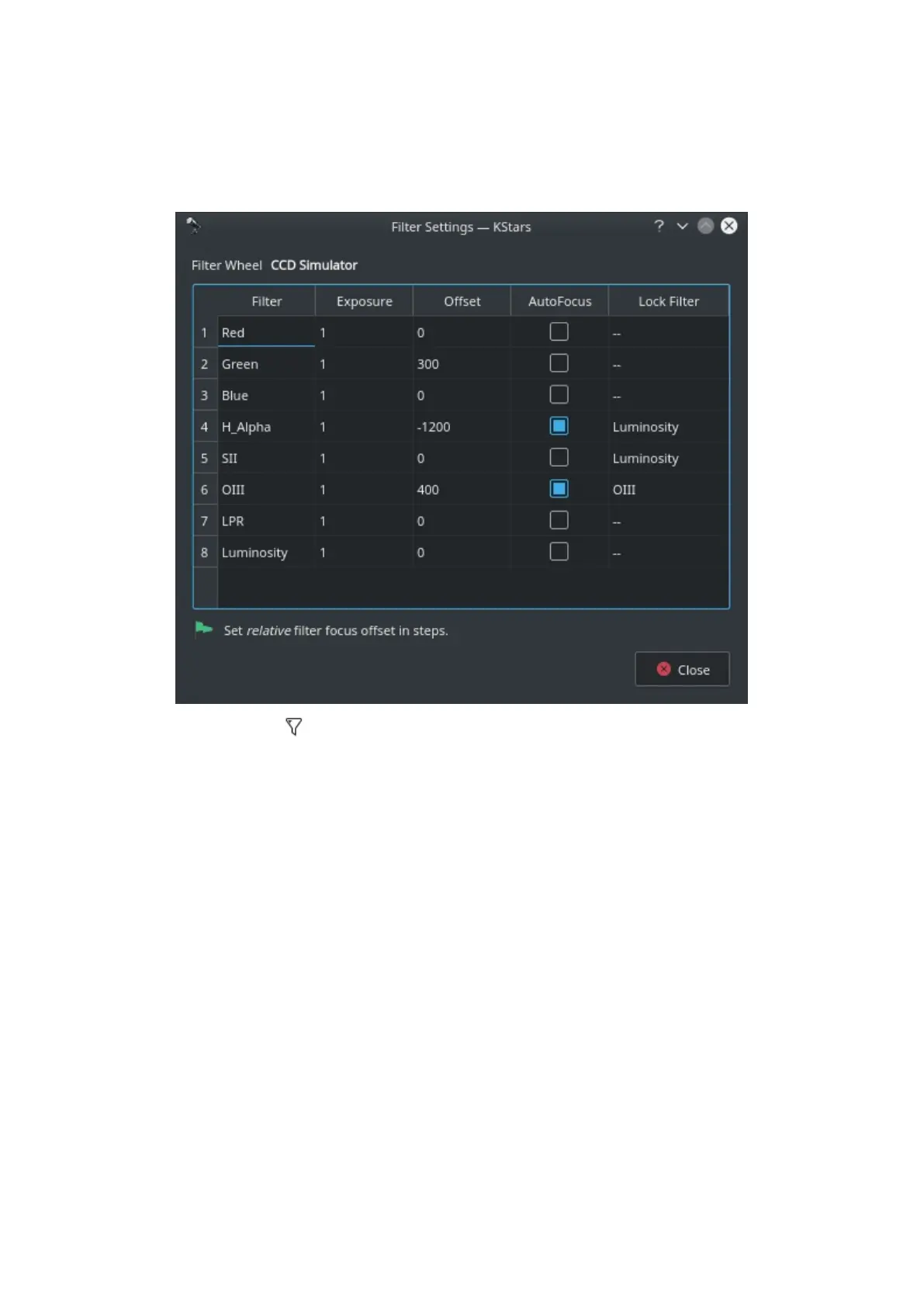
Filter Settings
Click the filter icon next to the filter wheel selection box to open the filter
settings dialog. If you are using filters that are not parafocal with each other and
require a specific amount of focus offsets in order to get them into proper then
set all the relative focus offsets in the dialog.
Configure settings for each filter individually:
1. Filter: Filter Name
2. Exposure: Set exposure time used when performing focus under this
filter. By default, it is set to 1 second.
3. Offset: Set relative offsets. Ekos will command a focus offset change if
there is a difference between the current and target filter offsets. For
example, given the values in the example image, if the current filter is
set to Red and next filter is Green, then Ekos shall command the focuser
to Focus In by +300 ticks. Relative positive focus offsets denote Focus
Out while negative values denote Focus In.
4. Auto Focus: Check this option to initial AutoFocus process whenever the
filter is changed to this filter.
5. Lock Filter: Set which filter should be set and locked when performing



 To Next Page