24/53 IMET - M550 ALL1-EN
5.6. Serial data transmission
The radio remote control is preset for optional serial data transmission and acquisition.
5.6.1. User serial (RS232)
This connection is used with transceiving applications to receive data from an external device and to
send data to the transmitter’s display.
The following messages can be sent:
• Messages stored in the application’s memory
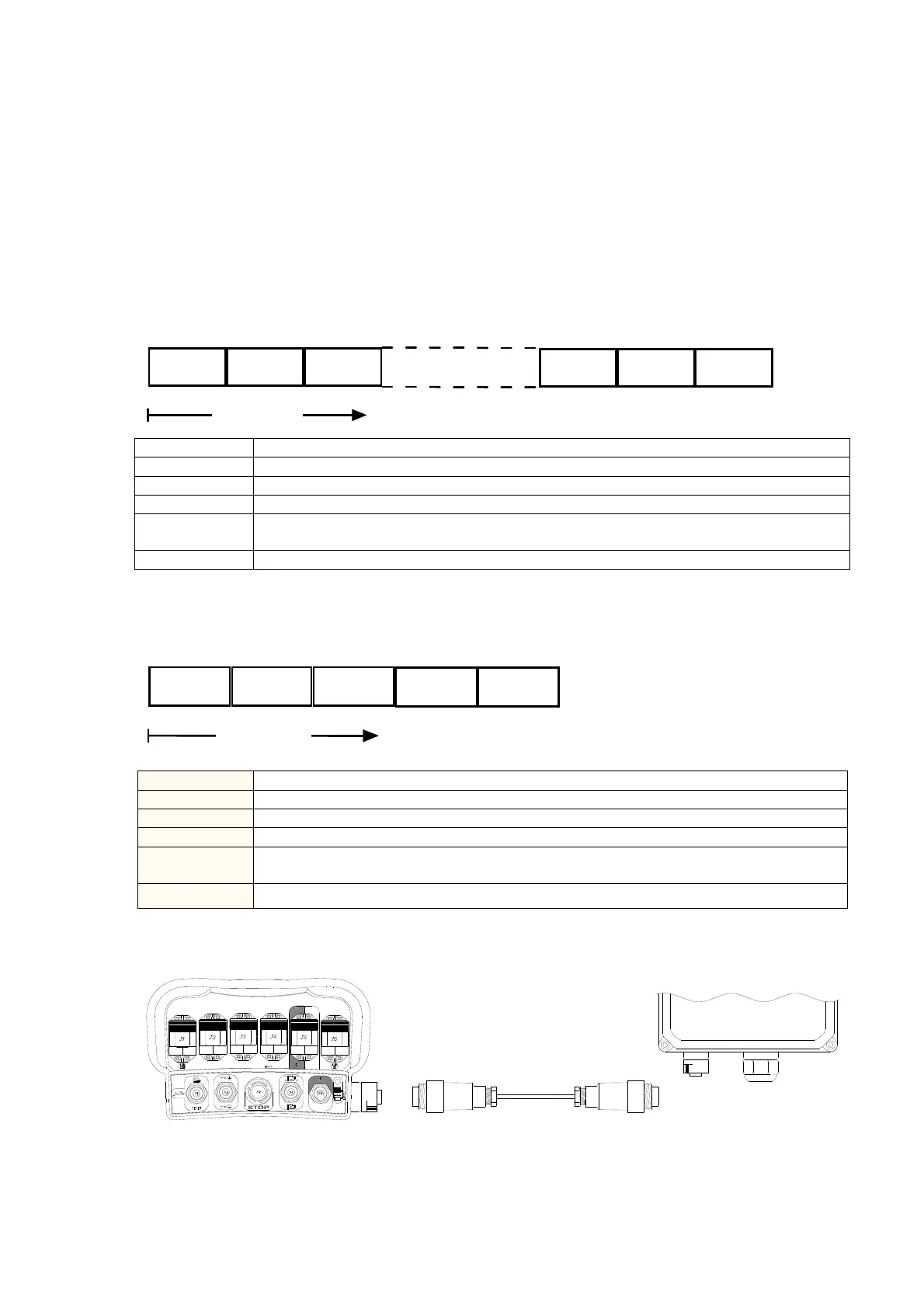
The messages must be sent to the RS232 connection in data packets following the serial protocol
shown below. The application must send the data feedback card the single characters that make up
the message to be shown on the display of the transmitting unit.
0x01 POS
ch
0
ch
N-1
0x0d
Ordine di invio
XOR
• Messages stored in the data feedback card’s memory
In this case the application sends an N code to the data feedback card regarding the message (N) to
be sent and shown on the display of the transmitting unit.
0x02 POS
N
0x0d
Ordine di invio
XOR
BYTE Description
0x02
A variable indicating the start of the message.
POS
Position of the message’s starting point on the display
N
Number of the message stored in the card data feedback card.
0x0d
A variable indicating the end of the message. The variable is a hexadecimal value
different from any ASCII character that can be shown on the display.
XOR
XOR of all the preceding bytes starting from 0x01 (parity check).
5.6.2. Serial connection cable
B
B
RS232
This option is used to transmit actuation command data via cable from the transmitter to the receiver
and vice versa in case of dual transmission radio remote controls. The serial connection cable
excludes radio frequency transmission and the receiver provides the power for the transmitter. After
using the serial cable with the radio remote control, disconnect the cable and switch off the transmitter
and the receiver to restore radio operation.
BYTE Description
0x01
A variable indicating the start of the message.
POS
Position of the message’s starting point on the display.
Ch
0
…Ch
N-1
Generic i
character sent to the display (text of message).
0x0d
A variable indicating the end of the message. The variable is a hexadecimal value
different from any ASCII character that can be shown on the display.
XOR
XOR of all the preceding bytes starting from 0x01 (parity check).
RS232
Max 15m


 To Next Page