IMET - M550 ALL1-EN 31/53
S
T
O
P
S
T
O
P
T
E
S
E
R
R
P8P7
P6P5
P4P3
P2P1
P9
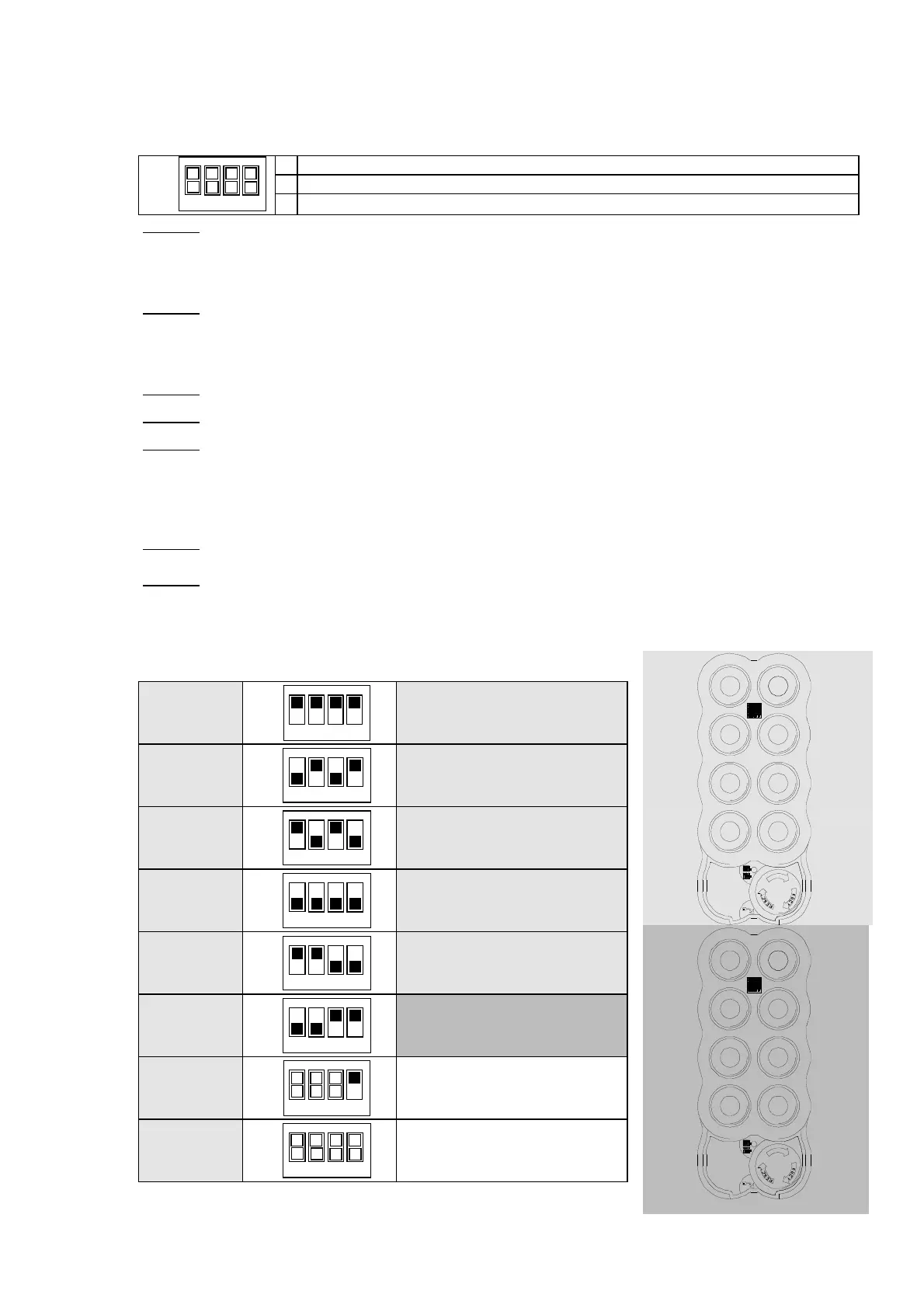
6.8. Dip-switch programmable output configurations
The receiving unit can be programmed to follow preset operation schedules for the more common
applications (e.g., tower cranes, bridge cranes and industrial cranes). This is done using the dip-
switches on the receiver. The dip-switches can be:
ON
OFF
1234
Enabled as per the tables below for WAVE transmitters (tables 0-5)
Enabled as per table 6 only
Enabled as per the customizable tables shown in Annexes A, B, C
Table 0: For applications with gantry cranes: The transmitter’s commands are executed with no
conditions posed by the receiver except for the interlock between right button and left
button on the same line. The second speed commands are common: the second function
of every pair of buttons on the same line produces the same command.
Table 1:
For applications with tower cranes: Three speeds associated with three different
buttons. While holding the main speed button pressed (A1 or A2), briefly press the
second speed button (A3) or the third speed button (A4). They will remain effective until
the main button is released.
Table 2:
For applications with tower cranes: Same as in Table 1 but with controls A5…A8.
Table 3:
For applications with tower cranes: Combines the functions of the two previous tables.
Table 4:
For applications with tower cranes: Three speeds associated with two buttons with
holding function. In this case the button’s dual function is exploited, producing the main
speed when pressed once and the second speed when pressed twice. The third speed is
obtained with, respectively: A3 for button A1/B5 or A2/B5, and A4 for button A5/B7 or
A6/B7.
Table 5:
For applications with gantry cranes: This solution distinguishes the second-speed
controls, which are normally the same for pairs of adjoining buttons.
Table 6:
DIP4 OFF: Both the start and horn relays are activated every time the Start button is
pressed.
DIP4 ON: The horn relay is activated the first time you press Start. Every time you press
Start after that, both relays are activated.
Table 0
ON
OFF
1 2
3 4
Basic configuration: no self-
holding
Table 1
ON
OFF
1234
A3 or (A3 and A4) held by A1 or
A2
Table 2
ON
OFF
1234
A7 or (A7 and A8) held by A5 or
A6
Table 3
ON
OFF
1234
Table 1 + Table 2
Table 4
ON
OFF
1234
A3 held by (A1+B5) or (A2+B5)
A4 held by (A5+B7) or (A6+B7)
Table 5
ON
OFF
1234
Distinct second speeds
Table 6
ON
OFF
1 2
3 4
Start and Horn configurable
Table …
ON
OFF
1234
More functions customizable on
request
A8/B8
A1/B5
A5/B7
A3/B6
A4/B5
A6/B7
A7/B8
S
T
O
P
S
T
O
P
T
E
S
E
R
R
P8P7
P6P5
P4P3
P2P1
P9
A1/B1
A3/B3
A5/B5
A2/B2
A4/B4
6/B6
A7/B7
A8/B8
A2/B5


 To Next Page