23
INSTALLER
USERMAINTENANCE TECHNICIAN
TECHNICAL DATA
1.9 ELECTRICAL CONNECTION
e appliance has an IPX5D protection degree; electrical safety of the appliance is achieved only when it is connected properly to an e-
cient earthing system, as specied by current safety standards.
e manufacturer declines any responsibility for damage or physical injury caused by failure to connect the appliance to an ef-
cient earthing system or failure to comply with the IEC reference standards.
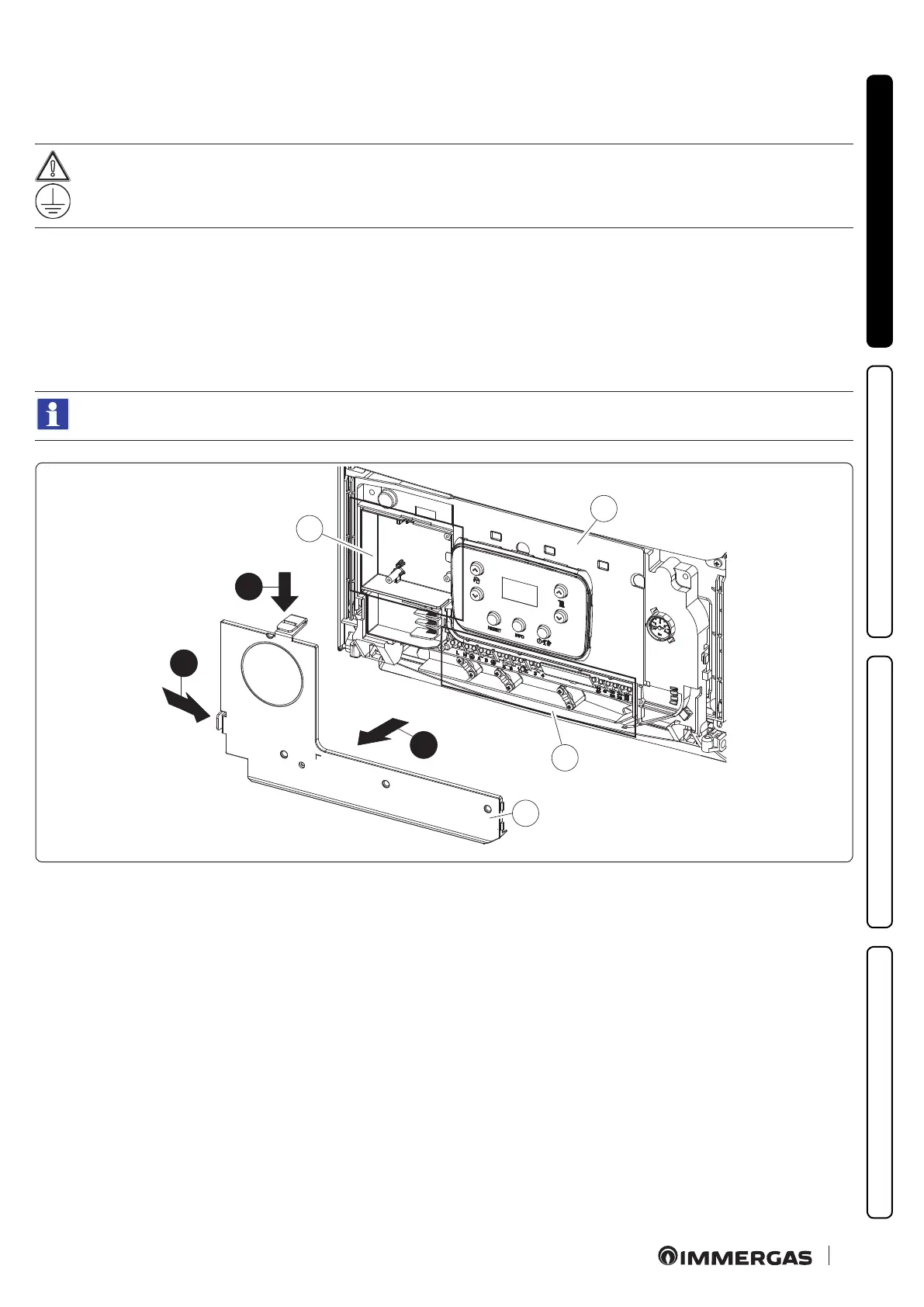
Open the control panel connections compartment (Fig. 9).
To carry out electrical connections, all you have to do is open the connections compartment as follows.
1. Remove the front casing (Fig. 69).
2. Disassemble the cover (a).
3. Press the two hooks on the connections compartment cover.
4. Remove the cover (a) from the control panel (b).
At this point, it is possible to access the terminal board (c).
e compartment (d) has cable clamps and screws to be used for connection of the optional external connections.
a
1
2
b
1
c
d
9






 To Next Page