InHand VG710 InVehicle Gateway User Manual
36
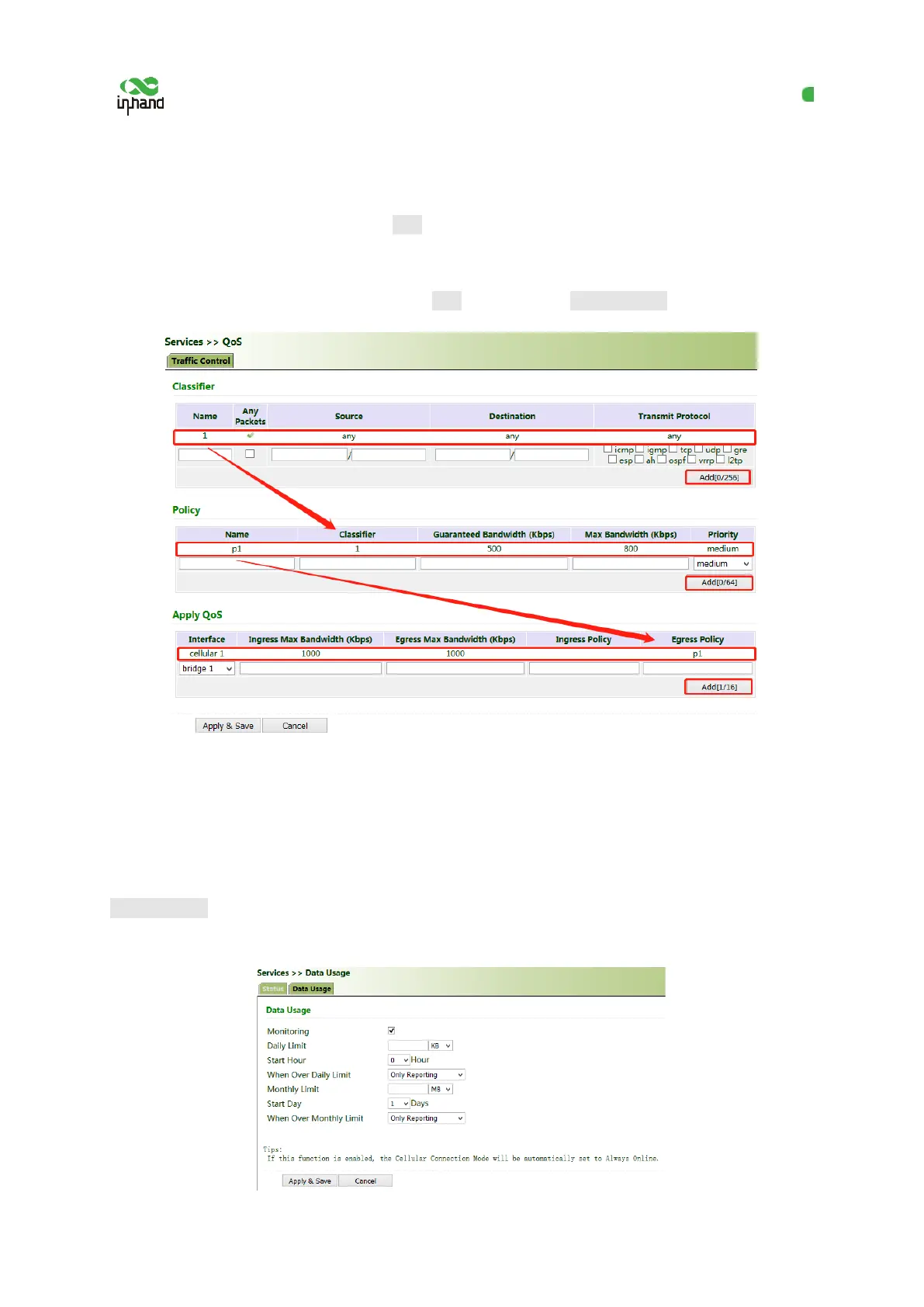
2. Set transmission policies. Click "QoS >> Traffic Control >> Policy", enter a custom policy name
for "Name", enter the classifier name for "Classifier", set the guaranteed bandwidth, maximum
bandwidth, and policy priority, and click Add.
3. Click "QoS >> Traffic Control >> Apply QoS", select the gateway interface, enter the policy name
for "Ingress Policy" and "Egress Policy", click Add, and then click Apply & Save.
5.4.7 Traffic Control
Method for enabling traffic control for the gateway:
Click "Services >> Traffic Control", enable traffic control, set traffic control parameters, and click
Apply & Save. After the settings are completed, the system generates an alarm, stops forwarding, or
disables the interface when the traffic exceeds the limit according to the settings on this page.


 To Next Page