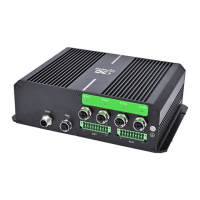
InHand VG710 InVehicle Gateway User Manual
2
2 Hardware
2.1 Indicator Description
VG710 Indicator Status and Definition
System
Steady off --- The device is powered off.
Steady red --- The system is starting.
Blinking green --- The system operates properly.
Blinking red --- The system is faulty.
Blinking blue --- The system is being upgraded.
Cellular
Steady off --- The dialup function is disabled.
Blinking green --- Dialup is in progress.
Steady green --- Dialup succeeds.
Blinking red --- Dialup fails (no module or SIM card is detected).
Signal
Steady off --- The current dialup card has no signal.
Steady red --- The current dialup card has weak signals (signal strength: ≤ 9 asu).
Steady blue --- The current dialup card has moderate signals (signal strength: 10–19
asu).
GNSS
Steady off --- GNSS is disabled.
Blinking green --- Positioning is in progress.
Steady green --- Positioning is completed.
Wi-Fi 2.4G
Used as an AP:
Steady off --- The AP is disabled.
Blinking green --- The AP operates properly.
Used as a STA:
Steady off --- The STA is disabled, or no AP is associated.
Steady green --- Connection fails due to a wrong password after an AP is associated.
Blinking green --- An AP is associated.


 To Next Page