EasyManua.ls Logo

Innovative Technology NV11 - Page 33

Innovative Technology NV11
167 pages
Print Icon
To Next Page IconTo Next Page
To Previous Page IconTo Previous Page
Loading...
NV11 Manual Set Section 2 7
Copyright © Innovative Technology Ltd 2012 GA963-2
Caution!
Be careful cleaning sensors.
When cleaning the recessed front sensor, use a
small soft brush or cotton bud do not use
anything sharp or abrasive.
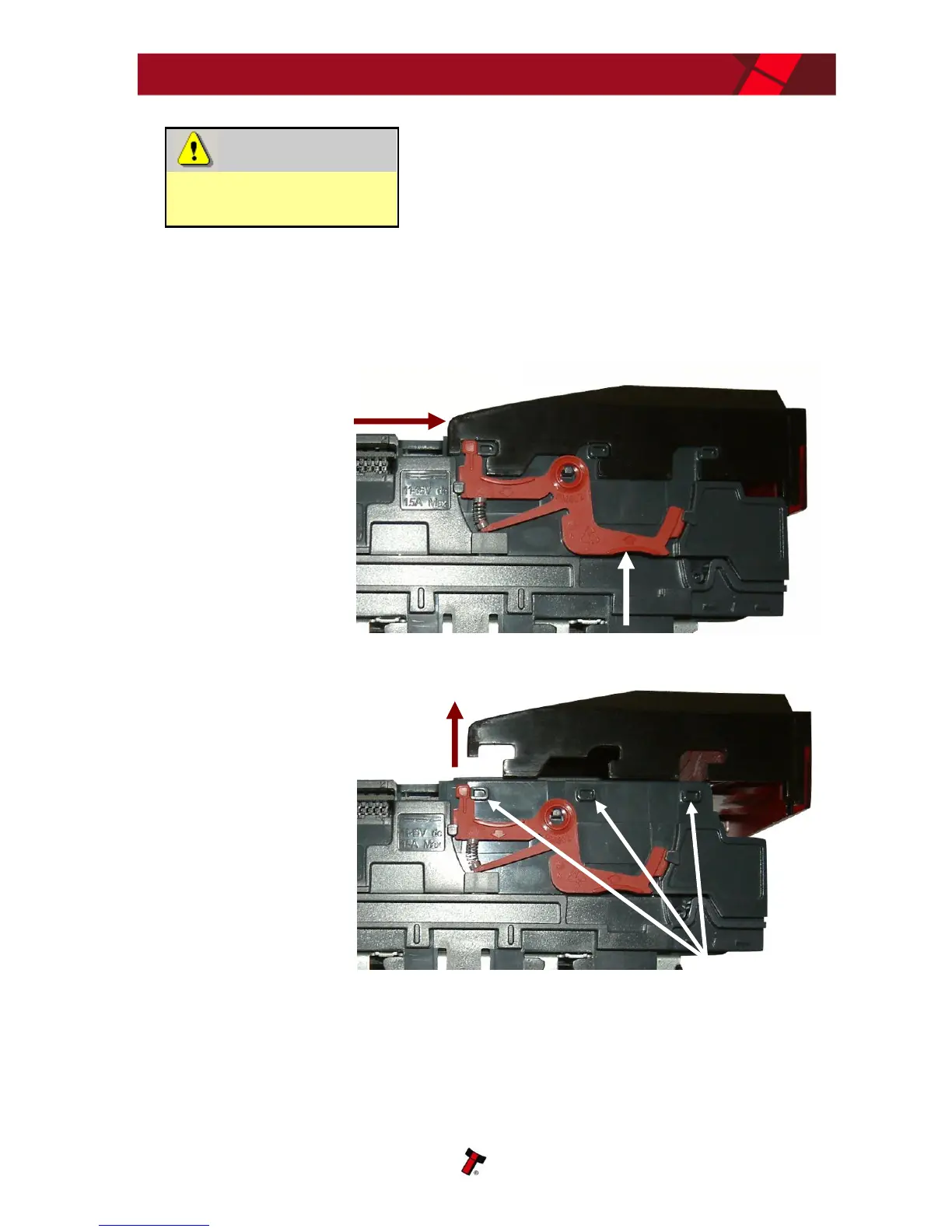
Cleaning the belts is a simple operation. Ensure the validator is enabled (i.e. bezel
lights are illuminated), then remove the bezel:
The bezel is
removed by pushing
the red locking arms
on both sides of the
validator upwards,
and sliding the bezel
away from the
locking arms
Lift the bezel off
once the bezel has
been slid fully
across and is clear
of the locating pins
a. Push locking arms upwards
b. Slide bezel away from
locking arms
Locating pins
Lift upwards to remove

Table of Contents

Related product manuals