Connections
En-13
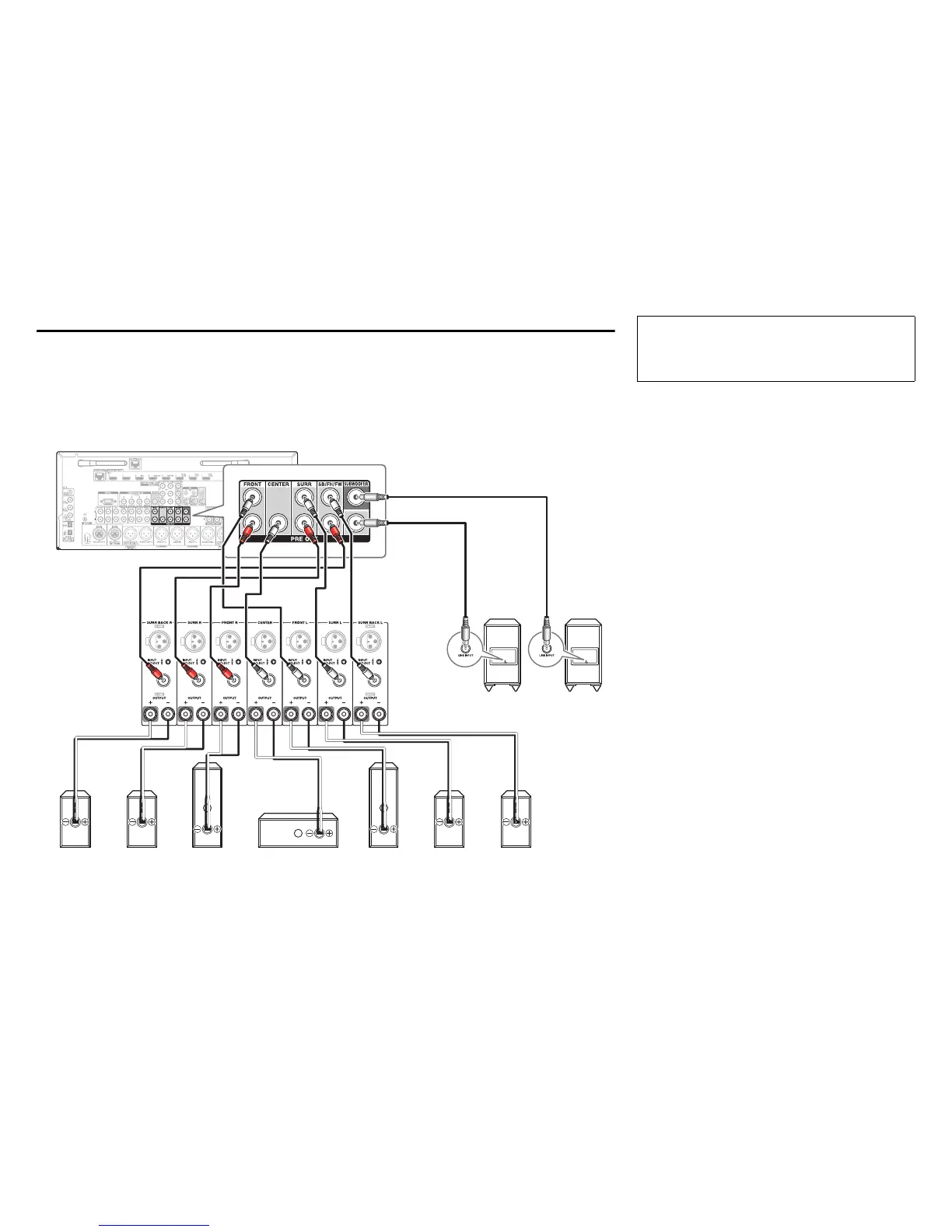
Connecting a Power Amplifier/Powered Subwoofers via RCA Jacks
You can connect the AV controller to a multichannel power amplifier via RCA jacks by using a multichannel RCA
audio cable or several stereo RCA audio cables.
See your multichannel power amplifier’s instruction manual for more information on connecting speakers.
Please connect a , b , c , d , e and f for 5.1-channel surround.
If you’re using only one surround back speaker, use the left jack.
Surround
speaker R
e
Surround
speaker L
d
Surround back,
Front high or Front
wide speaker L
G, I, K
Front
speaker L
a
Front
speaker R
b
Center speaker
c
Surround back,
Front high or Front
wide speaker R
H, J, L
Powered
subwoofer
f
Powered
subwoofer
f
AV controller
Multichannel
power amplifier
•
By default, speakers for 7.1-channel surround are
configured to use: front right/front left/center/surround
right/surround left/surround back right/surround back
left/subwoofer.
Before connecting the power cord, connect all of
your speakers and AV components. A setup wizard
is launched upon first-time use to let you perform
the settings (➔ page 25).


 To Next Page