MEDIAJET – Operating instructions V09 Installation
22 INTEGRA Biosciences AG
3.6 Turbo mode option
The turbo mode option is used to accelerate the filling process. For this option
the turbo mode kit (Part No. 103 036) must be installed. For dish filling speeds
see “6.1 Specification of the device” on page 54
.
When placing the silicone tubing set (Part No. 103 035) into the double pump
head assembly, gently stretch the tubing so that inside the pump head the
tubing is taut (avoid loading the tubing in a loose, slackened way).
Finally, enable the turbo mode option under program configuration, see “4.2
Adapt system parameter” on page 26.
The turbo mode option is ready to start.
WARNING
Always switch off the MEDIAJET when assembling the double pump head.
Be aware of the sharp edges of the pump heads when assembling them and
when opening and closing the first pump head for tubing insertion.
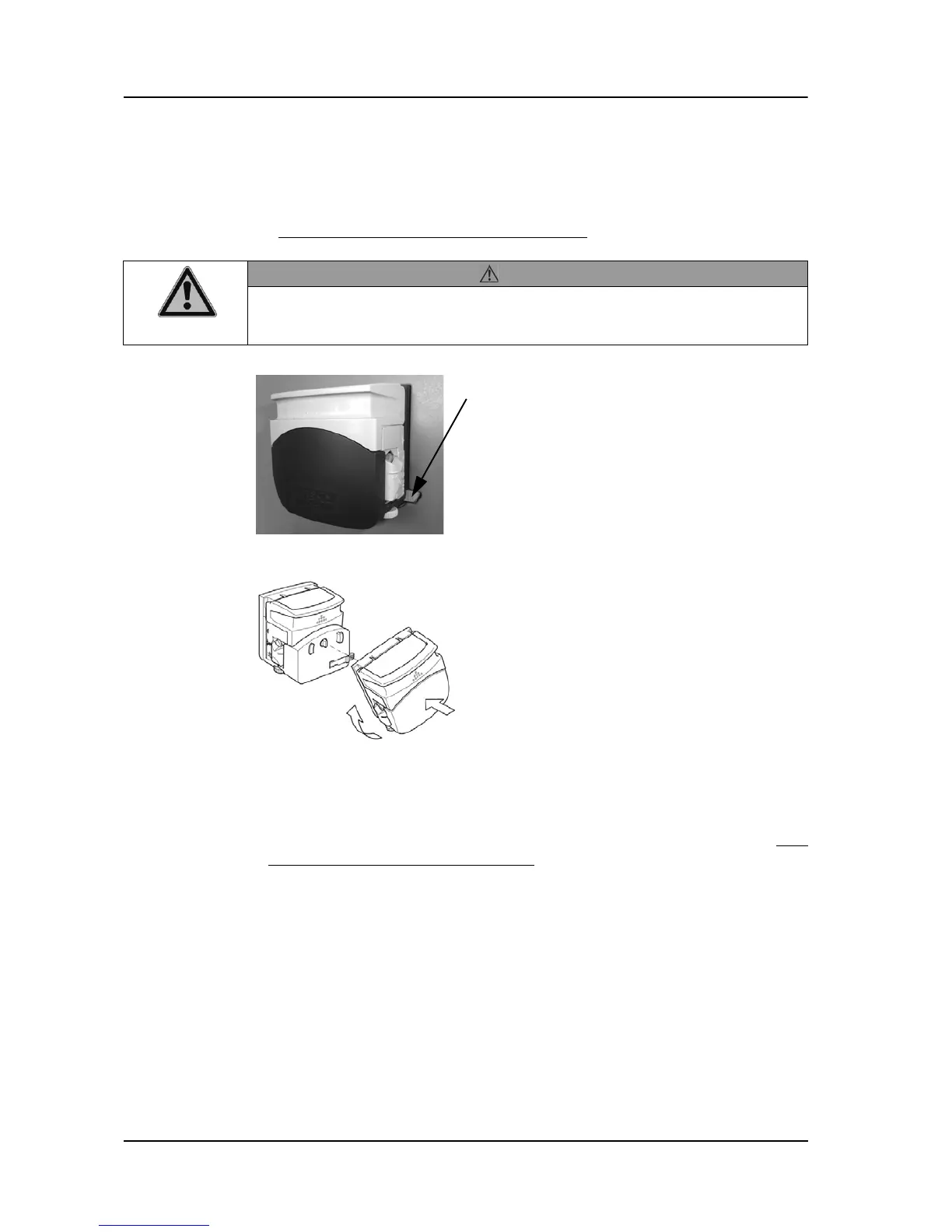
Keep the lever on the right side of the
original pump head pressed and turn the
pump head to the left. Pull off the original
pump head and replace it by the extension
pump head. Turn the extension pump head
to the right and ensure that the lock
mechanism engages with an audible click.
Assemble the two pump heads by locking
the original pump head onto the extension
pump head in the same way. Turn the
original pump head to the right until it
audible locks in place.
Important: The rollers of the two pump
heads must be out of phase in order to avoid
excessive strain on the motor (torque limits)
and to obtain a reduction in flow pulsation.



 To Next Page