Intel® Server Board M10JNP2SB User Guide
34
8. Reset and Recovery Jumpers
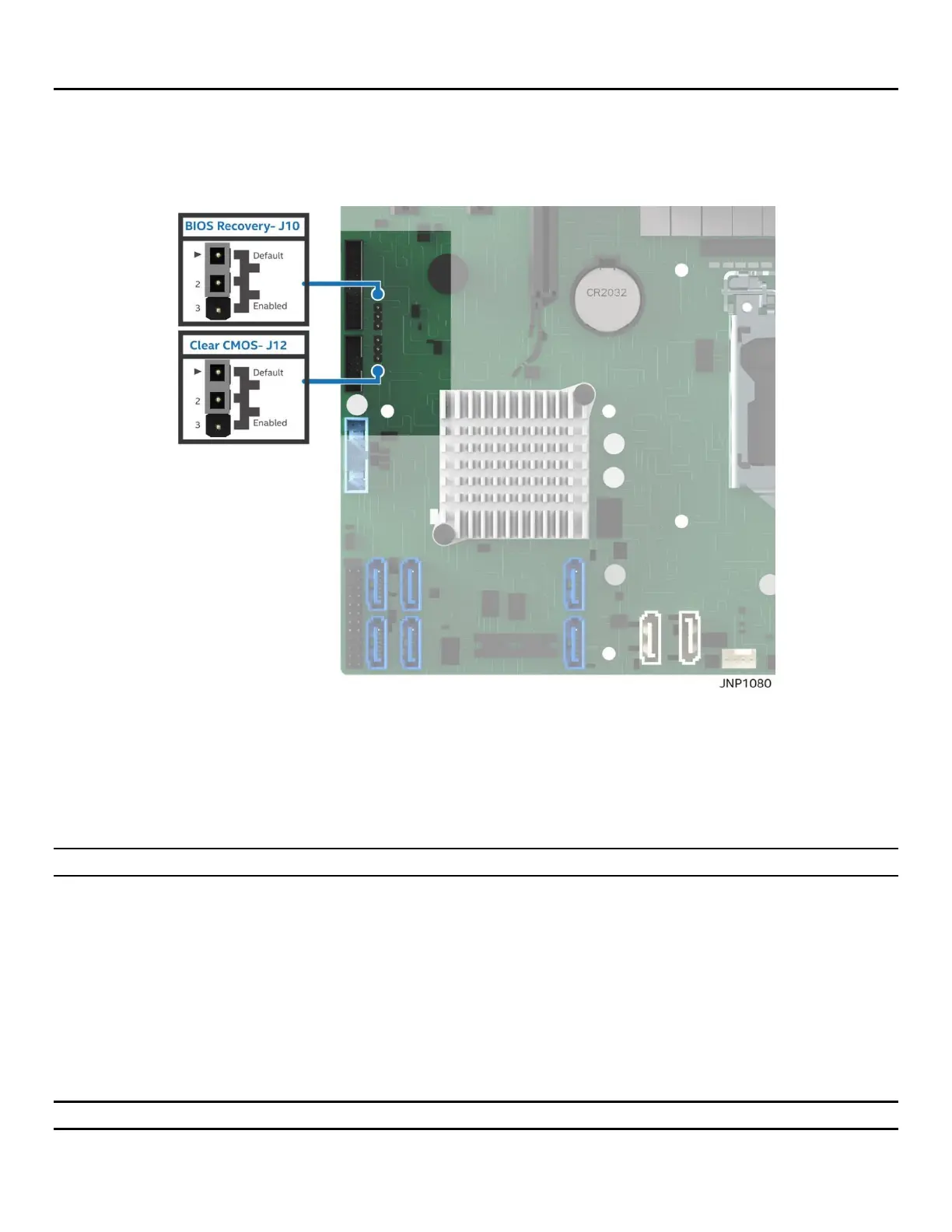
The server board includes two jumper blocks which can be used to configure, protect, or recover specific
features of the server board. Figure 17 identifies the location of each jumper block on the server board. Pin 1
of each jumper block can be identified by the arrowhead (▼) silkscreened on the server board next to the
pin.
Figure 17. Board jumper identification
8.1 Clear CMOS Jumper Block
This jumper resets BIOS options, configured using the <F2> BIOS Setup Utility, back to their default factory
settings.
Note: This jumper does not reset administrator or user passwords.
To use the BIOS default jumper, perform the following steps:
1. Power off the system and unplug the power cord(s).
2. Open the system chassis and access the “Clear CMOS” jumper block.
3. Move the “Clear CMOS” jumper from pins 1-2 (normal operation) to pins 2-3 (reset BIOS options).
4. Wait five seconds then move the jumper back to pins 1-2.
5. Close the system chassis.
6. Plug in the power cord(s), power on the system and press <F2> during POST to access the BIOS setup
utility to configure and save desired BIOS options.
Note: The system time and date may need to be reset.












 To Next Page