66
v45C - Maritime VSAT Antenna System
Antenna Firmware Upgrade (Manual Upgrade method) Procedures:
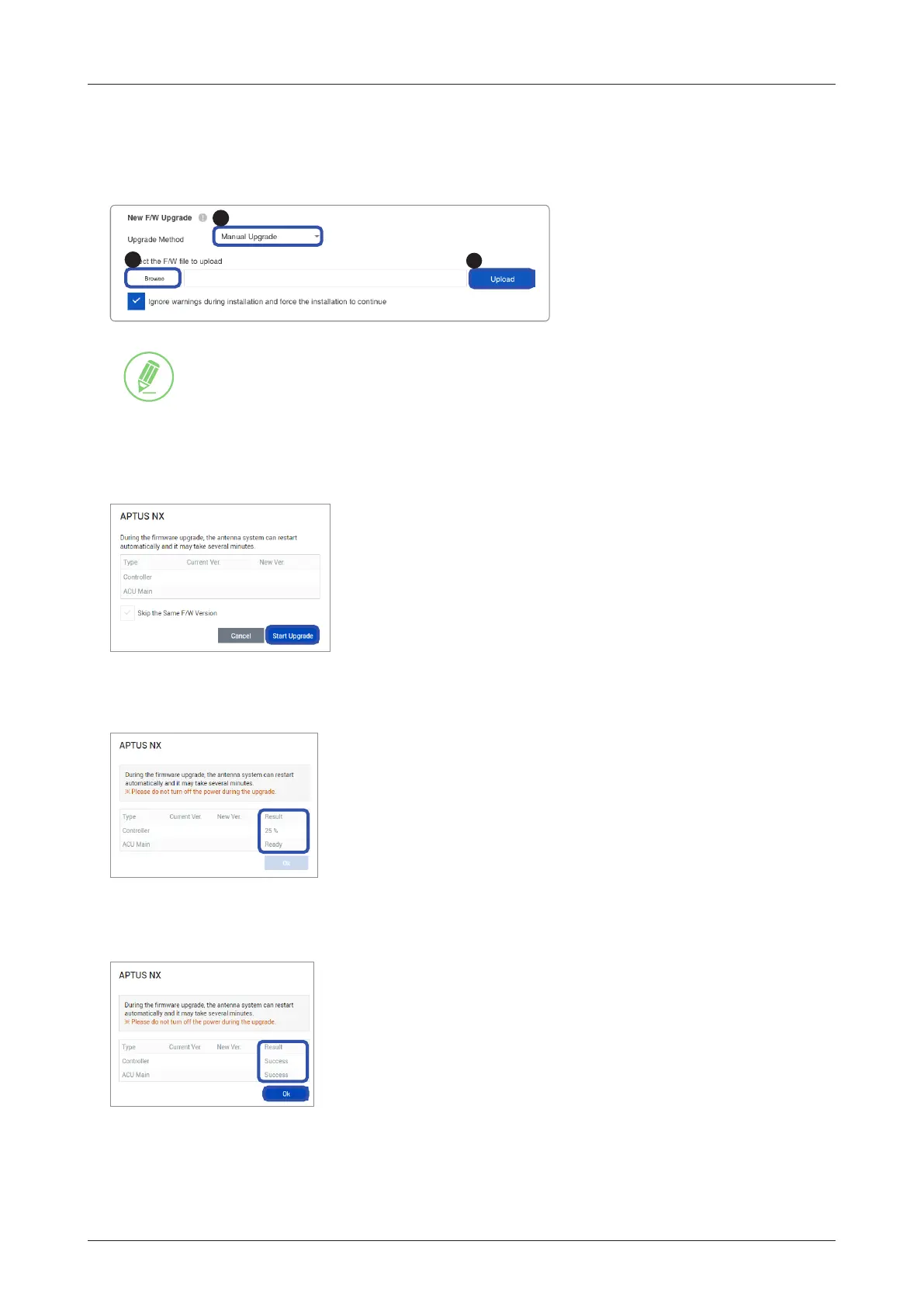
1. Choose Manual Upgrade from the pull-down menu of Upgrade Method. Browse and select the upgrade
package le to upload. Click on the Upload button to transfer the Firmware package le ("*.fwp") to
iARM module.
3
1
2
NOTE
If you select the box "Ignore warnings during installation and force the installation to
continue", warning messages do not appear during the upgrade.
2. The antenna rmware versions are displayed on the pop-up window. Check the current version installed
and the new version available for each type of rmware, then click the Start Upgrade button.
v1.00
v1.00
v1.01
v1.01
3. The upgrade of each rmware type is performed in order, and the process is displayed on the window. If
the current version matches with the new version of the rmware, the upgrade process is skipped.
v1.00
v1.00
v1.01
v1.01
4. If the rmware is successfully upgraded, the result is marked as "Success". Click the Ok button to close
the pop-up window.
v1.00
v1.00
v1.01
v1.01



 To Next Page
 Loading...