Intermec EasyCoder PC4—Service Manual 37
Chapter 5—Base Frame
5.4 Peel-Off Mechanism
Description
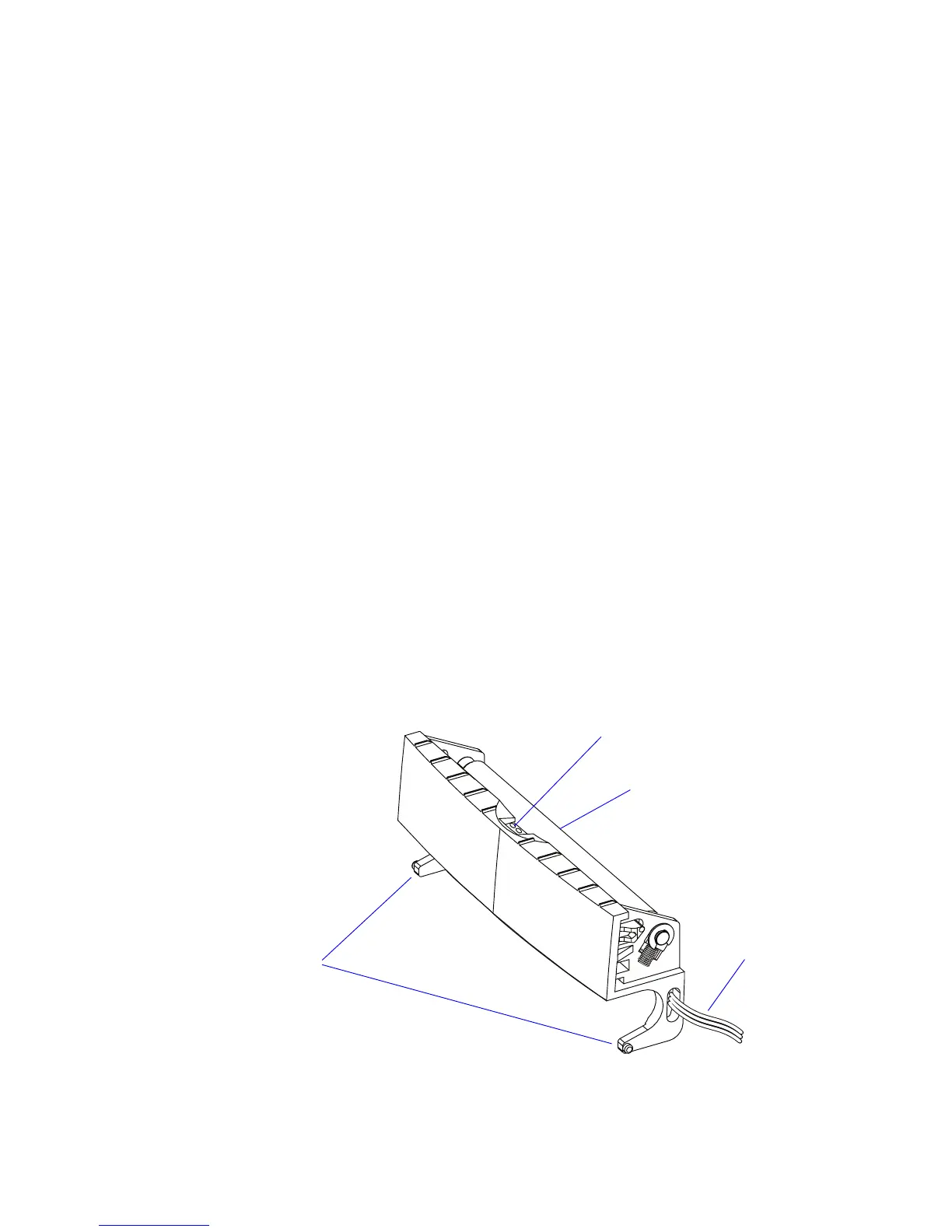
e peel-off mechanism is hinged to the base frame moulding. It has a
spring-loaded idle roller that is pressed against the platen roller, when the
peel-off (self-strip) mechanism is closed so the liner is pulled down over the
peel-off bar, which causes the labels to be separated from the liner.
e peel-off mechanism is fitted with a label taken sensor, which is used to
halt the printing until a printed label has been removed. e label taken
sensor is disabled by the
ON command, see ESim v6.xx, Programmer’s
Reference Manual
.
e label taken sensor consists of an LED and a photoelectric sensor with
an on/off switch. e light from the LED is reflected back to the sensor by
the back side of any label or similar that remains to be removed from the
outfeed area. e sensor triggers at 4V, which must drop to 1V before the
sensor changes it state. e same circuit board is also used as for ribbon
detection.
Replacement
e peel-off mechanism comes as a complete unit including the label taken
sensor.
• Disconnect the label taken sensor cable from JP8 on the main board.
• Disengage the hinges from the inner walls of the base frame moulding
and pull out the peel-off mechanism.
• Install a replacement unit in reverse order.
Hinges
Label Taken Sensor
Roller
To JP8
on main board
















 To Next Page