Intermec EasyCoder PC4—Service Manual 69
Chapter 10—Starting Up
10.2 Test Mode
e Test Mode determines the media length between gaps (“auto detec-
tion”) up to 700 mm (27 in) at 203.2 dpi or 460 mm (18 in) at 300 dpi,
sets the sentitivity of the label gap sensor, prints a test label, and set the
printer to Dump Mode. To enter the Test Mode, keep the Feed key pressed
down while switching on the power. Do not release the Feed key until the
LED control lamp flashes green (for detecting gap media) or red (for Black
Mark media).
e first thing that happens after you have entered the Test Mode is that
the LED flashes green and the printer feeds out three to four blank forms
(that is, labels, tags, tickets, etc) in order to determine the length of each
form. (e firmware assumes that all forms have the same length.)
If a gap has not been detected within 700 mm (27 in) at 203.2 dpi or 460
mm (18 in) at 300 dpi of media feed, the firmware assumes that a continu
-
ous media stock is used.
If you use forms longer or black marks, you must set the length of form
using a Q command (see the ESim v6.xx, Programmer’s Reference Manual).
When this Auto detection is completed, the firmware checks for any
inserted memory cartridge and prints a test label. e test label contains a
lot of information about the printer's current configuration and gives you
an opportunity to check the printout quality.
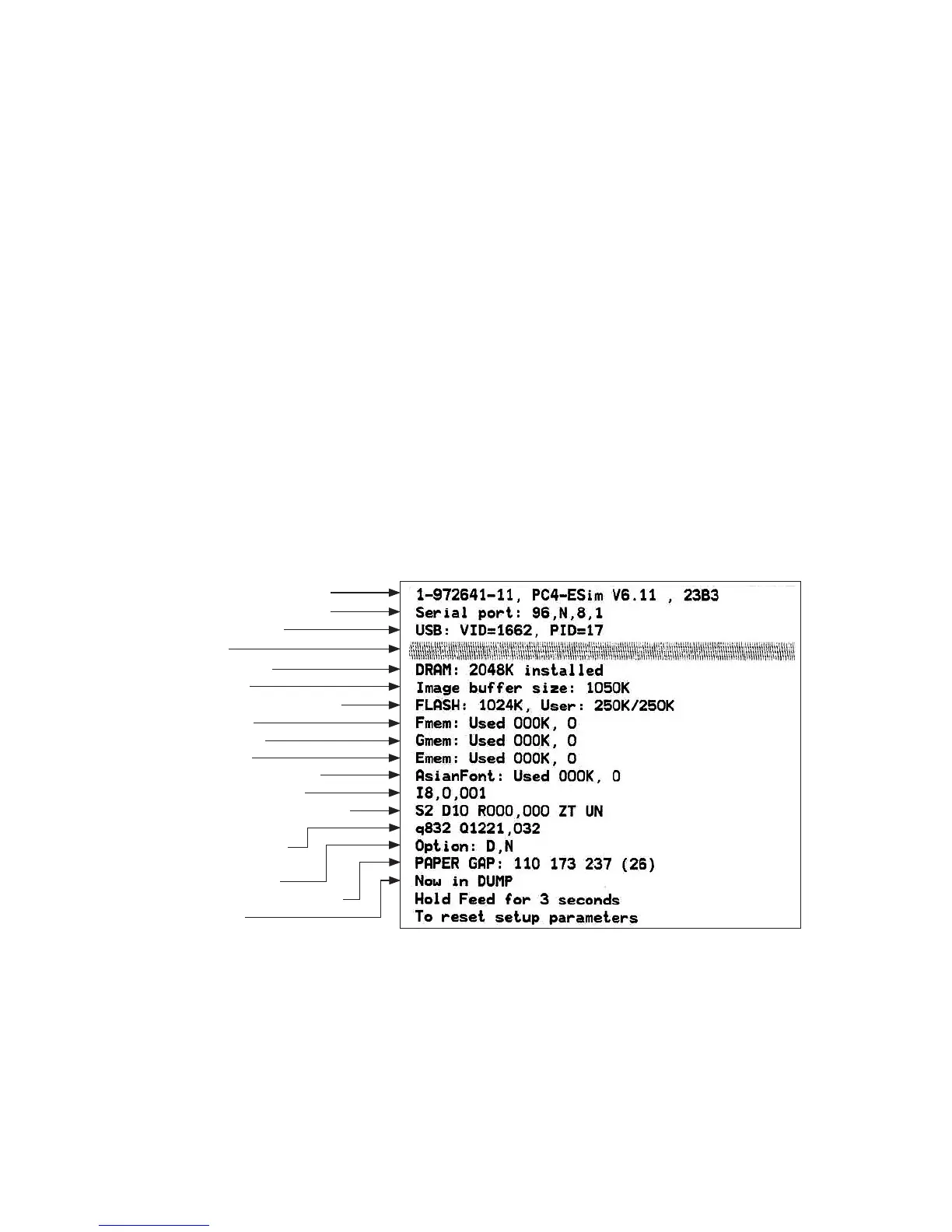
e test label shows the printer’s configuration. e test label above shows
the default configuration for a 203.2 dpi (8 dots/mm) printer without a
memory cartridge. When the test label has been printed, the printer auto
-
matically switches to Dump Mode (see Chapter 10.3).
Part No , ESim version, & checksum
Serial RS-232 port setup (see Y cmd)
USB Vendor & Product ID
Test pattern
Size of RAM installed
Image buffer size
Flash memory (total, available to user)
Form memory size
Graphic memory size
Font memory size
Memory occupied by Asian fonts
Character set (see I command)
Speed – Density – Ref. point – Dir – Errors
(see S, D, R, Z & UN/US cmds)
Label width –Form length
(see q & Q cmds)
Options (see O & C cmd)
LSS (liner+label – detection level – liner)
Dump Mode On
















 To Next Page