32 | Fieldbus Guide | Version 1.02 www.invertekdrives.com
8
Ethernet/IP Communication
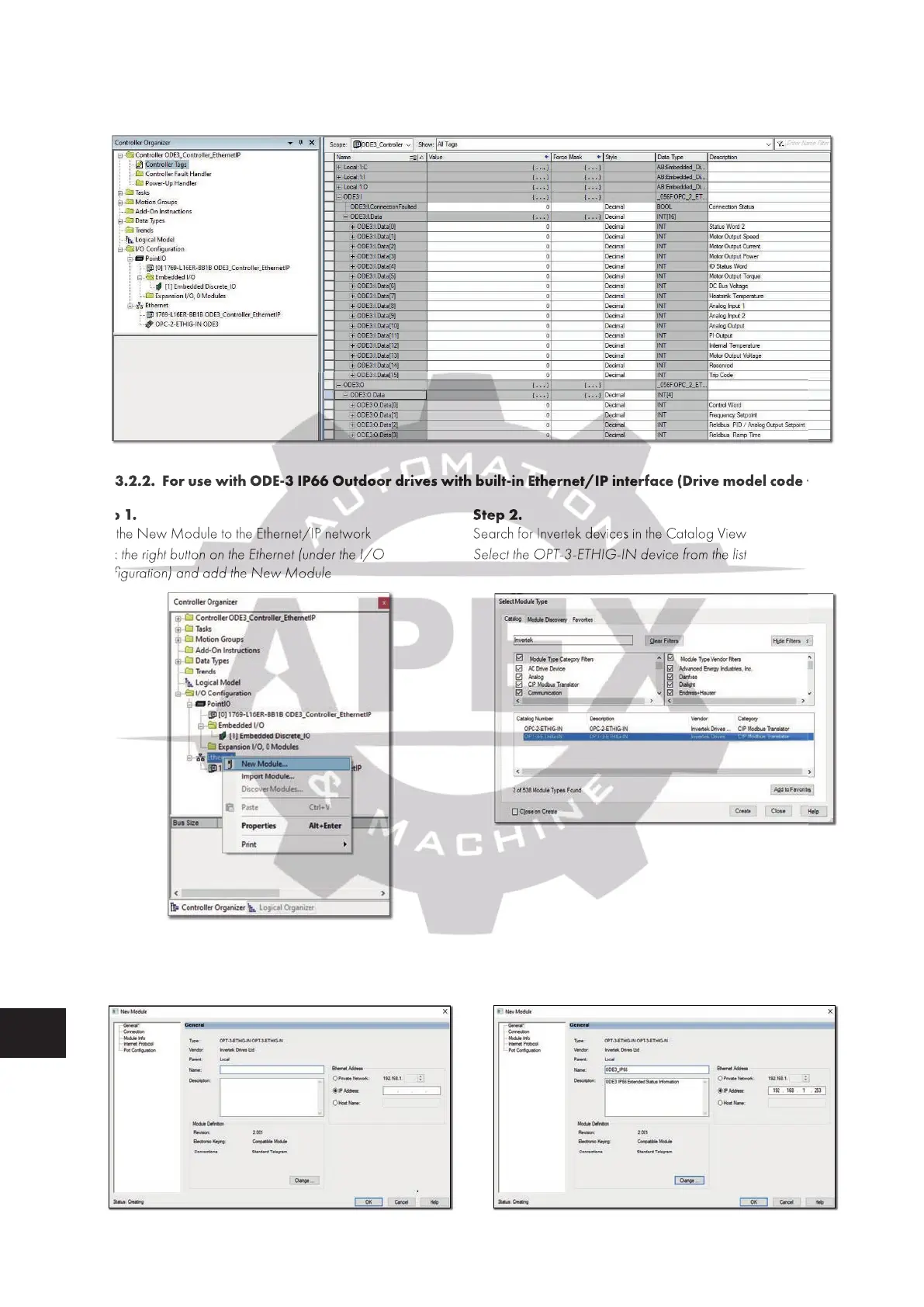
Step 13.
Drive tags created in the Controller Tags Window
8.6.3.2.2. For use with ODE-3 IP66 Outdoor drives with built-in Ethernet/IP interface (Drive model code +“EiP“)
Step 1.
Add the New Module to the Ethernet/IP network
Click the right button on the Ethernet (under the I/O
Confi guration) and add the New Module
Step 2.
Search for Invertek devices in the Catalog View
Select the OPT-3-ETHIG-IN device from the list
Step 3.
Assign the device Name and the IP Address to the Drive
(Default IP Address of the module is 192.168.1.253)
Step 4.
Click the ‘Change…’ button in the Module Defi nition
8.6.3.2.2. For use with ODE-3 IP66 Outdoor drives with built-in Ethernet/IP interface (Drive model code +“EiP“)
Add the New Module to the Ethernet/IP network
Click the right button on the Ethernet (under the I/O
Confi guration) and add the New Module
Search for Invertek devices in the Catalog View
Select the OPT-3-ETHIG-IN device from the list

 To Next Page
 Loading...