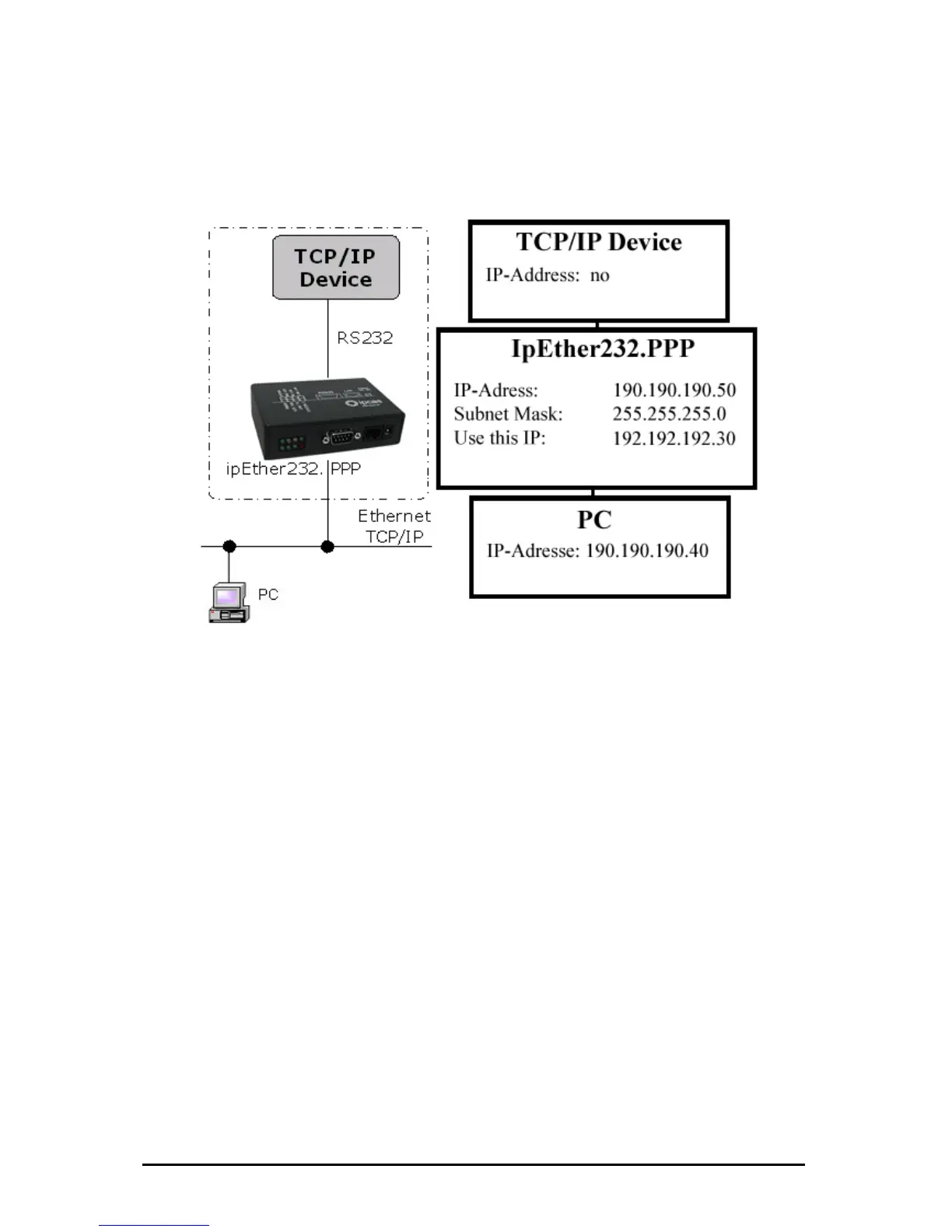
Configuration s ”
all TCP/IP enabled devices without a dedicated
Routing betwee
and on the PC.
At the example
...these commands for Windows NT / 2002
• For PPP: „ 0.40 MASK 255.255.255.0 190.190.190.50“
• For PC : “r .0 192.192.192.30”
…these comma
• For PPP: „rou
net
• For PC : „rou 90.190.50 gw 192.192.192.30
netmask 255.255.255.0 dev ppp0“
The Configuration could be tested as follows:
• For PPP:
• For PC : „ in
ample 1: “Ethernet for all
Ethernet capability for
Ethernet interface.
n two networks. A route have to be configured at the TCP/IP device
above it would be...
route ADD 190.190.19
oute ADD 190.190.190.50 MASK 255.255.255
nds for Linux-Systems:
te add –net 190.190.190.40 gw 190.190.190.50
mask 255.255.255.0 dev ppp0“
te add –net 190.1
„ping 190.190.190.50 -t“
p g 190.190.190.40 -t“
Änderungen vorbehalten Stand 09.09.05
ipcas GmbH ipEther232 V11.01 Seite 89 von 150



 To Next Page