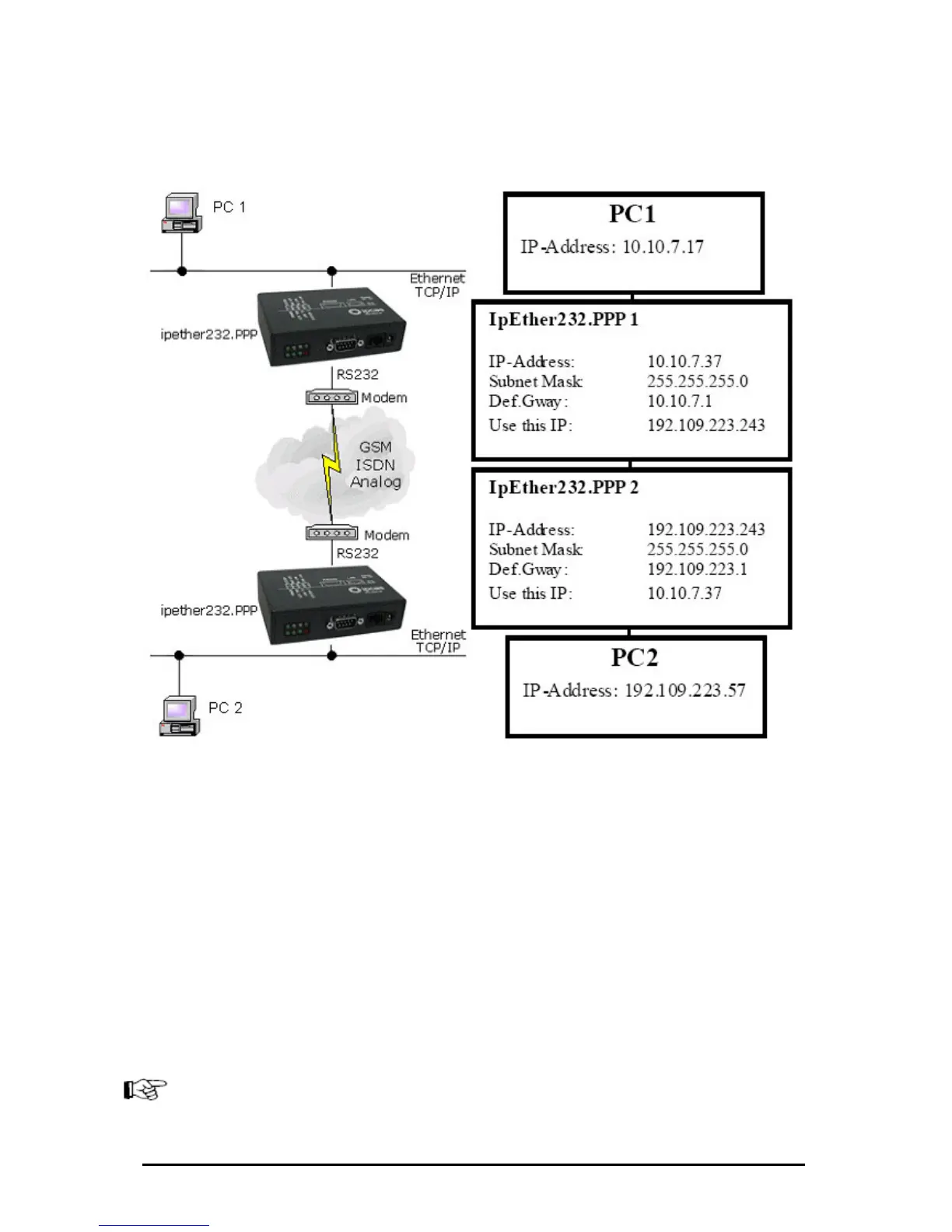
Configuration sample 2: “simple Network routing”
Simple routing between two networks via GSM, ISDN or analog modems,
Routing between two networks. A route have to be configured on both PC’s.
At the example above it would be...
...these commands for Windows NT / 2002:
• For PC 1: „route ADD 192.109.223.0 MASK 255.255.255.0 10.10.7.37“
• For PC 2: “route ADD 10.10.7.0 MASK 255.255.255.0 192.109.223.242”
…these commands for Linux Systems:
• For PC 1: „route add –net 192.109.223.0 gw 10.10.7.37
netmask 255.255.255.0 dev ppp0“
• For PC 2: „route add –net 10.10.7.0 gw 192.109.223.243
netmask 255.255.255.0 dev ppp0“
The Configuration could be tested as follows:
• For PC 1: „ping 192.109.223.57 -t“
• For PC 2: „ping 10.10.7.17 -t“
Both modems have to be configured to „Answer incoming calls”.
(Normally: Register S0=1)
for instance to link up a branch to the company LAN.
Änderungen vorbehalten Stand 09.09.05
ipcas GmbH ipEther232 V11.01 Seite 90 von 150



 To Next Page