EasyManua.ls Logo

Iridex PASCAL Synthesis - System Software Setup; System Setup Screen

Default Icon
141 pages
Print Icon
To Next Page IconTo Next Page
To Previous Page IconTo Previous Page
Loading...
PASCAL
®
Synthesis Ophthalmic Scanning Laser Systems Page 83 of 141
88292-EN, Rev D
System Software Setup
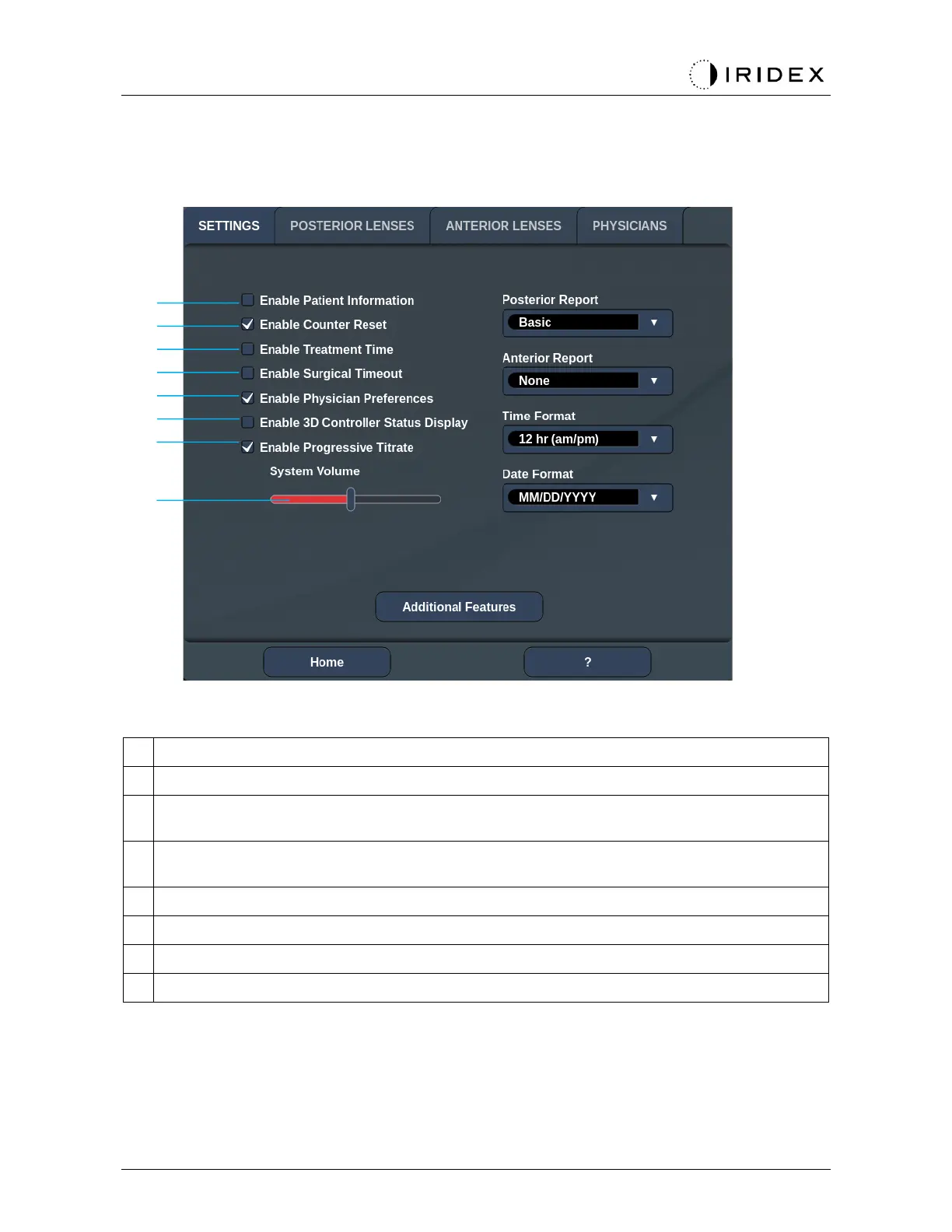
System Setup Screen
A
<Patient Information> - Enable/Disable Patient information pop-up prior to treatment
B
<Counter Reset> - Enable/Disable resettable counter in <Treatment Screen>
C
<Enable Treatment Time> - select to display treatment time and date on Treatment screen and
report
D
<Surgical Timeout> - Enable/Disable screen to review patient information (prior advancing to
<Treatment Screen>)
E
<Physician Preferences> - Enable/Disable Physician List and Information
F
<Enable 3D Controller Status> - Enable/Disable 3D Controller disconnect notification
G
<Enable Progressive Titrate> - Enable/Disable Progressive titrate
H
<Volume> - slide to adjust system volume (cannot turn off)
A
F
G
B
C
D
E
H

Table of Contents

Related product manuals