4.3 Combining two rooms into a group
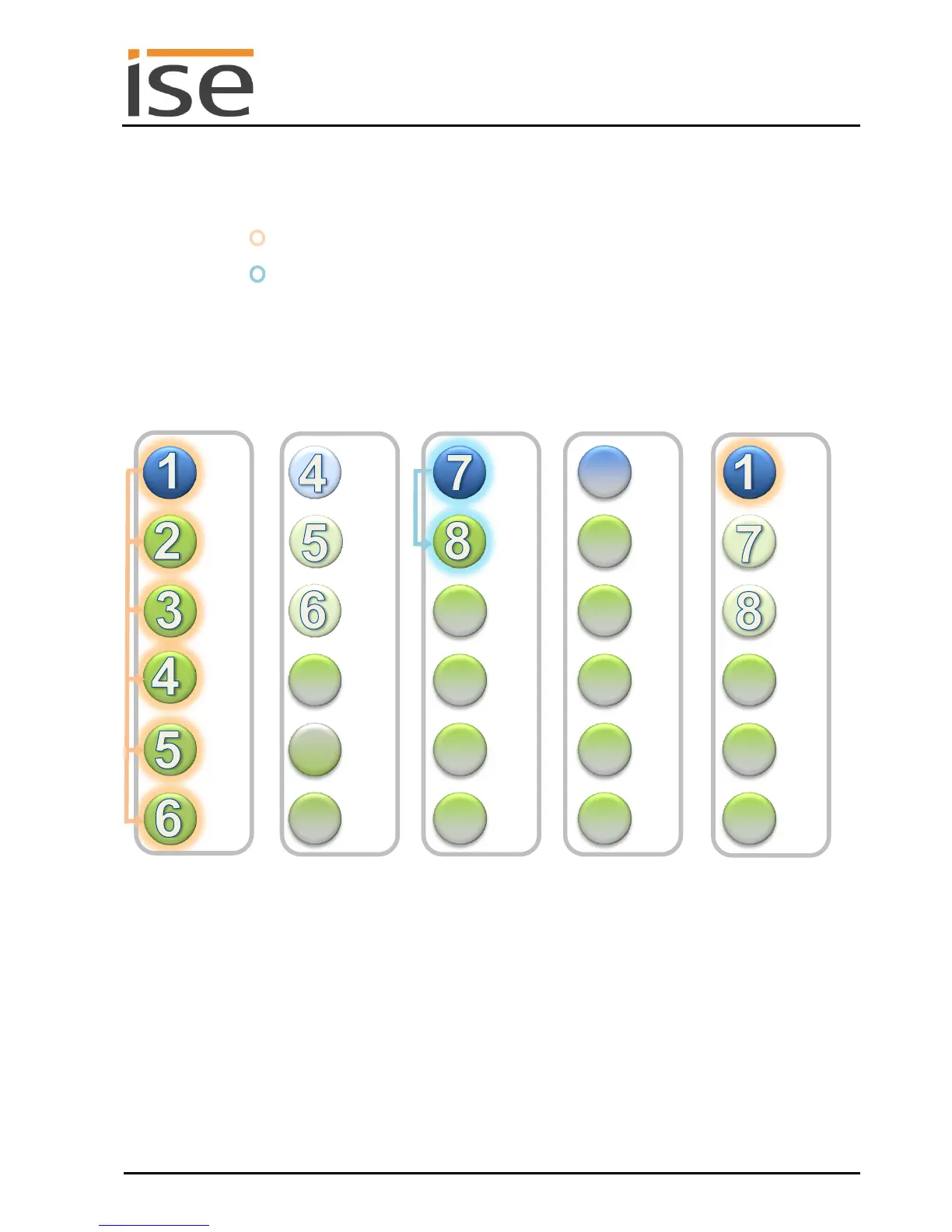
At present, one group and one room have been implemented.
Group Living room
and dining area : Sonos device 1 (master) and Sonos devices 2, 3, 4, 5 and 6 slaves of 1,
device 4 is no longer master
Room Kitchen : Sonos device 7 (master) and Sonos device 8, slave of 7
The group and the remaining room are independent of one another. This means that each group has a
master and can operate its own music program. The Living room and dining area group is controlled via
master 1 (Sonos device 1). The music playback for the entire group can now be controlled via the Liv-
ing room operating devices for the entire group. Volume control of the individual slaves is still possible
using the individual operating devices in the dining area.
Schematic 4: Example configuration with a ise smart connect KNX Sonos.
Combination of Sonos devices of the living room and dining area rooms into a group.
In the example, Sonos device 4 (dining area) becomes slave 1.3 under master 1.
Please note that Sonos devices 5 and 6 are not also automatically controlled by master 1 here.
They must be activated separately as slave 1.4 and 1.5.
An independent music programme can still be operated in the kitchen.



 To Next Page